

Payload CMS and Kamaan solve the "add a blog to my SaaS" problem from opposite ends. Payload is a code-first, open-source Next.js backend you install into your own app and run yourself, prized by developers who want full control and a TypeScript admin panel. Kamaan is a managed, framework-agnostic blog CMS you drive through a REST API and, if you want, straight from Claude or ChatGPT, with multilingual publishing built in. The right pick depends on one question: do you want to own the server and the schema, or do you want the blog to be a solved problem so you can ship the product? This compares them honestly on nine dimensions.
Quick takeaways
- Payload is free to self-host under an MIT license; Payload Cloud managed hosting has been listed around $35 per month (Standard) to $199 per month (Pro) with usage overages, though check current availability, since Cloud plans have been in flux since the Figma acquisition.
- Payload is code-first: you define collections and config in TypeScript. That is a feature for an app, and overhead for a plain blog.
- Payload is Next.js-native and installs into your /app folder. Kamaan is framework-agnostic and renders in Next.js, Nuxt, SvelteKit, Astro, React, or Vue through one REST API.
- Payload has no native publish-once multilingual with server-side hreflang; localization is something you configure and run. Kamaan ships it as a setting.
- Choose Payload for full-stack control on a self-hosted Next.js app. Choose Kamaan when you want a managed blog with multilingual and multi-site handled for you.
What Payload CMS actually is
Payload markets itself as the Next.js headless CMS and app framework, and that description is accurate. It is open source, database-agnostic, and installs directly into an existing Next.js /app folder, giving you a full TypeScript backend and an auto-generated admin panel including auth. Developers like it because it is code-first: your content model lives in version-controlled config, not in a point-and-click UI, and you get real types end to end. Figma acquired Payload in 2025, which has raised its profile further.
That design is a genuine strength for building an application backend. It is also the source of the tradeoff for a blog. A blog is not a bespoke data model; it is posts, authors, tags, and translations. Making that config you write and maintain in code, plus a server you run, is a lot of surface area for content that most CMS platforms treat as a solved shape.
What Kamaan is, and who it is for
Kamaan is a managed headless blog CMS built for people who run SaaS blogs: multi-product founders, agencies, and developers who want a blog live without wiring five tools together or running a server. It is not a page-builder or a full application framework, and it says so. It is blog-first, and it leans on four things Payload leaves to you: a no-config article CMS, managed hosting, native multilingual, and an AI-native workflow.
The developer trust lever is that Kamaan is a plain JSON REST API. One endpoint shape, and it renders in Next.js, Nuxt, SvelteKit, Astro, React, or Vue with a normal fetch call. No SDK lock-in and no proprietary query language to learn for a blog:
const res = await fetch("https://api.kamaan.io/v1/articles?site=your-site");
const { articles } = await res.json();
That is the whole integration surface for pulling content into any framework. The rest, hosting, translation, hreflang, and multi-site management, is handled for you.
Payload CMS vs Kamaan on nine dimensions
| Dimension | Payload CMS | Kamaan |
|---|---|---|
| Type | Code-first CMS + app framework | Managed, blog-first headless CMS |
| Hosting | Self-host free, or Payload Cloud from ~$35/mo | Fully managed, no server to run |
| Framework fit | Next.js-native (installs into /app) | Framework-agnostic REST API (Next.js, Nuxt, SvelteKit, Astro, React, Vue) |
| Content modeling | Schema-as-code in TypeScript | No-config article CMS |
| Multilingual | Localization you configure and run | Publish once, 99+ languages, hreflang server-side |
| Multi-site | One app per project, you wire multi-tenancy | Multi-Site Management, one dashboard for many blogs |
| AI-native workflow | None built in | MCP Server and ChatGPT Actions |
| Who runs updates and security | You do, on self-host | Kamaan does |
| Best for | Full-stack control on a Next.js app | A blog that is a solved problem across sites and languages |
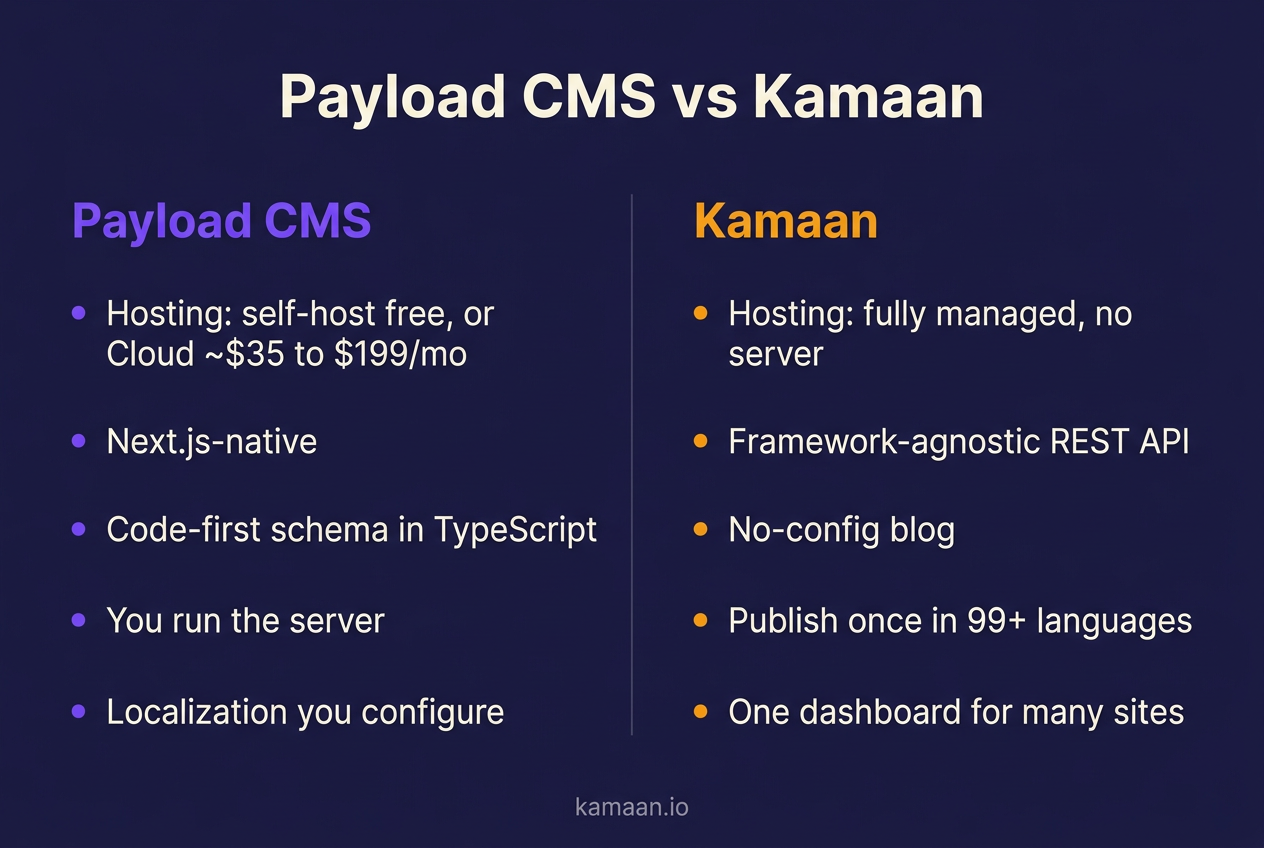
The pattern in that table is consistent. Payload gives you control and asks for ownership: your server, your schema, your multi-tenancy, your localization wiring. Kamaan gives you a managed job and asks for less: no server, no schema, native multilingual, one dashboard. Neither is wrong; they are aimed at different jobs.
The chart below sets the two side by side on the dimensions that decide the choice.
Where existing tools, Payload included, fall short for a SaaS blog
Most headless CMS options were built for structured application content, then pointed at blogs. That shows up in three recurring gaps.
The first is multi-site. If you run several products, you have several blogs, and almost every CMS makes each one a new project, space, or install with its own login and billing. Payload's answer is to build multi-tenancy yourself in code. Kamaan's Multi-Site Management gives you one account and one dashboard for every blog you run, on flat tiers, so you stop tab-switching between logins.
The second is multilingual. Publishing the same post in Spanish, German, French, and Italian with correct hreflang is a project in most tools, and hreflang is the part people get wrong. Payload has localization, but you configure and operate it. Kamaan makes it a setting: publish once in English, get 99+ languages with hreflang emitted server-side.
The third is workflow. You already write in Claude, ChatGPT, or Cursor. Kamaan's MCP Server and ChatGPT Actions let you plan, write, publish, and translate from inside that AI tool, so an article goes from outline to a live, translated post inside one conversation, no dashboard required. Payload has no equivalent built in.
When Payload is the right call
This is a comparison, not a hit piece, so be clear about where Payload wins. Pick Payload when your blog is not really the point and the CMS is the backend of a larger Next.js application: you want your content model in version-controlled TypeScript, you have the ops capacity to self-host or budget Payload Cloud, and you value a single unified backend and admin panel for the whole app. In that world, Payload's code-first design and Next.js-native install are exactly right, and the control is worth the ownership.
Pick Kamaan when the blog itself is the deliverable and you want it handled: you run more than one site, you want multilingual and hreflang solved rather than configured, you would rather not run a server, and you want the option to publish from an AI client. If you are weighing several options, our best headless CMS for startups guide lays out the full field, and Contentful vs Kamaan covers the enterprise-tier comparison.
Payload is usually shortlisted next to the other self-hostable options rather than on its own. The Directus and Strapi comparison covers those two on the same axis of control versus operational cost. For teams already on Strapi who want to stop running the server, our roundup of six headless CMS options that skip self-hosting covers the managed side of the same trade.
Real-world scenarios
A developer building a Next.js SaaS with a complex, bespoke data model chooses Payload, installs it into the existing /app folder, defines collections in TypeScript, and self-hosts it alongside the app. The blog is one collection among many, the schema lives in git, and the team already runs the infrastructure. Payload fits because the CMS is genuinely part of the application backend.
A multi-product founder runs three SaaS products and wants a blog on each, in English plus Spanish, German, French, and Italian. Self-hosting three Payload instances and wiring localization on each is a project they do not have time for. On Kamaan's Growth plan, they manage all the blogs from one dashboard, publish an article once, and it delivers across languages with hreflang set server-side. Routine posts get published straight from Claude through the MCP Server, without opening a dashboard.
Start building with Kamaan
When the blog should be solved, not built
Payload CMS is an excellent code-first backend for a Next.js application, and if you want full-stack control with your content model in TypeScript and the ops capacity to run it, it earns its place. But if your real job is shipping a product and the blog is meant to be a solved problem, especially across several sites and several languages, building and hosting a CMS is work you do not need to own. Kamaan is the managed alternative: a framework-agnostic REST API into any frontend, Multi-Site Management for every blog you run from one dashboard, publish-once delivery in 99+ languages with correct hreflang, and an MCP Server so you can drive it all from Claude or ChatGPT. It is one flat monthly rate, the first month is free, and there is no server for you to run.
FAQ
Is Payload CMS good?
Yes, for what it is: a code-first, Next.js-native headless CMS and app framework with a strong TypeScript developer experience. It is well regarded for building application backends. It is a heavier choice for a plain blog, where the schema-as-code and self-hosting are overhead rather than benefit.
How much does Payload CMS cost?
The software is free and open source under an MIT license, so self-hosting costs only your server and time. Payload Cloud, the managed hosting, has been listed around $35 per month for Standard and $199 per month for Pro, with overage charges on database storage, file storage, and bandwidth past the included quotas. Cloud pricing and availability have shifted since the Figma acquisition, so verify the current offer before planning around those numbers.
Is Payload CMS free?
Yes, Payload is free to self-host under an MIT license. You can run it on your own infrastructure at no license cost. You only pay if you choose Payload Cloud for managed hosting, or for the server and maintenance time that self-hosting requires.
What is the difference between Payload CMS and a managed CMS like Kamaan?
Payload is self-hostable and code-first: you own the server and define the schema in TypeScript. Kamaan is fully managed and blog-first: no server, no schema config, with native multilingual and multi-site handled for you. Payload favors control; Kamaan favors the blog being a solved problem.
Does Payload CMS support multiple languages?
Payload has localization, but you configure and operate it as part of your build; there is no publish-once, 99+ language delivery with server-side hreflang out of the box. Kamaan ships that as a setting, which is the main multilingual difference between the two.
Is Payload CMS better than Strapi?
Both are open-source, self-hostable, code-adjacent CMS options. Payload is Next.js-native and TypeScript-first; Strapi is a broader Node CMS. The better choice depends on your stack. Neither is managed by default, so both leave hosting, updates, and multilingual to you, unlike a managed platform.
Can I use Payload CMS without Next.js?
Payload is designed to install into a Next.js /app folder and is at its best there. You can consume its API from other frontends, but the tight Next.js integration is a core part of its value. If you want a framework-agnostic REST API that renders anywhere, a managed CMS like Kamaan is the more portable fit.
Who owns Payload CMS?
Payload was acquired by Figma in 2025. The core CMS remains open source under an MIT license, so you can still self-host it for free. The acquisition raised its profile and backing, but the self-hosted, code-first model is unchanged.
Is Payload CMS good for a multi-product founder?
Less so out of the box. Running blogs for several products means self-hosting multiple instances or wiring multi-tenancy in code, plus operating each one. A multi-site managed platform is a better shape for that job. See our best headless CMS for startups guide for the alternatives.
Do I need to write code to use Payload CMS?
Yes, more than most CMS platforms. Payload is code-first: you define collections and configuration in TypeScript before modeling content. That is a strength for developers building an app and a barrier if you want a no-config blog. For a config-free option, see our Sanity alternative guide, which covers the same schema-versus-no-schema tradeoff.
Can I publish to Payload CMS from Claude or ChatGPT?
Not natively; Payload has no built-in AI-client integration. Kamaan does: its MCP Server and ChatGPT Actions let you plan, write, publish, and translate from inside Claude, ChatGPT, or Cursor, so a post goes from outline to live without opening a dashboard.
