

Sanity's pricing looks simple on the pricing page and turns into a moving target once you ship. The free plan is genuinely generous, the Growth plan is billed per seat, and the part that catches teams off guard is the usage metering underneath both: API requests, bandwidth, and asset storage that keep counting whether or not you added a person. If you run one blog it rarely bites. If you run three or five product blogs, the seat math and the overage math compound at the same time, and the "cheap CMS" turns into a line item you have to forecast.
Quick answer: what Sanity actually costs
- The Free plan is $0 forever, includes up to 20 users, 2 datasets, and generous storage and bandwidth allowances, but it operates on hard limits and pay-as-you-go stops there.
- The Growth plan is $15 per occupied seat per month. Viewer-only users are free; every editor and developer with write access is a paid seat.
- Growth adds pay-as-you-go overage: once you pass the included API request, bandwidth, or asset-storage quota, you are billed for the excess on top of the seat fee.
- Enterprise is custom-priced and exists for SSO, custom roles, dedicated support, and higher limits. There is no public number.
- The bill spikes on usage and on seat count, not just on plan choice. A team of 10 on Growth is $150 per month before a single overage line.
The three Sanity tiers in plain numbers
Sanity ships three published tiers and one custom one. The headline prices are easy. The quotas under them are what decide your real invoice.
| Plan | Price | Seats | What it is for |
|---|---|---|---|
| Free | $0 forever | Up to 20 users | Individuals, hobby projects, a single small blog |
| Growth | $15 per seat per month | Up to 50 users | Commercial teams that outgrow the free quotas |
| Enterprise | Custom | Custom | SSO, custom roles, dedicated support, higher limits |
The Free plan is not a trial. It stays free, and for a solo founder shipping one blog it can carry you a long way: 20 seats and two datasets is more than most side projects need. The catch is that the free plan runs on hard limits, so when you hit a ceiling you do not get billed for overage, you get blocked until you upgrade.
These figures are drawn from Sanity's own pricing page and verified as of July 2026. Pricing pages change, so confirm the current numbers there before you budget.
Growth is where most commercial projects land. At $15 per occupied seat per month it reads as inexpensive, and for a two-person team it is. The number that surprises people is the multiplier: every person who needs write access is a seat, so a five-person content and dev team is $75 per month before usage, and a ten-person team is $150 per month before usage.
The part the pricing page underplays: usage-based billing
Sanity is a usage-metered platform, not a flat one. On top of the seat fee, Growth meters three things and charges for anything past the included quota:
- API requests, specifically uncached requests to the content API.
- Bandwidth, the data served out of the API and asset CDN.
- Asset storage, the images and files you upload.
This is the mechanism behind the "my Sanity bill spiked" threads. Nothing changed in your plan; your traffic, your image library, or an uncached query pattern crossed a line, and the overage started accruing. It is fair billing, and it is predictable once you know it exists. The problem is that it is a second axis of cost that a founder comparing sticker prices does not see until the invoice arrives.
For a content blog specifically, the usage risk is usually asset storage and bandwidth, since a blog is mostly images and cached reads. For an app backing onto Sanity, uncached API requests dominate. Either way, the honest way to budget Sanity is seat fee plus a usage estimate, not the seat fee alone.
Sanity is priced on two axes at once: how many people can write, and how much the content is used. Budget for both or the invoice surprises you.
Where Sanity gets expensive for multi-product founders
Sanity's model is built around a project. That is clean for one product. It stops being clean the moment you run several.
If you are a multi-product founder or an agency, you do not have one blog, you have three, five, or ten. In Sanity, each project is its own space with its own seats and its own usage meter, and you manage each one separately. The seat math multiplies across projects, the usage math accrues per project, and the dashboard-switching tax is real: separate logins, separate billing lines, separate mental overhead for every property you run.
That is the exact gap Kamaan is built to close. Instead of a project per blog, Multi-Site Management gives you one account and one dashboard for every blog you run, on flat tiers rather than per-seat, per-project usage metering. You are not forecasting overage across five spaces; you are managing five blogs from one place on a plan you can read off in one line.
Contentful is the tool most teams price-check against Sanity at this point, and its per-space model fails in a different way. Sanity and Contentful side by side compares the two on modelling, localisation, and where each bill actually breaks.
Sanity pricing vs a flat multi-site plan
The chart below breaks down Sanity's three tiers and the usage billing that sits underneath them.
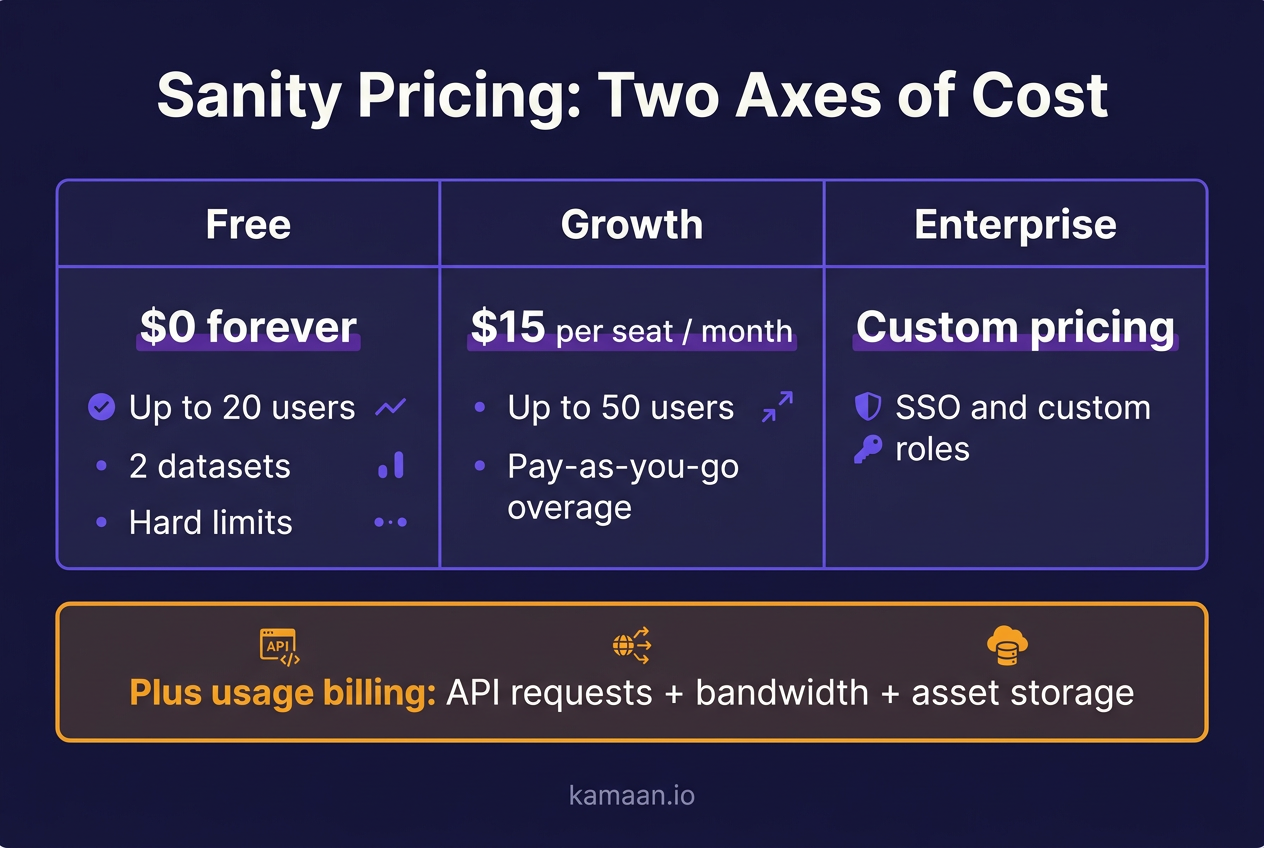
Here is the same three-product-blog scenario priced two ways: Sanity's per-seat plus usage model, and a flat command-center plan.
| Dimension | Sanity (Growth) | Kamaan (Growth) |
|---|---|---|
| Billing model | Per occupied seat, per project | Flat monthly, per account |
| Base cost | $15 per seat per month | Flat monthly rate |
| Sites included | One project per plan | 3 sites |
| Languages | Add per project, manual | 3 languages, publish once |
| Usage overage | Billed on API, bandwidth, storage | No per-request overage on the plan tier |
| Managing three blogs | Three projects, three logins | One dashboard, one login |
| Schema setup | Schema-as-code required | No-config article CMS |
The point is not that Sanity is bad. Sanity is a strong structured-content platform, and for a single app with a data model that genuinely needs schemas, it earns its price. The point is that for a founder whose actual job is running several SaaS blogs, the per-seat-per-project model is the wrong shape, and a flat multi-site plan does the same job for a number you can predict. For the wider field, Sanity alternatives compared lines up Kamaan, Payload, Strapi, Storyblok, and Contentful against it for a blog.
Real-world scenarios
A bootstrapped founder runs three SaaS products and wants a blog on each. On Sanity Growth, that is three projects, and with two people needing write access on each, the seat math alone lands at $90 per month before any usage overage, plus schema config on every project. On Kamaan, the same founder manages all three blogs from one dashboard on the Growth plan, publishes an article once, and it delivers in three languages with hreflang emitted server-side.
An agency managing blogs for eight clients hits the per-project wall harder. Eight Sanity projects means eight usage meters to watch and eight billing lines to reconcile at month end. The agency moves the blogs onto Kamaan's Scale plan for up to 10 sites, runs all of them from one account, and drives publishing straight from Claude through the MCP Server without opening a dashboard for routine posts.
Start building with Kamaan
If you run more than one blog, stop paying per project
Sanity's pricing is fair for what it is: a per-seat, usage-metered structured-content platform. But if your real job is running several SaaS blogs, you are paying for a project-shaped model that fights the way you work. Kamaan is the command center for exactly that: one account and one dashboard for every blog, on flat tiers you can read in a single line, with publish-once delivery into 99+ languages and correct hreflang built in. It is one flat monthly rate for a single site, the first month is free, and you can drive the whole thing from Claude, ChatGPT, or Cursor through the MCP Server.
FAQ
How much does Sanity CMS cost?
Sanity has three published tiers. Free is $0 forever with up to 20 users and hard usage limits. Growth is $15 per occupied seat per month with pay-as-you-go overage on API requests, bandwidth, and storage. Enterprise is custom-priced. The real monthly cost is the seat fee plus whatever usage you accrue past the included quotas.
Is Sanity free or paid?
Both. Sanity has a genuine free-forever plan that covers up to 20 users, two datasets, and generous storage and bandwidth. It is not a trial. You only pay when you cross the free-plan hard limits or need Growth features like more seats and pay-as-you-go overage.
What is the price of the Sanity Growth plan?
Growth is $15 per occupied seat per month. Only users with write access count as occupied seats; viewer-only users are free. So a two-editor team is $30 per month before usage, a five-person team is $75, and a ten-person team is $150, plus any overage on requests, bandwidth, or storage.
What are the Sanity free plan limits?
The free plan includes up to 20 users, two datasets, and generous asset-storage and bandwidth allowances. The key difference from paid plans is that free runs on hard limits: when you hit a ceiling you are blocked rather than billed for overage, which forces the upgrade decision.
Does Sanity charge for usage on top of the plan?
Yes, on Growth. Beyond the flat seat fee, Sanity meters uncached API requests, bandwidth, and asset storage, and bills you for anything past the included quota. This is the usual cause of a Sanity bill spiking without any plan change: traffic or asset growth pushed usage past the quota.
Why did my Sanity bill go up without adding anyone?
Because Sanity bills on usage, not just seats. If your traffic rose, your image library grew, or a query pattern started missing the cache, you crossed a usage quota and the overage started accruing. Nothing about your plan changed; the metered usage under it did.
How much does Sanity cost for a team of 10?
At Growth, ten occupied seats is $150 per month before any usage. Add whatever overage your API requests, bandwidth, and asset storage accrue past the included quotas. For a content-heavy blog, expect the overage to come mostly from bandwidth and asset storage rather than API calls.
Is Sanity cheaper than Contentful?
For a small team, usually yes at the entry point: Sanity Growth starts at $15 per seat while Contentful's first paid tier is around $300 per month. The models differ, though. Sanity charges per seat plus usage; Contentful walls features behind a per-space model. See our Contentful pricing breakdown for the full comparison.
Do I need to write schema code to use Sanity?
Yes. Sanity is schema-as-code: you define your content types in code before you can model content. For a structured app that is a feature. For a plain blog it is setup you may not want. If you want a headless CMS without the schema config, see our guide to a Sanity alternative.
Is Sanity a good CMS for a multi-product founder?
Sanity is strong for a single app with a real data model. It is a poor fit for running several blogs, because each product is its own project with its own seats and usage meter, so cost and admin multiply per property. A flat multi-site plan is the better shape for that job. Start from our best headless CMS for startups guide.
Is Sanity better than WordPress for a blog?
They are different tools. WordPress is a full, self-contained website and blog platform with plugins and themes; Sanity is a headless content backend you pair with your own frontend. Sanity wins on structured content and developer control, WordPress wins on out-of-the-box simplicity and plugin ecosystem. For a plain SaaS blog, a managed headless option avoids both the WordPress plugin sprawl and Sanity's per-seat, usage-metered bill.
What is the difference between Sanity datasets and projects?
A project is the top-level container with its own plan, seats, and billing. A dataset is a data partition inside a project, often used to split production and staging. Free includes two datasets in one project. Running multiple separate blogs usually means multiple projects, which is where the per-project cost stacks up.
Does Sanity offer a discount for startups?
Sanity runs a startup program that gives qualifying early-stage companies additional allowances. Eligibility is capped by company size and revenue, so check the current terms on Sanity's site before assuming you qualify. It changes the free-tier math but does not remove the per-seat, per-project structure.
