

Every framework has its own CMS SDK tutorial. Next.js docs show you Contentful. Nuxt docs show you Sanity. SvelteKit docs show you Storyblok. Astro docs show you Strapi. None of them show you the thing you actually want: one endpoint, one JSON shape, five frontends pulling from it without a vendor-specific SDK in any of them. The result is teams that pick a CMS, get locked into that CMS's client library, and then re-platform every time they switch frameworks. A blog API that returns plain REST JSON breaks that pattern. This article walks through one such endpoint, the shape it returns, and the exact fetch code for Next.js, Nuxt, SvelteKit, Astro, and vanilla React.
Quick takeaways
- A blog API is just a REST endpoint that returns articles as JSON. No SDK required.
- The same endpoint can feed Next.js, Nuxt, SvelteKit, Astro, and React with under 15 lines of fetch code per framework.
- A clean response shape includes id, title, slug, content (markdown or HTML), excerpt, featured_image_url, language, and parent_article_id for translations.
- Kamaan is the command center for multi-product founders and agencies who run many SaaS blogs: manage every blog from one dashboard, and run every operation across all of them from Claude, ChatGPT, Cursor, or any MCP client.
- First-time wiring takes 40 to 60 minutes for a developer. Subsequent blogs reuse the same fetch pattern.
Why a portable blog API matters more than another SDK
The job of a CMS is to store content and hand it back. SDKs add a wrapper around that job. Wrappers feel helpful when you start, then become friction. You upgrade the framework, the SDK breaks. You switch frameworks, the SDK does not exist. You spin up a second product, you pay per-space and per-seat for the SDK you already wrote glue code around. A plain REST API skips all of that. If your CMS returns JSON, your frontend can render it.
This article uses Kamaan's REST API as the running example because it returns a flat, predictable JSON shape and because the same endpoint serves every site in your account. The pattern below works against any CMS that exposes REST. If you want a deeper introduction to the architectural choice, the pillar on how to add a blog to a SaaS covers when to pick headless versus an in-app blog. The companion piece on what is a headless CMS explains the underlying split between content storage and rendering.
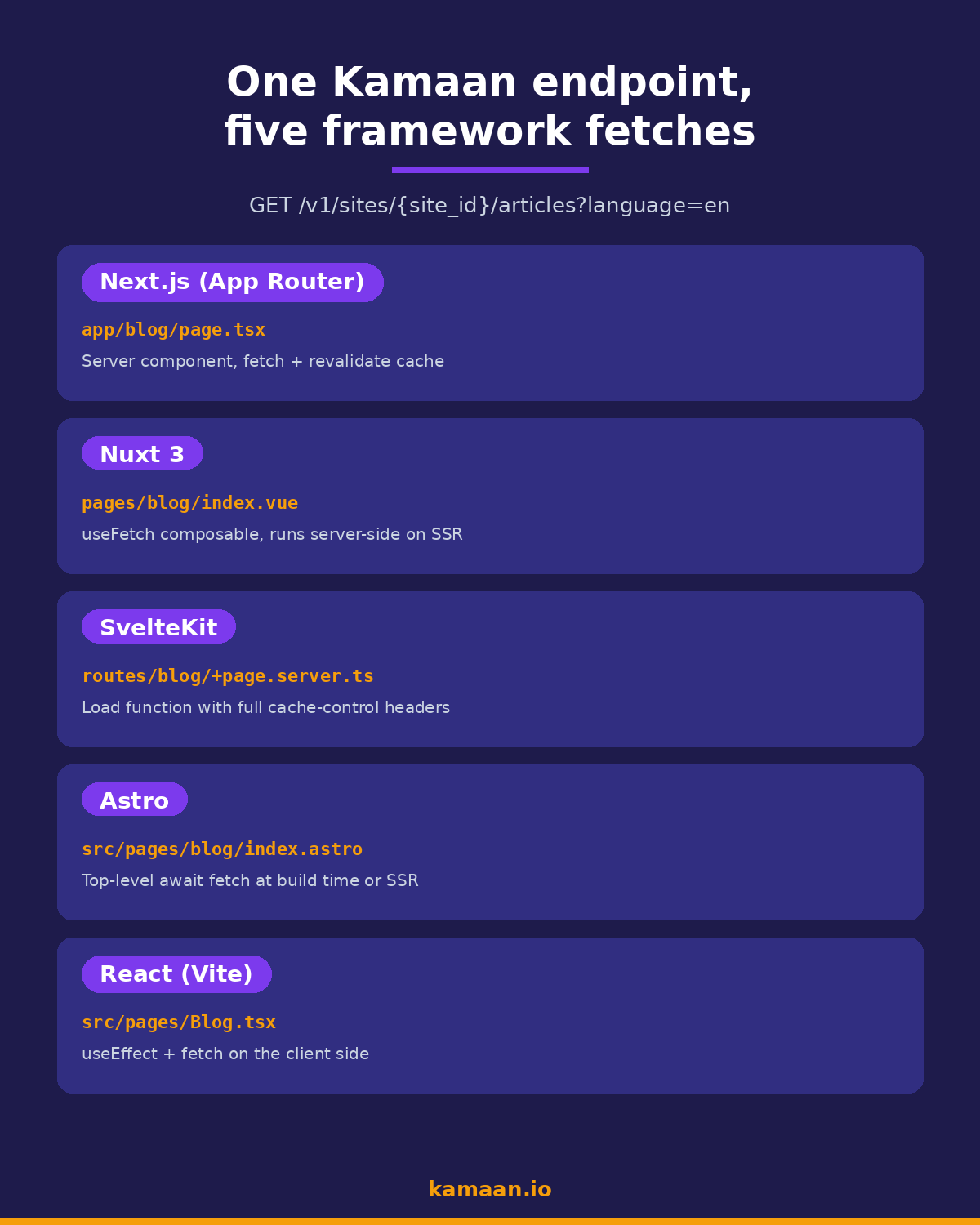
Here is what the same fetch looks like across all five frameworks at a glance:
The example endpoint and response shape
Here is the call every framework below makes:
GET https://api.kamaan.io/v1/sites/{site_id}/articles?language=en&status=published
Authorization: Bearer kmn_pk_live_xxxxxxxxxxxxxxxx
The response is a JSON array of articles. Each item looks like this:
{
  "id": "art_2k1nB7Vy8q",
  "title": "Blog API: How to Fetch and Render Headless CMS Content in Any Framework",
  "slug": "blog-api",
  "content": "# Blog API\n\nEvery framework has its own CMS SDK tutorial...",
  "excerpt": "One Kamaan endpoint, rendered five different ways.",
  "featured_image_url": "https://cdn.kamaan.io/img/km0013_featured.png",
  "language": "en",
  "parent_article_id": null,
  "status": "published",
  "published_at": "2026-05-29T10:14:00Z",
  "updated_at": "2026-05-29T10:14:00Z",
  "meta_title": "Blog API: One Endpoint, Five Frontends",
  "meta_description": "How to fetch and render headless CMS content...",
  "tags": ["headless-cms", "blog-api", "developer-integration"]
}
A single article by slug uses:
GET https://api.kamaan.io/v1/sites/{site_id}/articles/blog-api?language=en
Translations link back to the source via parent_article_id. To request the German version of the same piece, change language=en to language=de. There is no extra translation endpoint. The article object is the same shape across all languages, which means your routing layer does not have to branch on locale.
Fetch number one: Next.js App Router
Server component, runs at build time or on demand with cache control:
// app/blog/page.tsx
const SITE_ID = process.env.KAMAAN_SITE_ID!;
const TOKEN = process.env.KAMAAN_TOKEN!;

async function getArticles() {
  const res = await fetch(
    `https://api.kamaan.io/v1/sites/${SITE_ID}/articles?language=en&status=published`,
    {
      headers: { Authorization: `Bearer ${TOKEN}` },
      next: { revalidate: 600 },
    },
  );
  if (!res.ok) throw new Error("Kamaan fetch failed");
  return res.json();
}

export default async function BlogIndex() {
  const articles = await getArticles();
  return (
    <ul>
      {articles.map((a: any) => (
        <li key={a.id}>
          <a href={`/blog/${a.slug}`}>{a.title}</a>
          <p>{a.excerpt}</p>
        </li>
      ))}
    </ul>
  );
}
The next: { revalidate: 600 } line tells Next.js to cache the response for 10 minutes. For a marketing blog that publishes a few times a week, that is the right default. If you want pure static, switch to force-cache. If you want every request fresh, switch to no-store. For the full pattern including the article detail page and incremental static regeneration, see the Next.js headless CMS guide.
Fetch number two: Nuxt 3
Same endpoint, useFetch composable, runs on the server during SSR:
<!-- pages/blog/index.vue -->
<script setup lang="ts">
const config = useRuntimeConfig();
const { data: articles } = await useFetch(
  `https://api.kamaan.io/v1/sites/${config.kamaanSiteId}/articles`,
  {
    query: { language: "en", status: "published" },
    headers: { Authorization: `Bearer ${config.kamaanToken}` },
    server: true,
  },
);
</script>

<template>
  <ul>
    <li v-for="a in articles" :key="a.id">
      <NuxtLink :to="`/blog/${a.slug}`">{{ a.title }}</NuxtLink>
      <p>{{ a.excerpt }}</p>
    </li>
  </ul>
</template>
useFetch automatically deduplicates the call between server render and client hydration. The runtime config keeps the token off the client bundle.
Fetch number three: SvelteKit
The load function on the server side gives you full control of caching headers:
// routes/blog/+page.server.ts
import { KAMAAN_SITE_ID, KAMAAN_TOKEN } from "$env/static/private";

export async function load({ fetch, setHeaders }) {
  const res = await fetch(
    `https://api.kamaan.io/v1/sites/${KAMAAN_SITE_ID}/articles?language=en&status=published`,
    { headers: { Authorization: `Bearer ${KAMAAN_TOKEN}` } },
  );
  setHeaders({ "cache-control": "public, max-age=600" });
  return { articles: await res.json() };
}
<!-- routes/blog/+page.svelte -->
<script lang="ts">
  export let data;
</script>

<ul>
  {#each data.articles as a (a.id)}
    <li>
      <a href={`/blog/${a.slug}`}>{a.title}</a>
      <p>{a.excerpt}</p>
    </li>
  {/each}
</ul>
Fetch number four: Astro
Astro fetches at build time by default, which fits a content-heavy blog perfectly:
---
// src/pages/blog/index.astro
const SITE_ID = import.meta.env.KAMAAN_SITE_ID;
const TOKEN = import.meta.env.KAMAAN_TOKEN;

const res = await fetch(
  `https://api.kamaan.io/v1/sites/${SITE_ID}/articles?language=en&status=published`,
  { headers: { Authorization: `Bearer ${TOKEN}` } },
);
const articles = await res.json();
---

<ul>
  {articles.map((a) => (
    <li>
      <a href={`/blog/${a.slug}`}>{a.title}</a>
      <p>{a.excerpt}</p>
    </li>
  ))}
</ul>
If you switch Astro to SSR mode, the same code runs on each request. No code changes.
Fetch number five: vanilla React (Vite)
Client-side fetch in a plain React app. Useful when the blog lives inside an authenticated SaaS dashboard:
// src/pages/Blog.tsx
import { useEffect, useState } from "react";

const SITE_ID = import.meta.env.VITE_KAMAAN_SITE_ID;
const TOKEN = import.meta.env.VITE_KAMAAN_TOKEN;

export function Blog() {
  const [articles, setArticles] = useState<any[]>([]);
  useEffect(() => {
    fetch(
      `https://api.kamaan.io/v1/sites/${SITE_ID}/articles?language=en&status=published`,
      { headers: { Authorization: `Bearer ${TOKEN}` } },
    )
      .then((r) => r.json())
      .then(setArticles);
  }, []);
  return (
    <ul>
      {articles.map((a) => (
        <li key={a.id}>
          <a href={`/blog/${a.slug}`}>{a.title}</a>
          <p>{a.excerpt}</p>
        </li>
      ))}
    </ul>
  );
}
For a client-side React app, expose a read-only public token. Never ship a write-scoped token to the browser.
Here is the same picture as a single reference card: one endpoint on top, the file path where each framework's fetch lives underneath.
Two real-world scenarios
Scenario one: a solo founder running three SaaS products. Each product has its own marketing site on a different stack, picked at different points in time. Product A is on Next.js, product B is on Astro, product C is on a vanilla React dashboard. Without a portable blog API, the founder maintains three different CMS integrations, three different content workflows, and three different bills. With one Kamaan account and three sites under it, the same fetch pattern above runs on all three. New articles drafted in Claude land in the right site through the MCP server, and each frontend picks them up on next revalidation. Total integration time across all three frontends: under three hours.
Scenario two: a small agency with seven client SaaS blogs. The agency does not want to teach seven CMS UIs to seven clients. They run all seven blogs from one Kamaan dashboard, give each client an editor seat scoped to their site, and let their content team batch-write across all seven from a single ChatGPT window. Each client site uses whatever framework the agency built it in, fetching the same JSON shape.
Where Kamaan fits
Kamaan is the command center for multi-product founders and agencies who run many SaaS blogs: manage every blog from one dashboard, and run every operation across all of them from Claude, ChatGPT, Cursor, or any MCP client. The REST endpoint shown above is the same shape across every site in your account. Auto-Multilingual Delivery means translations appear automatically on publish, returned by the same articles endpoint with language=de, language=fr, and so on. The parent_article_id field links each translation back to its English source, so your routing layer can resolve locale variants without a second request.
Pricing is one flat monthly rate, unlimited sites, no per-site or per-space or per-seat fees. First month is free, no credit card to start, cancel anytime. A lifetime plan is available for teams who would rather pay once. AI translation credits are only consumed if Kamaan does the translation. If you paste in your own translations from Claude or ChatGPT, the upload costs nothing.
The CMS side of first-publish is around 14 minutes from sign-up to first post live. The developer integration, the part this article covers, is honestly 40 to 60 minutes for first-time wiring including env vars, the index route, the detail route, and a sitemap. After that, every new site reuses the same fetch.
FAQ
What is a blog API?
A blog API is an HTTP endpoint that returns blog articles as structured data, usually JSON. Your frontend code calls the endpoint, receives the articles, and renders them however you like. The CMS handles storage, editing, and publishing. The frontend handles presentation.
Do I need a vendor-specific SDK to use a blog API?
No. The native fetch function built into every modern JavaScript runtime is enough. SDKs can add convenience (typed responses, retry logic, image transforms) but they also lock you in. A REST endpoint that returns plain JSON works with any framework, any year, any version.
Can the same blog API feed multiple frontends?
Yes. That is the point of headless. You can render the same articles on a Next.js marketing site, an Astro docs site, and a React dashboard at the same time, all pulling from one endpoint. The CMS does not care how the content is rendered, and you can even wire the same JSON into a syndication feed with a free RSS feed generator.
How do I handle translations from a blog API?
Look for a CMS that returns translations as separate article objects linked to the source via a parent field. Kamaan uses parent_article_id. To fetch the German version, pass language=de on the same articles endpoint. Avoid CMSs that nest translations inside a single article object, because that forces every frontend to parse the locale logic.
Should I cache responses from the blog API?
Yes, in almost every case. Marketing blog content does not change often. For static-export frameworks like Astro or Next.js with revalidate, the fetch happens at build time or on a long interval. For SSR frameworks, a 5 to 10 minute cache is usually safe. Only skip the cache when you need preview drafts to appear immediately for logged-in editors.
What about preview drafts?
Pass status=draft and add an auth header or a preview token that your editors carry. Most teams ship a separate /preview/[slug] route that fetches draft content, behind a login gate.
How do I render markdown returned by the API?
Pick a markdown parser that matches your runtime. For React, react-markdown works. For Vue, vue-markdown-render. For Svelte, svelte-markdown. For Astro, the built-in component. The CMS should return raw markdown so each frontend can sanitize it the way it prefers.
How is this different from picking Contentful or Sanity?
Contentful and Sanity both expose REST endpoints, so the fetch pattern above works against them too. The differences sit in pricing model and operational surface. Kamaan charges one flat monthly rate for unlimited sites and gives you AI-orchestration through MCP so you can run every blog operation from Claude, ChatGPT, or Cursor.
Related on Kamaan
-
How to add a blog to your SaaS covers the architectural decision before you wire any code.
-
What is a headless CMS explains the storage-versus-rendering split this article assumes.
-
Headless CMS for Next.js goes deeper on the Next.js specifics: ISR, on-demand revalidation, image domains.
-
Best headless CMS for startups compares pricing and operational fit for early-stage teams.
-
Headless CMS for SvelteKit: Setup Guide and API Integration is the framework-specific deep dive for SvelteKit, with the minimum +page.server.ts code wired against this same Kamaan REST endpoint.
Start building with Kamaan
Kamaan is the command center for multi-product founders and agencies who run many SaaS blogs: manage every blog from one dashboard, and run every operation across all of them from Claude, ChatGPT, Cursor, or any MCP client. Auto-Multilingual Delivery means a translation appears on every locale automatically when you publish. Multi-Site Management means one account, one bill, every blog you run. The REST API Delivery shown in this article is the same shape across every site in your account.
Pricing is one flat monthly rate, unlimited sites, no per-site or per-space or per-seat fees. First month is free, no credit card to start, cancel anytime. A lifetime plan is available if you would rather pay once. Try it on your next blog and keep the fetch code you already wrote.
