

Most SaaS products add a blog as an afterthought, three years in, when the marketing team finally asks why organic traffic is flat. The developers spin up a WordPress on a subdomain, the SEO leaks across two properties, and nobody owns the integration. Two years later the blog needs to ship in five languages and now the founding engineer is writing a custom translation pipeline at 11pm on a Wednesday. There is a cleaner way to add a blog to your SaaS product, and it does not require any of that.
Quick takeaways
- A blog inside your SaaS product needs three things: a content store, a delivery API, and a render layer in your app. Skip any of them and you regret it later.
- Subdirectories (
yourapp.com/blog) consolidate SEO. Subdomains (blog.yourapp.com) fragment it. This is the single most expensive decision people get wrong. - Contentful Lite starts at $300/month. Sanity Free caps at 10,000 documents. Building your own CMS costs 4 to 12 weeks of engineering. None of these are the right answer for a small SaaS team that wants a blog live this week.
- Kamaan's REST API Delivery returns standard JSON to any framework: Next.js, Nuxt, SvelteKit, Astro, or anything else. Auto-Multilingual Delivery publishes Spanish, German, French, and Italian versions the moment you publish English.
- First month is free. One Kamaan account covers unlimited sites at a flat monthly rate, so adding the blog to your second product later does not add a second invoice.
The three moving parts of a SaaS blog
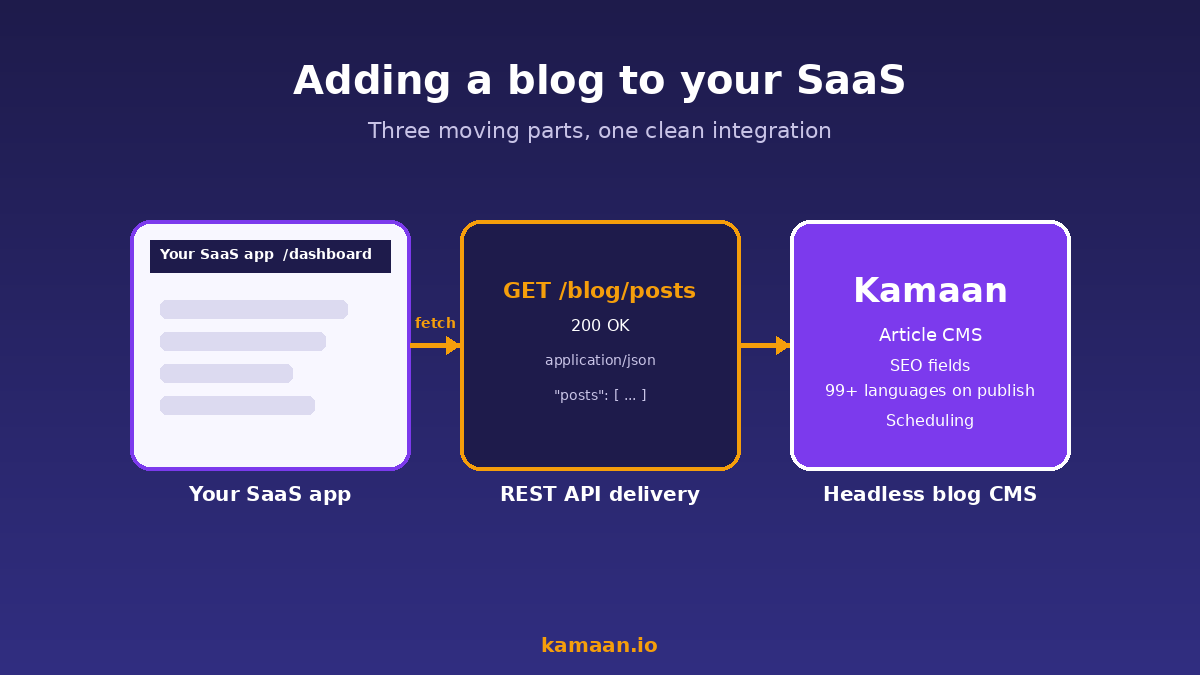
Every SaaS blog has the same three pieces, no matter how you build it.
The first piece is the content store. This is where articles live as structured data, with fields for title, body, slug, metadata, scheduled publish dates, and translations. The second piece is a delivery API that hands that content to whatever app is going to render it. The third piece is the render layer inside your SaaS frontend that fetches from the API, slots the content into your existing layout, and serves it under your domain.
When teams try to shortcut this, they usually skip the API and embed an iframe, or skip the render layer and host the blog under a different domain. Both shortcuts cost more than they save. An iframe blog does not contribute to your site's SEO because Google indexes the iframe source domain, not yours. A subdomain blog (blog.yourapp.com) does get indexed, but Google treats subdomains as separate properties, so your link equity does not compound across the product and the blog. Subdirectory hosting (yourapp.com/blog) keeps everything under one domain and one SEO surface, which is what every credible SEO study has shown for the last decade.
Why "just use WordPress" is usually wrong for a SaaS product
WordPress is the default suggestion because everyone has installed it once. For a marketing site that does not share a domain with a product, it is fine. For a blog that needs to live inside a React or Next.js SaaS frontend, it is a forced fit.
The integration always becomes a reverse-proxy problem. You either run WordPress on a subdomain (which costs you the SEO consolidation) or you stand up a reverse-proxy rule that rewrites /blog/* to a separate WordPress install. The reverse-proxy approach works but introduces a second deployment, a second set of security patches, and a styling boundary where your SaaS app stops looking like itself. WordPress also assumes server-side rendering by default, which fights modern SaaS frontends built on Next.js, Nuxt, or SvelteKit. You can use WordPress headlessly, but at that point you have all the operational cost of WordPress plus the integration cost of a headless CMS, and none of the multilingual or multi-site benefits a purpose-built headless CMS would give you.
A blog inside a SaaS product is not a separate website. It is content rendered by the same app that renders your product UI. That is what a headless CMS solves, and that is why the question is not "WordPress or not" but "which headless CMS."
What a clean integration actually looks like
A clean integration has four properties. First, blog content fetches from a single REST endpoint with predictable JSON. Second, that endpoint is fast enough to call on every request without a build step. Third, the same content store serves every language version of every article, indexed in a way the API understands. Fourth, the integration touches your existing repo, not a separate one.
In Next.js, the pattern is a server component or a route handler under /app/blog/[slug]/page.tsx that calls the CMS API at render time. With Kamaan's REST API Delivery, that call looks like a standard fetch against /v1/sites/{site_id}/articles?slug=<slug>&language=en and returns the article body, SEO fields, featured image URL, and the full translations map in one response. You render it with your existing layout, your existing typography, and your existing analytics. No second deployment, no separate styling layer, no proxy rules.
The same pattern works in Nuxt with a server route, in SvelteKit with a +page.server.ts load function, and in Astro with a static or dynamic route. The CMS does not care which framework you use. That is the point of a REST API: the contract is the network protocol, not the framework.
For the concrete fetch code in each major framework against that exact JSON shape, the blog API walkthrough shows one endpoint rendered by Next.js, Nuxt, SvelteKit, Astro, and vanilla React.
How to choose, in one table
Most teams do not have weeks to evaluate every headless CMS on the market. Below is the honest version of the comparison, scored on the dimensions that actually break a small SaaS team's integration.
| Approach | Setup time | Monthly cost | Multi-site | Auto i18n | Lock-in risk |
|---|---|---|---|---|---|
| Build your own CMS | 4 to 12 weeks | Engineering time | Yes (your code) | No | High (your code) |
| WordPress on subdomain | 1 to 3 days | About $20/mo for hosting | 1 install per site | Plugin, paid | Medium |
| Contentful Lite | 1 to 2 days | $300/month | Add-on environments | Manual workflow | Medium-high |
| Sanity Free | 3 to 7 days (Studio config) | $0 to $15/user/mo | Dataset per site | Manual workflow | Low-medium |
| Kamaan | Under 1 hour | First month free, then flat annual | Unlimited under one account | 99+ languages on publish | Low (standard REST) |
The infographic below lists the same comparison with the callouts that matter most for a small team adding a blog this quarter.
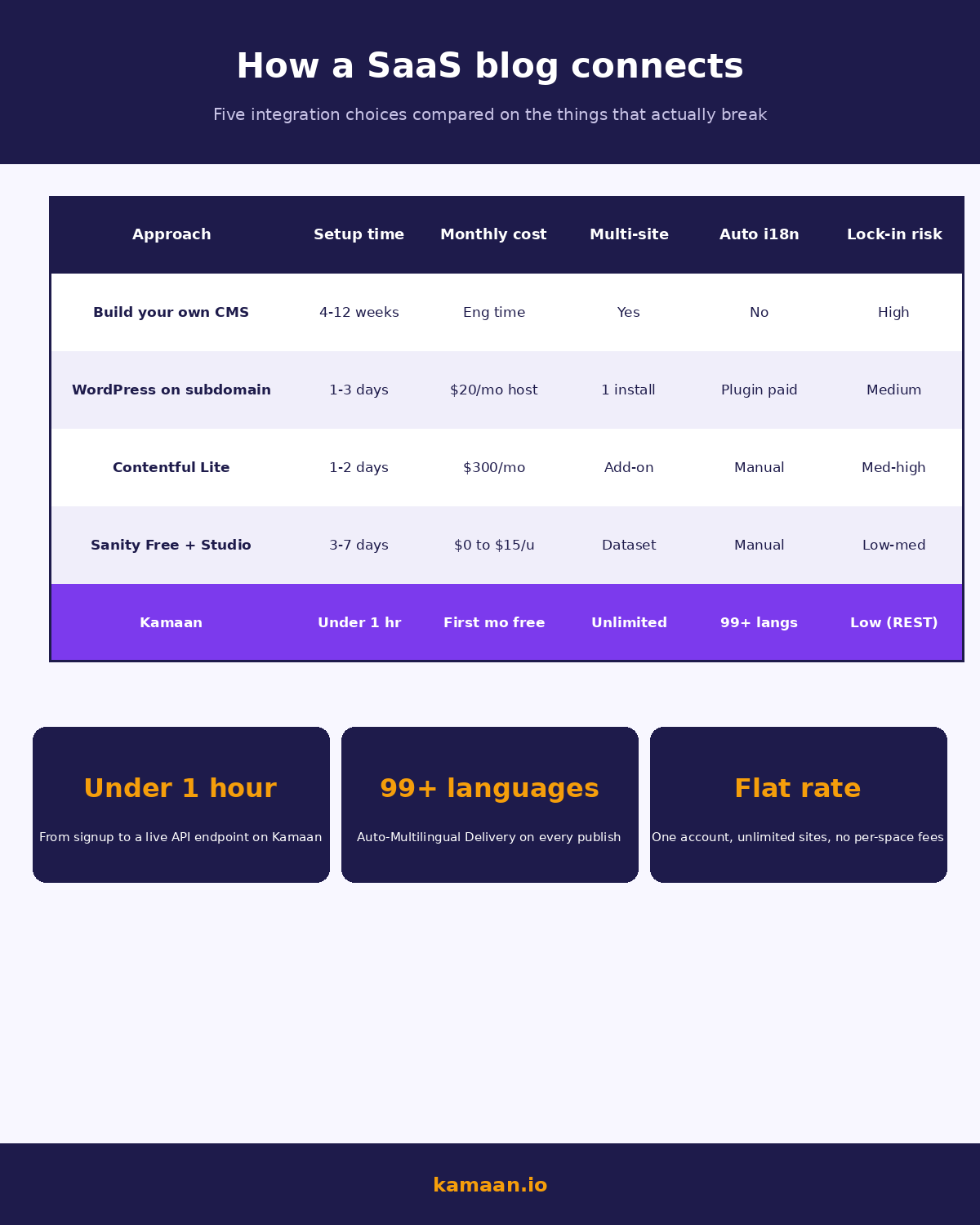
Contentful charges $300/month at the first paid tier. Sanity requires schema-as-code and a developer to configure. Storyblok charges per space, which adds up fast across multiple products. If you have one product, one language, and you already know the headless space, Sanity Free is reasonable. If you have multiple products or you sell into Europe or LATAM, the multi-site and multilingual columns are where the cost differences compound.
Step-by-step: add a blog to an existing SaaS app in under an hour
This is the path with Kamaan. Substitute your tool of choice if you are evaluating others, but the shape of the steps is the same for any REST-API headless CMS.
- Create the site in your CMS. Pick a site identifier that matches your domain. With Kamaan, this is one form, one click. You get an API base URL and a read API key back. No schema to design, no Studio to deploy. The Article CMS gives you rich text, SEO fields, featured image, and scheduling out of the box.
- Add a
/blogroute to your SaaS app. In Next.js, that is/app/blog/page.tsxfor the index and/app/blog/[slug]/page.tsxfor the article. In Nuxt, SvelteKit, or Astro, the equivalent file-based route. - Fetch from the API on the server. Use your framework's recommended data-fetching pattern. For Kamaan, a
GET /v1/sites/{site_id}/articles?status=publishedreturns the index, andGET /v1/sites/{site_id}/articles?slug={slug}returns one article. The response includes the article body as HTML, the SEO meta fields, the featured image CDN URL, and the translations map. - Render with your existing layout. Wrap the article body in your typography component. Keep your header, footer, and analytics from the rest of the app. Add the meta tags from the API response to your
<head>, and drop in BlogPosting structured data with a free blog schema generator so search engines parse each post correctly. Set hreflang tags from the translations map. - Set up locale routing. For multilingual SaaS, the recommended URL pattern is
/[lang]/blog/[slug]. Kamaan returns one translations map per article, so you can render each language version under its own locale prefix without a second fetch per language. - Publish. Write the article in the Kamaan dashboard, schedule or publish, and the API returns it immediately. With Auto-Multilingual Delivery, Spanish, German, French, and Italian go live at the same time under their localized slugs.
Total time, for a developer who knows their framework, is well under an hour. Most of the time is spent on the typography and the meta-tag wiring inside your app, not on the CMS side.
If your stack is Next.js specifically, the step-by-step Next.js plus headless CMS integration guide walks through the exact files, including the fetch helper, generateStaticParams, and ISR config, in under sixty minutes.
Where founders typically lose months they did not need to
Three failure modes account for most of the wasted time we see.
The first is putting the blog on a subdomain because it was easier in week one. Six months later, the SEO numbers are flat, somebody runs the audit, and the team rebuilds the integration on a subdirectory anyway. Pick the subdirectory on day one and you skip this cycle.
The second is picking a CMS that requires schema-as-code (Sanity, Strapi) for a blog that has the same five fields every blog ever has. Title, body, slug, featured image, published date. There is no schema to design. Configuration time on a schema-as-code CMS is real engineering work, and for a blog it does not pay back. Pick a CMS that ships with a blog content type already defined.
The third is paying for multilingual after the fact. Contentful, Sanity, and Storyblok all support multilingual content, but the workflow is "create the English version, then for each language manually create a translated entry." For a team that ships 4 articles a month into 5 languages, that is 20 translation tasks a month somebody has to manage. Kamaan's Auto-Multilingual Delivery publishes Spanish, German, French, and Italian versions of every article the moment you hit publish in English. Zero extra steps.
Real-world scenarios
A solo founder running a B2B SaaS invoicing tool wants a blog for SEO. She picks Kamaan, creates one site, drops a /blog route into her Next.js app, and points it at the Kamaan REST API. Her first article is live under kamaan.io/blog/... the same afternoon. She writes the next post in English, hits publish, and within 10 minutes Kamaan has auto-published Spanish, German, French, and Italian versions at /es/blog/, /de/blog/, /fr/blog/, and /it/blog/. Google indexes all five within 48 hours. She did not write a single word in a second language and did not pay a translation vendor.
A bootstrapped founder running three SaaS products publishes blog updates for all three from a single Kamaan dashboard. One account covers all three sites at a flat monthly rate. The same article in different products shares no content, but the integration code in each frontend is identical: same REST endpoint shape, same article schema, same multilingual handling. When he ships product number four next quarter, he adds a site, drops in the same /blog route, and goes live the same day.
FAQ
How do I add a blog to a Next.js SaaS app without breaking my existing routes?
Create /app/blog/page.tsx for the index and /app/blog/[slug]/page.tsx for individual articles. Fetch from your headless CMS at render time using fetch() inside the server component. Wrap the response in your existing layout components. With Kamaan's REST API Delivery, the article body comes back as HTML, so you slot it into a typography wrapper and serve it under your existing domain.
Should my blog live at blog.myapp.com or myapp.com/blog?
myapp.com/blog. Subdirectory hosting consolidates SEO under your main domain. Subdomains are treated as separate properties by Google, which fragments your link equity and slows the time to rank. The only reason to use a subdomain is if you literally cannot get your SaaS framework to render content under /blog, which is essentially never true for Next.js, Nuxt, SvelteKit, or Astro.
Can I use a free headless CMS for my SaaS blog?
Yes, with caveats. Sanity Free caps at 10,000 documents, which is enough for a blog for years. Contentful Free has tighter limits on entries and API calls but is workable for a small blog. The catch on both is that multilingual workflows are manual and multi-site costs extra. Kamaan's first month is free with full multilingual on every publish, which is the cleaner trial for a team that already knows it needs translations.
Do I need a developer to set up a headless CMS blog?
For Sanity, Strapi, or any schema-as-code CMS, yes. For Kamaan, Contentful, or Storyblok, the CMS itself is no-code; the integration into your app needs a developer for the routing, fetching, and layout work, which is typically an afternoon for someone familiar with the framework.
How do I make my SaaS blog multilingual without hiring translators?
Pick a CMS where multilingual is native, not an add-on. Kamaan's Auto-Multilingual Delivery publishes Spanish, German, French, and Italian versions the moment you publish in English. Each version gets its own localized slug under /[lang]/blog/<slug>. Hreflang tags are generated from the same translations map. The bill for translations stays at zero.
What is the difference between a headless CMS and a traditional CMS for a SaaS blog?
A traditional CMS like WordPress assumes it owns the rendering. A headless CMS stores and serves content via an API; your app does the rendering. For a SaaS product where the blog needs to live inside an existing React, Vue, or Svelte app, headless is the only architecture that works without a reverse-proxy hack.
How fast does a headless CMS API need to be for a SaaS blog?
Sub-100ms response time is the line above which a blog page feels slow. Kamaan's REST API Delivery is served from a CDN edge in front of the content store, so typical reads are well below that. For server-side-rendered pages, you also have the option to cache responses at your framework's data layer (Next.js revalidate, Nuxt useFetch with cache headers) so most requests do not hit the origin at all.
Will adding a blog to my SaaS product hurt my Core Web Vitals?
Only if you do it wrong. Render the blog server-side with the same layout components as the rest of your app, serve images from a CDN with proper width and height attributes, and keep the JavaScript footprint of the blog route lean. With Kamaan's REST API Delivery and a static or server-rendered blog route, Core Web Vitals stay where they were before the blog existed.
Related on Kamaan
-
What Is a Headless CMS: A Plain-English Guide for SaaS Teams. The category explained without jargon, with the comparison table you can hand to a non-technical co-founder.
-
Best Headless CMS for Startups: An Honest Comparison With Pricing. Side-by-side scoring of the five tools small SaaS teams actually consider in 2026.
-
How to Build a Multilingual Blog: A Complete Guide for SaaS Products. The deeper read on the i18n side, including hreflang and URL structure decisions.
-
Publish blog posts from Claude and ChatGPT: the AI-native CMS setup. The AI-native side of the same integration: skip the dashboard entirely and ship a post in one chat message via the Kamaan MCP Server or ChatGPT Actions.
Start building with Kamaan
One REST endpoint, every language, every site you ship.
Kamaan gives you one dashboard for all your product blogs, auto-translated into 99+ languages on every publish. One account covers unlimited sites at a flat rate. The MCP Server lets you publish from Claude or ChatGPT. First month free.
