

A SaaS founder shipping in three countries opens their blog backend on a Monday morning. The English post is live. The Spanish version exists in a different tool. The German translation is still in a Google Doc. The French copy is paid for but not pasted yet. Three CMS dashboards, two billing cycles, and a translator invoice that did not need to exist. This is the cost of building a blog the way most teams build a blog in 2026, and it is the problem a headless CMS exists to fix.
Quick takeaways
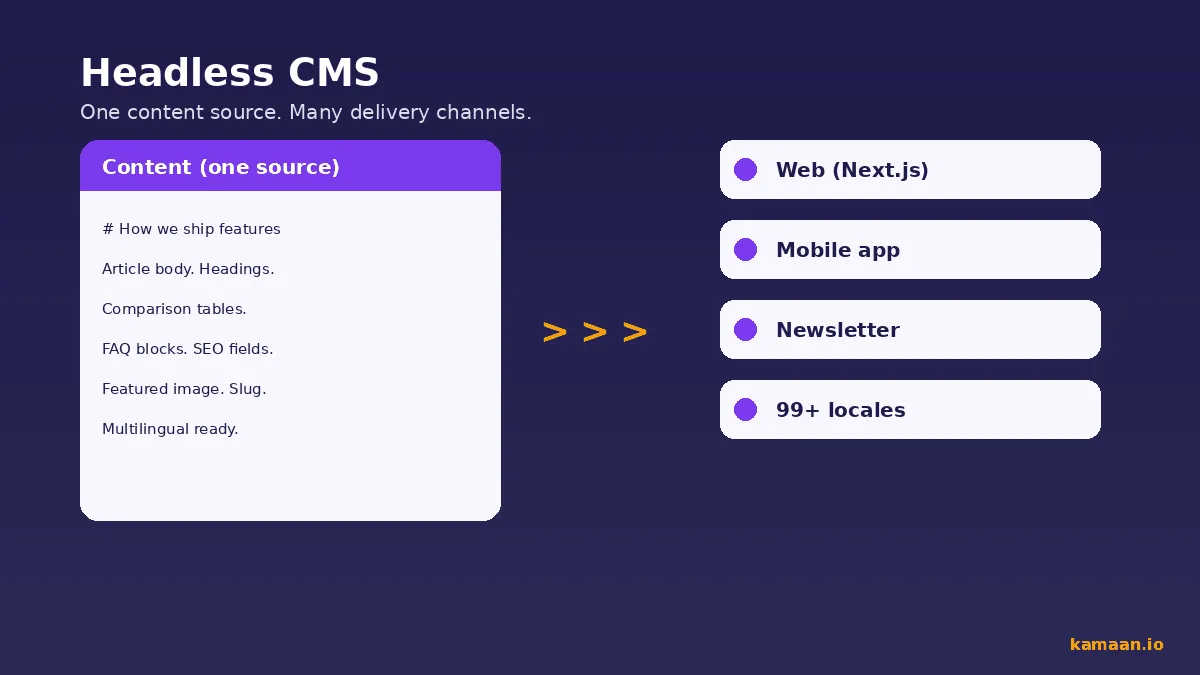
- A headless CMS stores content in a database and exposes it as a REST or GraphQL API. The front end is decoupled. You can render the same article on a Next.js site, an iOS app, an email digest, and a partner page without copying it five times.
- Contentful charges $300 per month at its first paid tier. Sanity requires schema-as-code and a developer to configure. Storyblok charges per space, which adds up fast across multiple products.
- Kamaan is a headless blog CMS that lets SaaS teams publish once and auto-deliver to 99+ languages, manage unlimited sites from one account, and write blog posts directly from Claude or ChatGPT.
- The right headless CMS pays back its monthly cost the first time you ship a multilingual article without opening a translator file.
- One Kamaan account covers unlimited sites at a flat monthly rate. No per-site fees, no per-space charges.
What a headless CMS actually is
A traditional CMS, like WordPress, bundles the content database, the editorial admin, the themes, and the front end into one application. You write a post, the same application renders it on a public URL using a theme that lives inside the same install.
A headless CMS strips the front end out. Content lives in a database and is exposed over a REST or GraphQL API. The admin UI handles writing, editing, scheduling, SEO fields, and multilingual variants. The rendering is whatever your team builds: a Next.js site, a Nuxt site, an Astro static site, an iOS app, a marketing landing page, or all of the above at once.
The label "headless" describes the missing front end. The body is the API and the admin. The head, the rendering surface, is yours to build or attach.
For a SaaS team this matters because the marketing site, the in-app help center, the partner microsite, and the blog often share content but render in different stacks. With a headless CMS the same article record can power four channels without four separate copies drifting out of sync.
Why SaaS teams care about this architecture
Three pressures push SaaS teams toward headless. The first is multilingual delivery. A B2B SaaS that sells in Europe is leaving traffic on the table if the blog is English-only. The largest opportunity for organic growth in 2026 for most niche SaaS companies is not better English content, it is the same content in German, French, Spanish, and Italian. A monolithic CMS makes that a manual chore. A modern headless CMS can automate it.
The second pressure is multi-product portfolios. Bootstrapped founders rarely run one product. They run three. A multi-site headless CMS lets you manage all three blogs from one account with one editorial workflow. Without it, each product has its own CMS account, its own invoice, and its own redundant admin overhead.
The third pressure is the AI workflow. In 2026 most SaaS founders draft blog content with Claude or ChatGPT. The friction is the last mile: copy-pasting from the chat into a CMS, adding SEO fields, scheduling. A headless CMS with an MCP Server or ChatGPT Actions endpoint closes that gap. You publish from the conversation, the article goes live, the SEO fields are set in the same call.
The Kamaan MCP Server lets you publish blog posts directly from Claude or ChatGPT. No CMS dashboard needed. These three pressures map onto Kamaan's core capabilities; you can explore Kamaan's features to see how each one is handled.
The practical mechanics of shipping a blog in five languages without hiring translators (URL structure, hreflang setup, slug localisation, and what to budget instead) live in the complete guide to building a multilingual blog.
The traditional CMS comparison
WordPress is the default reference point. WordPress in 2026 still powers a large share of the web. It is also the architecture that most makes the case for going headless. A WordPress install ships content, themes, plugins, the admin, and the front end as one bundle on one server. Multilingual support requires a paid plugin like WPML. Multi-site requires WordPress Multisite, which most teams find more painful than running separate installs. The REST API exists but is rarely the primary interface, so framework integration outside of WordPress themes is awkward.
The strength of WordPress is the editorial UI and the plugin ecosystem. The weakness is everything downstream: locked into a PHP rendering layer, paid plugins to do what a modern API would do natively, multi-site that needs DevOps attention, and a SEO setup that depends on plugin authors keeping up with Google.
Headless flips this. The editorial UI is still there. The rendering is yours. The API is the contract. You pay for the API, not for the rendering.
For a deeper side-by-side comparison with concrete 2026 pricing and the three questions that decide it, see our headless CMS vs traditional CMS guide for SaaS teams. And if WordPress is the CMS you already run, headless WordPress covers decoupling it in place.
What headless CMS tools actually cost
This is where the honest comparison breaks most marketing claims. Reading the official pricing pages of the major headless CMS players in May 2026:
| Dimension | Kamaan | Contentful | Sanity | Storyblok | WordPress |
|---|---|---|---|---|---|
| Free tier | First month free, full features | 1 locale, 25k API calls | 3 users, 10k docs, 500k API CDN | 1 free seat, additional users $9 per month | Free hosted on .com, self-host free |
| Entry paid plan | Flat monthly, unlimited sites | $300 per month, 2 locales | $15 per month, Growth tier | $99 per month, 5 seats | Plugin and hosting costs |
| Multi-site pricing | Unlimited sites included | Per space pricing on enterprise | Per project, unlimited free | Per space, each on its own plan | One install per site |
| Multilingual | Auto to 99+ languages on publish | Locales add to base price | Manual, schema-per-language | Locale and per-space cost | Paid plugin like WPML |
| REST or GraphQL API | JSON REST, no SDK needed | Both, SDK heavy | GROQ and GraphQL | Both | REST API exists, limited |
| Dev required for setup | No | No, but schema mgmt yes | Yes, schema-as-code | No | Yes for self-host |
| AI publishing | MCP Server and ChatGPT Actions | None native | Custom build | None native | Plugin required |
| Free month after trial | First month free | None | None on Growth | None | N/A |
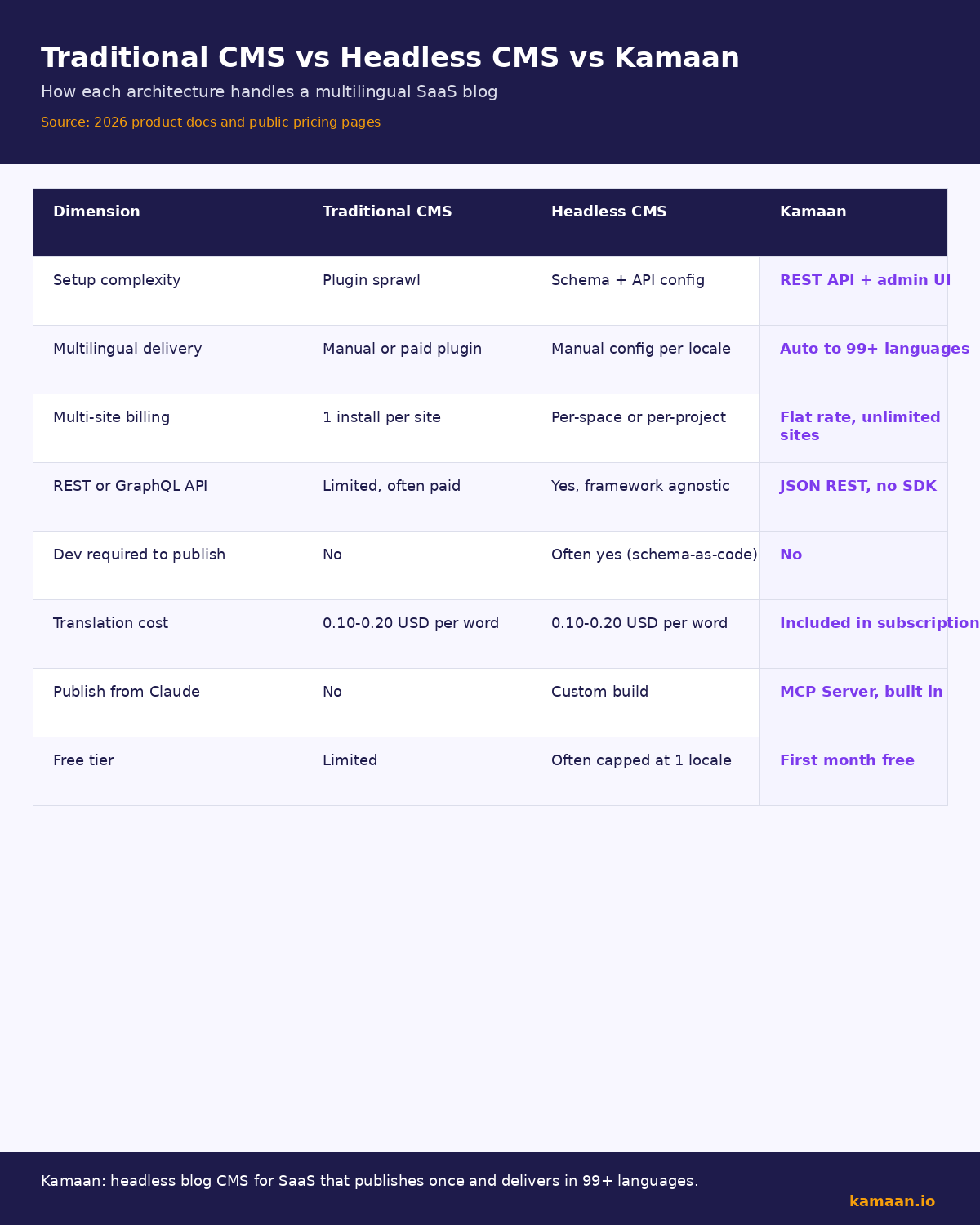
Two things stand out. First, Sanity has a generous free tier and an honest $15 per month Growth plan, which makes it the cheapest entry point if you have a developer ready to configure it. Second, Contentful jumps from free to $300 per month with no middle tier. For a small SaaS team this is the pricing cliff that drives most people to look for alternatives. Storyblok's per-space model means a three-product founder pays three times.
Kamaan's positioning is the flat-rate multi-site model. One account, unlimited sites, auto-multilingual on every publish. The first month is free. After that, annual plans only, which keeps the price honest.
The chart below visualises the same comparison with all values verbatim from the table above.
Where existing headless CMS tools fall short for SaaS
Contentful, Sanity, and Storyblok are excellent tools. They are also tools built for enterprise content operations teams, agencies, and developer-led ecommerce. A founder running a B2B SaaS blog hits friction in three predictable places.
The first is multilingual. Every major headless CMS treats locales as either a paid upgrade or a manual schema decision. Adding Spanish, German, French, and Italian to an existing English blog in Contentful means buying more locale slots, configuring the field for each content type, and either hiring translators or building a Zapier flow into DeepL. None of this is hard. All of it is overhead the founder did not budget for.
The second is multi-site. If you run two SaaS products, you are paying twice. Contentful's per-space pricing on its higher tiers, Storyblok's per-space model, and Sanity's per-project free-tier limits all assume you have one product. A multi-product founder is the wrong shape of customer for these tools.
The third is the AI workflow. The CMS dashboards that won the 2020s were built before MCP servers existed and before ChatGPT Actions had a standard contract. Adding an AI publishing flow to any of the legacy headless CMS tools means writing a custom integration. None of them ship with a Claude- or ChatGPT-native publishing path.
Kamaan's Auto-Multilingual Delivery publishes Spanish, German, French, and Italian versions of every article the moment you hit publish in English. Zero extra steps. This is the gap.
For the full side-by-side breakdown of Kamaan against Contentful, Sanity, Storyblok, Ghost, ButterCMS, and Strapi on entry-tier price and multi-site cost, the honest comparison of the best headless CMS for startups ranks the seven tools on the dimensions that matter for an indie SaaS founder.
For a breakdown of which headless benefits arrive immediately versus which take a year to compound, plus the five costs you take on, see our headless CMS benefits guide.
A practical setup walkthrough for a SaaS blog
If you are evaluating going headless for the first time, the practical setup looks like this.
- Pick the CMS. The choice usually comes down to four criteria: how much developer time you have, how many sites you need to manage, how important multilingual is, and how you want to draft content. For a founder who wants minimum dev time and built-in multilingual, Kamaan is the direct answer. For a developer-led team that wants total schema control, Sanity. For an enterprise with deep budget, Contentful.
- Connect the front end. Most modern SaaS sites use Next.js. The Kamaan REST API returns articles in standard JSON. You fetch the list at build time or on demand, render with your existing layout, and you have a blog. No SDK is required.
- Wire up the multilingual routing. The URL pattern for a translated article on Kamaan is
kamaan.io/<lang>/blog/<translated-slug>. The locale prefix sits beforeblog. Your front-end router needs to handle the prefix and pass the language code to the API call. - Set the SEO fields once. Kamaan's article record includes focus keyword, meta title, meta description, OG fields, Twitter fields, and slug. These translate automatically alongside the body.
- Decide your AI publishing flow. If you draft with Claude, connect the Kamaan MCP Server to your Claude desktop or web app. Articles get drafted, published, and SEO-set inside the conversation. If you draft with ChatGPT, the ChatGPT Actions integration does the same.
The whole setup, for a founder who already has a Next.js site running, takes under an hour. The hardest decision is which CMS you trust to be around in three years.
Real-world scenarios
A founder running a B2B SaaS invoicing tool publishes one article about a new recurring billing feature. Within ten minutes, Kamaan has auto-published Spanish, German, French, and Italian versions at /es/blog/, /de/blog/, /fr/blog/, and /it/blog/. Google indexes all five within 48 hours. The founder did not write a single word in a second language. The hreflang tags are set automatically. The slugs are localised.
A bootstrapped founder running three SaaS products publishes blog updates for all three from a single Kamaan dashboard. One account, one monthly invoice, no per-site fees. The same editorial team manages all three blogs without three separate billing portals or three separate user-permission setups. When the founder ships a new feature on product two, they draft the article in Claude, the MCP Server publishes it to the correct site, and the multilingual versions roll out the same minute.
FAQ
Is a headless CMS hard to set up for someone who is not a developer?
Not anymore. The first generation of headless CMS tools, like Strapi and early Sanity, required a developer to define content schemas as code. Modern tools like Kamaan ship with the schema for blog content already configured. You sign up, connect a front end, and start writing. The developer effort is on the rendering side, not the CMS side.
Does going headless hurt SEO?
It can if you render the blog client-side without server-side rendering or static generation. Google indexes client-rendered JavaScript more slowly than server-rendered HTML, and Core Web Vitals scores often suffer. The fix is to use a static site generator or server-side rendering. With Next.js, Nuxt, or Astro and a headless CMS, you get faster page loads and stronger Core Web Vitals than a WordPress monolith. We cover this in more depth in the headless CMS SEO write-up, and if you need valid BlogPosting structured data to go with it, you can build it with our free blog schema generator.
What does a headless CMS cost compared to WordPress?
The honest comparison: WordPress is free on a self-hosted server, but you pay in plugin licenses, hosting, security updates, and developer time. A managed headless CMS shifts that cost into a predictable monthly bill. For most SaaS teams, the total cost of ownership is similar; the headless option just removes the operational drag.
Can I publish from Claude or ChatGPT?
Yes, if your CMS supports it. Kamaan exposes an MCP Server for Claude and ChatGPT Actions for ChatGPT. Other major headless CMS tools do not ship with this built in, so you would need to build a custom integration to a tool like Zapier or n8n.
How does multilingual work on a headless CMS?
Two patterns. The first is locale-as-a-field: each article has a Spanish version, a German version, and so on, all stored as variants of the same record. The second is auto-translation: the CMS translates the article on publish and stores each language as a separate published record with its own slug and SEO fields. Kamaan uses the second pattern with 99+ languages supported. Most competitors use the first.
What is the difference between a headless CMS and a static site generator?
A static site generator like Astro or Hugo builds the front end. A headless CMS stores the content. You use them together: the CMS holds the article records, the generator fetches them at build time, and the result is a fast static site backed by an editorial UI.
Should I use a headless CMS for a one-product blog?
If multilingual matters or you plan to add other products, yes. If the blog is English-only and unlikely to grow past one site, WordPress is still a reasonable choice. The headless advantage compounds with scope.
Are headless CMS prices honest, or are there hidden fees?
There are almost always usage caps that drive overage charges. Contentful caps API calls and locales. Sanity caps documents and bandwidth. Storyblok charges per space. Kamaan's flat-rate model is the exception, and we publish the limits openly. Always read the pricing page twice.
Related on Kamaan
-
How to build a multilingual blog: a complete guide for SaaS products. The practical setup for shipping a blog in five languages without hiring translators.
-
Best headless CMS for startups: an honest comparison with pricing. Side-by-side breakdown of Kamaan, Contentful, Sanity, Storyblok, and Ghost on price and features.
-
Start free at kamaan.io. One dashboard for all your product blogs, auto-translated into 99+ languages on every publish.
-
How to add a blog to your SaaS product: a developer guide. The under-an-hour integration recipe for a headless blog inside an existing Next.js, Nuxt, SvelteKit, or Astro app, with the five-option comparison founders actually need.
-
Publish blog posts from Claude and ChatGPT: the AI-native CMS setup. How the Kamaan MCP Server and ChatGPT Actions let you skip the dashboard and ship a post in one chat message, with all four translations live the same minute.
-
Best headless CMS in 2026, ranked by use case. Once you understand what a headless CMS is, this round-up names the honest winner for seven concrete situations: multi-product founders, multilingual solo founders, AI-native workflows, editorial teams, visual marketing editors, paid newsletters, and self-hosters.
-
Headless CMS examples: 7 real SaaS products using them in production. Concrete proof of who actually runs Contentful, Sanity, and Git-based MDX at companies like PostHog, Figma, Mux, Tailscale, Intercom, Cloudflare, and Sanity itself, with the public source for every pick.
Start building with Kamaan
One dashboard for every product blog you run, auto-translated into 99+ languages on every publish
Kamaan gives you one dashboard for all your product blogs, auto-translated into 99+ languages on every publish. One account covers unlimited sites at a flat rate. The MCP Server lets you publish from Claude or ChatGPT. First month free.
