You picked Astro because the blog should be fast, static, and free of the framework weight you do not need. Then you opened the CMS market and every tool wanted schema-as-code, a billing tier per site, or a custom SDK that locks you to one platform. This is the gap. Astro pairs cleanly with any REST API: standard JSON, fetch(), and getStaticPaths() is all it really needs. The question is not which CMS has the slickest Astro plugin. The question is which CMS gives Astro a clean JSON endpoint and stays out of your way as the product grows.
Quick takeaways
- Astro's
getStaticPaths()plus a standard REST endpoint is the whole integration. No SDK lock-in, no schema config for a blog. - Kamaan publishes article content over a standard JSON REST API. Fetch it in Astro the same way you would fetch any HTTP source.
- Setup from a fresh Astro project to a live multilingual blog is 40 to 60 minutes for first-time wiring, with the CMS side at the ~14 minute mark for the first published post.
- The Auto-Multilingual Delivery turns one English post into 99+ language versions with correct hreflang, served at
/es/blog,/de/blog,/fr/blog,/it/blog. The Astro side renders them with the same dynamic route. - Kamaan is the command center for every SaaS blog you run, operated from Claude, ChatGPT, Cursor, or any MCP client. Astro stays a thin presentation layer.
Why Astro and a headless CMS belong together
Astro ships content as static HTML wherever it can, and falls back to server-rendered or live-fetched routes only when the content actually needs to update at request time. A blog is the canonical static workload: write something, render it once, serve it for years. The Content Layer API was built exactly for this case. You define a loader that pulls posts from any source, and Astro builds a route per post at compile time.
A headless blog CMS that emits standard JSON over HTTP fits this model with zero friction. You write a loader, point it at the CMS, and Astro handles routing, rendering, and SEO from there. No SDK. No schema-as-code. No proprietary query language. If the CMS goes down tomorrow, your build still works because the content was already pulled at build time.
The mistake most Astro setups make is starting with an opinionated SDK. Sanity wants you to write schemas in JavaScript. Storyblok ships a block-tree model that feels heavy for a 600-word post. Contentful charges $300 a month to unlock the content tier that matches a typical multi-product founder's volume. These tools were designed for content systems with dozens of editors and approval workflows, not for a SaaS founder who wants a blog up by Friday.
The standard fetch pattern in Astro
The pattern is the same whether you use Astro's Content Layer API or a plain fetch() inside getStaticPaths(). You ask the CMS for the article list, you build one route per slug, and you pass the article body in as props.
Here is what the route file looks like. src/pages/blog/[slug].astro:
---
export async function getStaticPaths() {
  const res = await fetch("https://api.kamaan.io/v1/sites/your-site-id/articles?language=en");
  const data = await res.json();

  return data.articles.map((article) => ({
    params: { slug: article.slug },
    props: { article },
  }));
}

const { article } = Astro.props;
---
<html lang="en">
  <head>
    <title>{article.meta_title}</title>
    <meta name="description" content={article.meta_description} />
    <link rel="canonical" href={`https://yoursite.com/blog/${article.slug}`} />
  </head>
  <body>
    <article>
      <h1>{article.title}</h1>
      <div set:html={article.content_html} />
    </article>
  </body>
</html>
That is the whole route. getStaticPaths() runs once at build, fetches the article list, and emits a route per slug. Astro renders each one to static HTML at build time. No client-side JavaScript needed for the article itself. Add the Astro Content Layer API on top if you want type-safe access, or stay with plain fetch() if you want zero abstraction.
Where existing CMS tools fall short for Astro
Three failure modes show up over and over when founders pair a CMS with Astro.
Schema-as-code is overkill for a blog. Sanity expects you to define a schema in JavaScript before you can create a single post. For a structured commerce catalog, that is correct. For a blog with a title, body, slug, and meta description, you have spent an hour configuring schemas to do what a markdown file already does. The Astro Content Layer API exists partly because the framework noticed this overhead and built a CMS-agnostic layer.
Per-space billing punishes multi-product founders. Contentful and Storyblok charge per space, which roughly maps to one space per site. A founder running three SaaS products on Astro pays for three spaces before they ever hit a paid feature. Kamaan's flat monthly rate covers unlimited sites under one account, with no per-site fee. One dashboard, one bill, every blog.
No native multilingual. Ghost has none. Sanity needs custom i18n configuration. Contentful charges per locale add-on. If you serve five language markets, that adds up to a meaningful share of the CMS bill in year one. Kamaan's Auto-Multilingual Delivery publishes a version of every article in every language on your plan the moment you hit publish in English, each at its own URL with correct hreflang. Zero extra steps.
Setting up Kamaan with Astro in under an hour
Step one: create a Kamaan account and add a site. The CMS side takes around 14 minutes from account creation to your first published article. First month is free on every plan, so you can wire the full pipeline before paying anything.
Step two: install Astro and scaffold the routes.
npm create astro@latest my-saas-blog
cd my-saas-blog
npm install
Step three: copy the getStaticPaths() pattern above into src/pages/blog/[slug].astro. Set your Kamaan site ID in an environment variable. Add src/pages/blog/index.astro to list articles.
Step four: handle multilingual routes. Astro's dynamic [lang]/blog/[slug].astro route mirrors Kamaan's URL pattern. Pull the article list with ?language=es, ?language=de, and so on. Kamaan returns translated title, content_html, meta_title, slug, and alt text for each language. Emit hreflang tags in the article head from Kamaan's translation map.
{article.translations.map((t) => (
  <link rel="alternate" hreflang={t.language} href={`https://yoursite.com/${t.language}/blog/${t.slug}`} />
))}
That is the full integration. Static build, multilingual routes, hreflang emitted server-side, content pulled from a REST API.
Comparison: Astro CMS options on the dimensions that matter
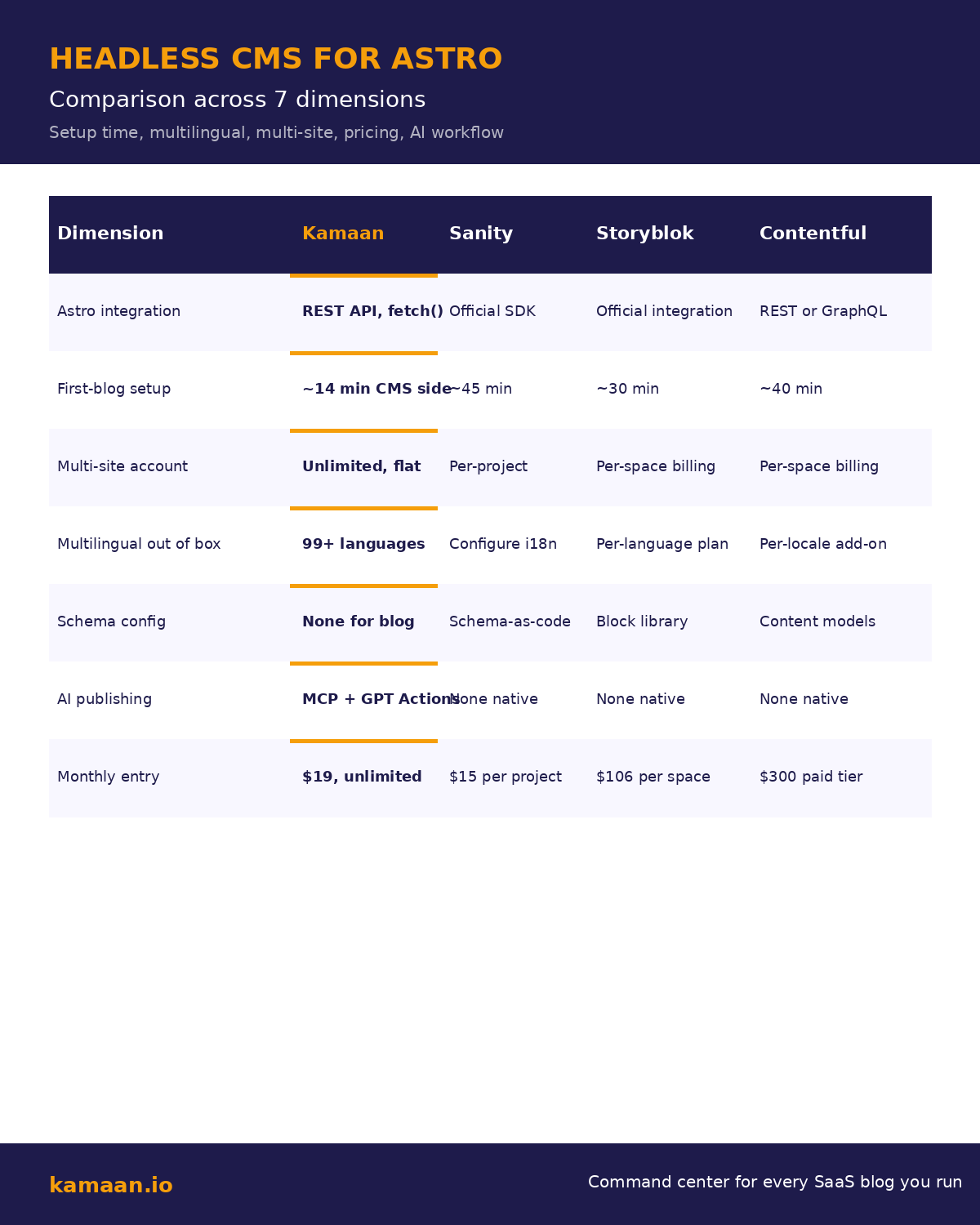
The chart below compares how the most common Astro-compatible headless CMS tools handle setup time, multi-site billing, multilingual support, schema config, AI publishing, and monthly entry pricing.
| Dimension | Kamaan | Sanity | Storyblok | Contentful |
|---|---|---|---|---|
| Astro integration | Standard REST + fetch() |
Official SDK + GROQ query language | Official Astro integration | REST or GraphQL |
| First-blog setup | ~14 min CMS side, 40-60 min full Astro wiring | ~45 min including schema config | ~30 min with the integration | ~40 min for first content model |
| Multi-site account | Unlimited sites, flat monthly rate | Per-project billing | Per-space billing | Per-space billing |
| Multilingual out of box | 99+ languages on publish | Configure i18n per schema | Per-language plan | Per-locale add-on |
| Schema config for a blog | None required | Schema-as-code | Block library setup | Content models |
| AI publishing | Kamaan MCP Server and ChatGPT Actions | None native | None native | None native |
| Monthly entry | Flat monthly rate, unlimited sites | $15 per project on paid tier | $106 per space | $300 a month at the first paid tier |
The comparison is not about who has the prettiest Astro starter template. It is about which CMS gets out of the way when you want to ship.
Real-world scenarios
A solo founder is building a developer-tools SaaS on Astro. She wants a blog up before her launch. She creates a Kamaan account, adds her site, writes her first article in the Kamaan dashboard, and hits publish. Within minutes the article is available at api.kamaan.io in JSON. She copies the getStaticPaths() pattern into her Astro project, deploys to Vercel, and the article is live at yoursite.com/blog/first-post. Total time from zero to live blog: under one hour. The article is automatically published in Spanish, German, French, and Italian at /es/blog, /de/blog, /fr/blog, /it/blog with correct hreflang. She did not write a single line of internationalization code. To let readers subscribe, she wires up an RSS endpoint for the blog with a free RSS feed generator.
A bootstrapped founder is running three Astro-built SaaS products. He needs a blog on each, but he refuses to pay three Contentful spaces. He creates one Kamaan account, adds all three sites, and uses the same getStaticPaths() route across all three Astro projects with a different site ID per project. One account covers all three blogs at one flat monthly rate. He runs the whole content operation from a Claude conversation through Kamaan's MCP Server: outline, draft, edit, publish, switch site, repeat.
Related on Kamaan
- How to add a blog to your SaaS product. The pillar guide for embedding a blog inside any framework, including Astro.
- Headless CMS Next.js integration. The same REST pattern in Next.js. Useful if you maintain both stacks.
- Headless CMS for SvelteKit. The Svelte side of the same story.
- Blog API: fetch and render any framework. One endpoint, five frontends.
- Publish from Claude and ChatGPT. The AI-native workflow that pairs with the REST API.
FAQ
Can I use Astro's Content Layer API with Kamaan?
Yes. Write a custom loader that calls https://api.kamaan.io/v1/sites/{site_id}/articles and returns the article array. The Content Layer API handles caching and type generation from there. The Kamaan REST response shape maps cleanly to Astro content entries.
Do I need to write a schema before I can create an article in Kamaan?
No. The Article CMS in Kamaan ships with title, rich-text body, slug, meta fields, featured image, scheduling, and translation support out of the box. There is no schema configuration step for a blog. If you need structured content for non-blog use cases, that is a different product category.
How does multilingual work between Kamaan and Astro?
Kamaan's Auto-Multilingual Delivery publishes a version of every article in every language on your plan the moment you hit publish in English. Each translation has its own URL at /{lang}/blog/{slug} with correct hreflang. On the Astro side, you fetch each language's article list with the ?language= query parameter and build one route per language. The same getStaticPaths() pattern works for every locale.
What does the Kamaan REST API return for an Astro build?
Each article includes title, slug, content_html, meta_title, meta_description, focus_keyword, keywords array, og_title, og_description, twitter_title, twitter_description, featured_image_url, featured_image_alt, language, published_at, updated_at, and a translations map listing every available language version of the same article with its localized slug and URL.
Will the build break if Kamaan is temporarily unreachable?
If you build with output: "static" in your Astro config, the content was pulled at build time and the deployed site keeps serving. Future builds need Kamaan to be reachable. For live content that updates at request time, use Astro's server output mode and fetch() inside the page component instead of getStaticPaths(). Kamaan supports both patterns through the same REST endpoint.
Can I publish to Kamaan from inside Claude or ChatGPT without leaving the conversation?
Yes. The Kamaan MCP Server connects Claude, Cursor, and any MCP client. The ChatGPT Actions integration does the same from ChatGPT. Run your whole content operation without a dashboard.
Is there a Kamaan plugin for Astro Studio or any Astro deployment platform?
The integration is plain REST, so no plugin is needed. Deploy your Astro site to Vercel, Netlify, Cloudflare Pages, Astro Studio, or anywhere else that runs Node at build time. Kamaan does not care where your Astro site is hosted.
How much does Kamaan cost compared to other Astro-friendly CMS tools?
Kamaan is one flat monthly rate, unlimited sites under one account, first month free. Sanity is $15 per project on the paid tier with separate i18n configuration. Storyblok is $106 per space at the first paid tier. Contentful is $300 a month at the first paid tier. Across three sites with translation, the difference is roughly 15x against Contentful and several multiples against Storyblok.
Start building with Kamaan
One dashboard, every Astro blog you run
Kamaan gives you one dashboard for all your product blogs, auto-translated into 99+ languages on every publish. One account covers unlimited sites at one flat monthly rate. The MCP Server lets you publish from Claude or ChatGPT. First month free.