

You write the draft in Claude. You polish it in ChatGPT. Then you open a third tab, paste the article into a CMS form, retype the meta description, upload an image, click publish, switch tabs again to grab the URL. Five minutes that should have been zero. Multiply by every post you ship in a quarter and that is hours of nothing. The reason this still happens is that almost no CMS has caught up with how people actually use Claude and ChatGPT to write. Kamaan's MCP Server and ChatGPT Actions let you skip the dashboard entirely and publish straight from the conversation.
Quick takeaways
- The Model Context Protocol (MCP) is a standard that lets Claude (and other MCP-aware clients) call external tools as if they were native commands. Kamaan ships an MCP Server so
Publish this draft to my Kamaan blogactually publishes it. - ChatGPT Actions are the OpenAI side of the same idea: a Custom GPT or ChatGPT agent calls your service over REST and gets back a result it can show in chat. Kamaan ships Actions so the same workflow works inside ChatGPT.
- The honest pricing: zero extra cost from Kamaan to use either integration. The MCP Server and the Actions are included.
- Auto-Multilingual Delivery runs at publish time. Whether the chat sends the article or you push from a dashboard, Spanish, German, French, and Italian go live the same minute the English version does.
- This is first-mover territory. Almost no headless CMS in 2026 has both an MCP server and a Custom GPT action set wired to the same backend. That is why founders building AI-native content workflows pick the CMS once and stop thinking about it.
What it means to publish from a chat
The shape of "publishing from a chat" is simple. The chat client (Claude or ChatGPT) holds the conversation, the user types publish this, the client calls the CMS, the CMS returns the URL. No new tab, no copy-paste, no second authentication.
What makes that simple shape possible is a contract. The chat needs to know, in a structured way, what tools the CMS exposes and how to call them. For Claude, that contract is the Model Context Protocol, a JSON-RPC-based standard that any MCP-aware client can consume. For ChatGPT, the equivalent is the Actions schema (OpenAPI 3) that a Custom GPT or built-in agent reads.
Both contracts boil down to the same thing: a list of operations (publish_article, update_seo, upload_image, translate), the JSON shape of each operation's inputs and outputs, and an auth mechanism. The chat picks the right operation from the user's natural-language instruction and fills in the JSON. The CMS does the work.
What changed in 2026 that makes this real
Three things changed at roughly the same time and turned AI-native publishing from a side project into a default.
The MCP specification stabilized. The protocol picked up enterprise auth, structured tool descriptions, and a clear capability negotiation step, which means MCP servers built today work the same way next year. The 2026 roadmap from the protocol's maintainers prioritized scalability and governance, not breaking changes, which is the signal serious tools need before they ship a server.
ChatGPT's Actions matured into a daily-driver pattern. Custom GPTs with Actions now sit in the GPT directory and run in the background of millions of conversations, calling Slack, Notion, Linear, and an expanding list of SaaS APIs. Publishing is one of the most natural fits because the chat already contains the article, the title, and usually the meta description.
The headless CMS category caught on. Most CMS products built between 2018 and 2023 assume a dashboard is where you spend time. The few built in the last two years assume the dashboard is where you go when the chat fails. Kamaan is in that second group, which is why its MCP Server and ChatGPT Actions ship as first-class features, not afterthoughts.
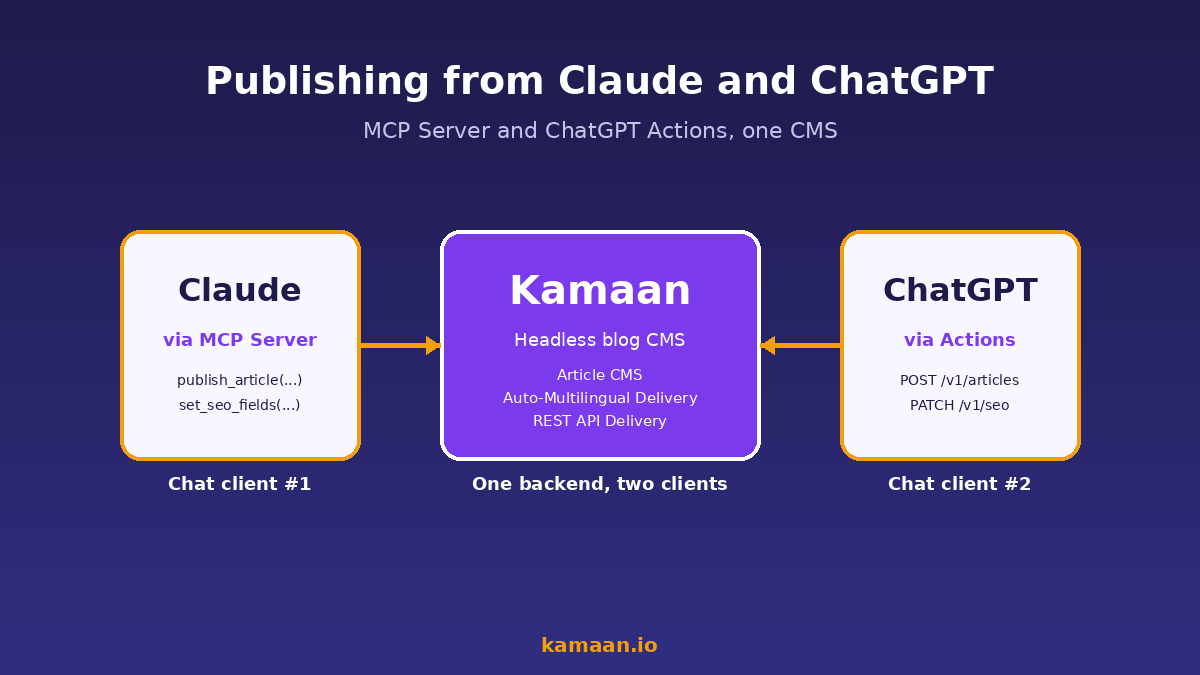
How the Kamaan MCP Server works in Claude
Kamaan's MCP Server is a small process that exposes the Article CMS over the Model Context Protocol. You connect it once inside Claude Desktop or any other MCP client (the connection is a few lines of config that lives in your local MCP settings), authenticate with your Kamaan API key, and from then on Claude knows the tools.
When you tell Claude publish this draft to my Kamaan blog under the slug headless-cms-pricing-2026, Claude reads its available MCP tools, picks publish_article, fills in the title, body, slug, meta description, and language, and sends one call. The server validates, writes to the CMS, kicks off Auto-Multilingual Delivery for the four target languages, and returns the canonical URL. Claude shows the URL in chat. You are done.
The MCP Server exposes the same surface as the REST API: publish_article, update_seo_fields, upload_image, translate_article, search_articles, read_article. You can ask Claude to find a sibling article by keyword and add a cross-link, run an audit pass on the five oldest posts, or schedule a draft for next Tuesday at 9am UTC. All of it is one operation per request, with the JSON shape spelled out in the MCP tool definitions so Claude does not guess.
How the ChatGPT Actions side works
The ChatGPT side uses an OpenAPI 3 schema. Kamaan publishes a Custom GPT (and a downloadable schema for users who want to build their own Custom GPT or call the Actions from a built-in agent) that wires the same operations into ChatGPT. The flow looks the same from the user's seat: type publish this, ChatGPT calls Kamaan, the URL comes back in chat.
The auth model is OAuth, which means there is one consent screen the first time you wire ChatGPT to Kamaan and after that the Custom GPT carries the token. Subsequent publishes are one chat message each.
What is different from MCP is that ChatGPT Actions assume each operation is independent and stateless. You cannot stream a long publish job back; you publish, the call returns, and you are done. For a blog post, that is fine because each operation finishes in well under a second. For multi-step workflows like "research, draft, publish, translate, schedule next post", you compose them in the chat by stringing operations together with natural language, which is what ChatGPT is already good at.
Four ways to publish from a chat, ranked honestly
There is more than one path here. Below is the comparison founders actually weigh when they are deciding whether to set up Kamaan's MCP Server and Actions versus muscling through with copy-paste or middleware.
| Path | Dashboard? | Steps to publish | Time per post | Translations on publish |
|---|---|---|---|---|
| Manual: write in chat, copy to CMS | Yes | 6 to 9 | 15 to 25 minutes | Manual per language |
| Zapier or Make: chat then automation then CMS | Partial | 4 to 5 | 8 to 12 minutes | Manual per language |
| Claude via Kamaan MCP Server | No | 1 chat message | Under 60 seconds | 99+ languages auto |
| ChatGPT via Kamaan Actions | No | 1 chat message | Under 60 seconds | 99+ languages auto |
The infographic below has the same comparison and the three callouts that matter most for a founder who is already shipping content from Claude or ChatGPT every week.
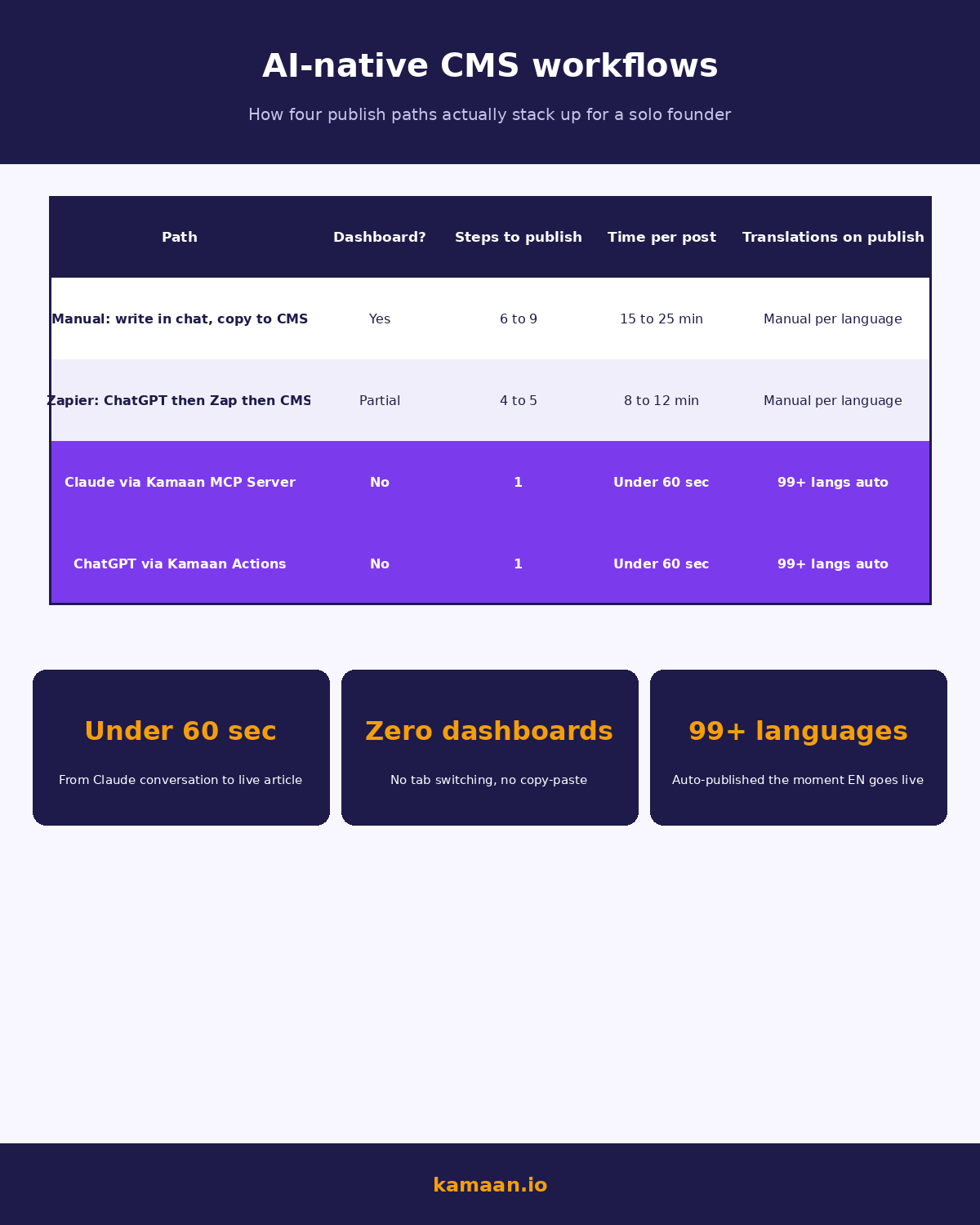
The middleware path (Zapier, Make) is a reasonable interim if your CMS does not ship MCP or Actions. It is not the long game, because every middleware hop is one more place for the workflow to break, and you still end up dropping into a dashboard to fix meta titles and slugs the formatter mangled. Native MCP and Actions remove that loop.
What you still want a dashboard for, occasionally
The chat is not the right place for every job. There are three reasons to still open the Kamaan dashboard.
The first is bulk review. Reading 20 articles in 5 languages each is faster in a list view than in a stream of chat messages. The Kamaan dashboard's article index shows status, language, last edited, and the Auto-Multilingual Delivery state per row.
The second is editing the structured fields that the chat got wrong. Most of the time the chat picks a clean slug, but if it picked something awkward and you want to override before crawlers see it, two clicks in the dashboard is faster than another round of chat.
The third is the first-time site setup. Site identifier, brand glossary, default language, image storage configuration, OAuth installs for ChatGPT and the MCP Server connection. You do that once, then leave the dashboard alone.
Step-by-step: set up Kamaan publishing inside Claude in 10 minutes
This is the path a founder actually walks the first time. Times below assume a developer or technical founder with a Kamaan account already.
- Create a Kamaan site. One form, one click. You get a site ID and a read/write API key back. The Article CMS, REST API Delivery, Auto-Multilingual Delivery, and the MCP Server are all wired up at this point. The dashboard onboarding flow walks through the brand glossary if you want translation consistency.
- Connect the MCP Server in Claude. Open Claude Desktop's MCP settings (or your MCP-aware client's equivalent), add a server entry pointing at Kamaan's MCP endpoint, paste the API key. Restart Claude. The Kamaan tools now show up in Claude's tool list.
- Ask Claude to publish a test article. Something like
publish a 200-word test article to my Kamaan blog titled Hello World with slug hello-world-test. Claude callspublish_articleonce. The URL comes back in chat. Open the URL to confirm. - Wire ChatGPT Actions. From the Kamaan dashboard, click "Connect ChatGPT". You install the Custom GPT in your ChatGPT account and approve the OAuth scopes. The same operations are now available inside ChatGPT.
- Run the same publish test from ChatGPT. Confirm the URL.
- Delete the test articles. Or leave them as drafts. Both are one-message operations from either chat client.
Total elapsed time, including waiting for restarts, is well under 15 minutes. Once it is wired, the future cost of publishing from chat is one message per article.
Where founders trip up on AI-native publishing
Three traps account for most of the wasted time we see.
The first is wiring middleware (Zapier or Make) before checking whether the CMS already has MCP or Actions support. Middleware solves the right problem but adds an integration to maintain. If the CMS already has the native path, use it.
The second is sending the chat output straight to publish without any guardrails. The honest fix is to ask the chat to set the focus keyword, the slug, and the meta description explicitly before calling publish_article. That gives the publish call the right inputs the first time. Kamaan's MCP and Action tool definitions document each field so the chat fills them; the failure mode is humans not asking for them. A saved instruction set beats remembering, and Locul publishes a free hub of search skills for Claude grouped by task and usable without an account.
The third is treating multilingual as a separate operation. With Kamaan's Auto-Multilingual Delivery, the four target languages go live the moment English does. There is no second chat command needed. Founders who came from Contentful or Sanity still type now translate it to Spanish out of habit, get back that already published, here are the URLs, and slowly retrain the muscle.
Real-world scenarios
A solo founder is researching a new blog post inside Claude while drafting it section by section. When the draft is ready, she types publish this to Kamaan under the slug saas-pricing-page-2026, set the meta description from the first paragraph, and use the default brand voice. Claude calls the Kamaan MCP Server once. Within sixty seconds the article is live at kamaan.io/blog/saas-pricing-page-2026, and Spanish, German, French, and Italian versions are live under their localized slugs. She never opened a browser tab.
A content lead at a three-product SaaS is using ChatGPT to repurpose a release-notes thread into a blog post for one of the three products. She types publish this to my Kamaan account under the second product site, headline as written, slug release-notes-v3, schedule for tomorrow 9am UTC. ChatGPT calls the Kamaan Actions once. The scheduled article appears in the Kamaan dashboard against the right site, with translations queued to publish at the same moment as the English version.
FAQ
Can I publish a blog post from Claude?
Yes. Kamaan ships an MCP Server that Claude Desktop and other MCP-aware clients connect to once. After that, asking Claude to publish an article triggers a single MCP call to the Kamaan CMS, which returns the live URL. The full operation set includes publishing, SEO updates, image uploads, translation, search, and scheduling.
Can I publish a blog post from ChatGPT?
Yes. Kamaan ships a Custom GPT and an Actions schema that ChatGPT uses to call the same operations. You install the Custom GPT once, authenticate with OAuth, and then any chat inside that GPT (or any agent that loads the schema) can publish, update SEO, or schedule from natural-language instructions.
What is the Model Context Protocol and why does it matter for a CMS?
The Model Context Protocol is an open standard that lets AI chat clients call external tools through a structured interface. For a CMS, it means the chat can execute publish, update, and search operations without a custom integration. Kamaan's MCP Server is the CMS-side implementation that exposes the Article CMS over that protocol.
Do I need to write code to use the Kamaan MCP Server or ChatGPT Actions?
No. The MCP Server is a config-only setup in Claude Desktop (paste the endpoint and the API key). The ChatGPT side is an OAuth install of the Custom GPT. Neither path requires writing code. If you want to build a custom workflow around the operations, the REST API is also available.
Does publishing from a chat skip the multilingual versions?
No. Auto-Multilingual Delivery runs at publish time regardless of the publish channel. Whether you publish from Claude, ChatGPT, or the developer REST API, the Spanish, German, French, and Italian versions go live the same minute the English version does.
What does it cost to use the MCP Server and ChatGPT Actions on Kamaan?
Nothing extra. Both are included on every Kamaan plan. First month is free, then a flat annual rate that covers unlimited sites, unlimited languages on publish, and unlimited chat-initiated operations.
Can I schedule a blog post for later from a chat?
Yes. The publish_article operation accepts a future published_at timestamp. Either chat client passes that field when you say "publish this for tomorrow at 9am UTC" or similar. The article shows up as scheduled in the Kamaan dashboard until the timestamp hits.
What happens if the chat picks a bad slug or meta description?
The publish operation returns the article record with the chosen fields. If something is off, you can ask the same chat to update it (update_seo_fields slug to something cleaner) or open the Kamaan dashboard and fix it in two clicks. The dashboard edit propagates to all translated versions on the next Auto-Multilingual Delivery pass.
Related on Kamaan
-
What Is a Headless CMS: A Plain-English Guide for SaaS Teams. The category explained without jargon, including why an API-first CMS is the right shape for AI-native publishing.
-
How to Add a Blog to Your SaaS Product: A Developer Guide. The under-an-hour integration recipe for the REST API side, useful if you want to combine chat-initiated publishing with a custom render layer.
-
Best Headless CMS for Startups: An Honest Comparison With Pricing. The honest side-by-side of the five tools small SaaS teams actually consider, with notes on which ones ship native MCP or Actions.
-
MCP Server for CMS: publish directly from Claude. The detailed breakdown of the six tools the Kamaan MCP Server exposes, what each one does, and the moment in a workflow when it fits.
Start building with Kamaan
Publish from Claude and ChatGPT, every language, every site you ship.
Kamaan gives you one dashboard for all your product blogs, auto-translated into 99+ languages on every publish. The MCP Server lets you publish from Claude. The ChatGPT Actions integration does the same from ChatGPT. One account covers unlimited sites at a flat rate. First month free.
