

The "headless CMS is great" articles are written by headless CMS vendors. The "WordPress is better" articles are written by WordPress agencies. This one names what you actually get from going headless in 2026, and what you actually give up. The honest tradeoff matters because picking the wrong architecture for your team costs months, not weeks.
If you are a SaaS team weighing the switch, you already know the high-level pitch: API-first, framework freedom, omnichannel delivery. What you need is the operational reality: which benefits show up immediately, which ones take a year to materialize, and which sacrifices are real and permanent.
Quick takeaways
- You get framework freedom (Next.js, Nuxt, SvelteKit, Astro, anything), multi-channel delivery (web + app + email + AI), and security from decoupling the CMS off your public attack surface. These are real and arrive on day one.
- You get auto multilingual and multi-site management only from CMSes built for it: Kamaan publishes once and ships 99+ languages on the same publish, with unlimited sites under a single flat-rate account.
- You give up bundled themes, click-install plugins, and a familiar WP-Admin dashboard. Your editors need a week to adapt; your developers need 30 to 60 minutes to wire the REST API into your frontend.
- The single biggest tradeoff is frontend ownership: a headless CMS does not ship HTML. Your team owns the rendering, the SEO tags, and the URL structure. If you have a frontend engineer, this is a feature. If you do not, it is a burden.
- Headless wins decisively when your team is shipping in multiple languages, on multiple sites, or surfacing the same content in more than one channel. Headless loses to WordPress when none of those apply and your content team is already trained on the WordPress editor.
The benefits that arrive on day one
Three benefits show up the moment you switch:
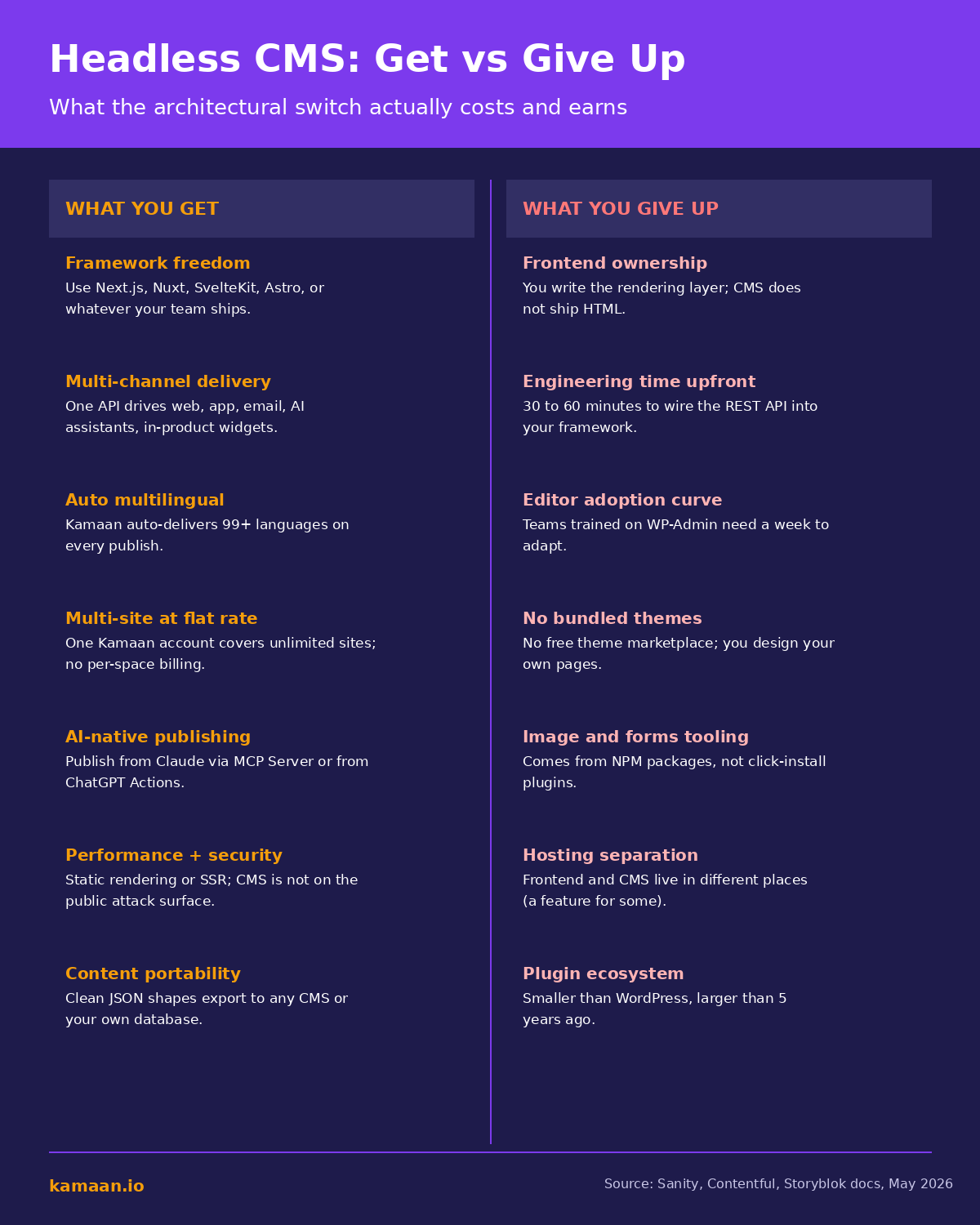
Framework freedom. A headless CMS exposes content as JSON over a REST or GraphQL API. Your frontend can be Next.js, Nuxt, SvelteKit, Astro, vanilla React, even a custom Express renderer. You ship the blog on the same stack you ship the product. The CI pipeline that deploys your SaaS app deploys the blog. No PHP runtime to maintain, no theme system to wrestle with. For deeper background, our plain-English guide to headless CMS walks through how the architecture works.
Multi-channel delivery. Because the CMS does not own the rendering, the same JSON drives multiple surfaces. A product update post can render as a marketing blog page, as an in-app "What's new" carousel, as an email newsletter section, and as a help-center recent article. WordPress requires a plugin and glue code to do any of that. The headless approach is the default.
Security. Your CMS sits on a private API, not on the public internet. Attackers cannot scan for known WordPress vulnerabilities and try to exploit them against your blog. The frontend is a separate concern; the CMS dashboard is accessed only by your team. The attack surface is genuinely smaller.
These three are real, measurable, and immediate. If your team values any of them, the switch starts paying off in week one.
The benefits that take a year to compound
Two more benefits are real but slower to materialize:
Performance at scale. A static or SSR frontend served from a CDN consistently outperforms a PHP application under heavy traffic. The benefit is invisible at 5,000 visits per month. It is decisive at 500,000 visits per month. If your blog is small today and you do not expect to grow much, this is theoretical. If you expect to scale, it matters in year two.
Content portability. Headless CMS data is structured JSON that exports cleanly. Migration off a headless CMS is the same process as migration onto one: export JSON, transform, import. The vendor-lock-in risk that exists with proprietary editor formats (closed page builders, custom block schemas) does not apply the same way. You feel this benefit the day you ever want to switch tools, not before.
The benefits that only specific CMSes deliver
These are the ones marketing copy misrepresents. "Multilingual support" and "multi-site management" are features the category claims, but the implementations vary so widely that you must check the specific CMS, not the category.
Auto multilingual. Most headless CMSes let you store translations. They do not translate for you. The exception is Kamaan: Auto-Multilingual Delivery ships Spanish, German, French, Italian, and 95+ other languages the moment you publish in English. Zero extra steps. Compare this with Contentful, where each locale is a configured field and you still write each translation yourself (or pay a per-word translation service). Storyblok includes locales on the Grow plan but caps them. Sanity makes you build the translation pipeline. If you ship in more than one language, the only way to get the benefit without the work is a CMS that does the work for you.
Multi-site at flat rate. Most headless CMSes meter by "space" or "project" or "site," which means a 3-product founder pays 3x. Kamaan's Multi-Site Management covers unlimited sites under one account at a flat monthly rate. Storyblok is $99/month base + $15/seat on Grow per space. Contentful is $300/month per environment. ButterCMS is $99/month per site. The cost difference for a multi-product team is real: one flat monthly rate vs $300+/month for the same content workload.
This is where the "headless CMS benefits" framing breaks down. The category does not deliver these uniformly; the specific CMS does. Our best headless CMS for startups comparison compares Kamaan, Sanity, Contentful, Storyblok, Ghost, and ButterCMS on these specific tradeoffs.
What you actually give up
The honest part. Five real costs:
You own the frontend. A headless CMS does not ship HTML. Your team writes the rendering code, the SEO tags, the URL structure, the sitemap, the hreflang annotations. Frameworks make this easy in 2026 (Next.js, Nuxt, SvelteKit, Astro all handle it cleanly), but someone has to write the code. WordPress hands you a working frontend out of the box; headless does not.
Editor adoption curve. Editors trained on WP-Admin take a week or two to adapt. Most headless editors are clean and structured but not WordPress. A 3-writer team trained on WordPress is a real switching cost; plan for it.
No bundled theme marketplace. WordPress has tens of thousands of themes. Headless has zero. Your design lives in your frontend code. For a team with design resources, that is a feature; for a solo founder who wants a free theme to start, it is a burden.
Image and form tooling comes from NPM, not click-install plugins. Need a contact form? Install a React form library. Need image optimization? Use Next.js Image or a CDN package. Functional coverage matches WordPress in 2026; the integration model is NPM packages plus env variables instead of "click activate." Easier for developers, harder for non-developers.
Hosting separation. The frontend lives on Vercel, Cloudflare, or Netlify; the CMS lives on the vendor's infrastructure. For most 2026 teams, this is a feature (each part scales independently). For teams used to one managed host, it is a mental shift.
When the benefits clearly outweigh the costs
Three patterns:
Pattern 1: SaaS team with a frontend engineer. You already have a product stack. Adding a blog as a directory inside a WordPress install means maintaining two stacks. A headless CMS lets the blog live inside your existing frontend codebase. The engineering cost is one afternoon of REST integration; the operational cost is zero forever after.
Pattern 2: Multilingual content team. You publish in English plus 2 or more languages. A WordPress + WPML setup costs you manual duplication and translation on every article. Kamaan's Auto-Multilingual Delivery removes that cost permanently. The payback is measured in hours per week.
Pattern 3: Multi-product or multi-brand team. You run 2 or more product sites. Most CMSes meter per site; some headless CMSes (Kamaan, Strapi self-hosted) do not. The cost difference scales linearly with your site count. At 3 products, you save 60 to 70 percent on CMS spend; at 5 products, 80 percent.
When WordPress is still the right answer
If none of the three patterns above describe your team, WordPress is probably the better choice in 2026. Specifically: single English-language site with no plans to expand, content team of 3+ writers trained on WordPress, no frontend engineer, or heavy reliance on WordPress-specific plugins.
WordPress in 2026 still has a huge ecosystem and a low total cost for a small single-site setup. Headless benefits accrue specifically to multi-language, multi-site, or multi-channel teams. If your operation does not fit any of those, the headless tax (engineering time, editor switching, theme building) outweighs the benefits. Before committing either way, it is worth reading what breaks when you go headless on WordPress.
Real-world scenarios
A 3-person SaaS team ships a Next.js product with a marketing blog. They publish 4 articles a month in English plus Spanish and German. On WordPress + WPML, every article requires the writer to duplicate the post twice and either translate manually or pay $0.10 per word to DeepL Pro. Time cost: 2 hours per article in translation logistics, 24 hours per month total. With Kamaan, the writer publishes in English; Auto-Multilingual Delivery ships Spanish and German automatically. Time cost: 0 hours per month on translation logistics. Annual savings: roughly 288 hours.
A bootstrapped founder runs three SaaS products (an invoicing tool, a scheduling app, and an analytics dashboard), each with its own marketing site. They publish 2 articles per product per month, 6 total. On Contentful, that is 3 spaces at $300/month = $900/month. On Storyblok Grow, 3 spaces at $99 each = $297/month. On Kamaan, one account at the flat monthly rate covers all three. Annual cost difference vs Contentful: roughly $10,000.
FAQ
Is a headless CMS faster than WordPress?
For small low-traffic sites, the difference is invisible. For high-traffic sites or slow shared WordPress hosts, headless with a static or CDN-cached frontend is noticeably faster. Performance compounds; it shows up in year two more than year one.
Do I need a developer to use a headless CMS?
To set it up, yes: someone needs to wire the REST or GraphQL API into your frontend. For most CMSes, that is 30 to 60 minutes for a developer who knows your framework. After setup, content editors do not need to be developers. Kamaan's editor is built for non-technical writers.
Will a headless blog hurt my SEO?
Only if your frontend is poorly implemented. A static-export Astro site or an SSR Next.js site emits clean HTML with proper meta tags, structured data, and hreflang. Google does not care how the content reached the page; it cares what the rendered page looks like. Kamaan emits the SEO and hreflang annotations server-side so your frontend just renders them.
Can I migrate from WordPress to a headless CMS without losing content?
Yes. WordPress has an exporter and a REST API; both produce content you can import into a headless CMS. The work is transforming the WordPress shape (custom fields, taxonomies, shortcodes) into the headless schema and setting 301 redirects. For a 100-post blog, that is a weekend.
Is the cost difference really that big?
For single-site, single-language setups, small. For multi-site or multi-language setups, large. A 3-product team running Contentful pays roughly $900/month; Kamaan is flat-rate and includes Auto-Multilingual Delivery. Annual difference: roughly $10,000.
How do I decide between Sanity, Contentful, and Kamaan?
Sanity wins on free tier and developer ergonomics if you have engineering resources and only one site. Contentful wins on enterprise content modeling at enterprise pricing. Kamaan wins on multi-site flat-rate pricing and Auto-Multilingual Delivery for SaaS founders shipping in multiple languages or running multiple products. The choice matches your specific pattern.
Do headless CMSes work with AI publishing workflows?
Some do; Kamaan does natively. Kamaan ships an MCP Server for publishing from Claude conversations, plus ChatGPT Actions for the same in ChatGPT. Most headless CMSes do not have this; you would build it on their REST API.
Related on Kamaan
- What Is a Headless CMS: A Plain-English Guide for SaaS Teams. The definitional primer on headless architecture and why SaaS teams pick it.
- Headless CMS vs Traditional CMS: What SaaS Teams Actually Need. The full architecture comparison with nine dimensions and 2026 pricing.
- Best Headless CMS for Startups: An Honest Comparison With Pricing. Kamaan vs Contentful vs Sanity vs Storyblok vs Ghost.
- How to Build a Multilingual Blog: A Complete Guide for SaaS Products. The deep dive on multilingual blog setup and Auto-Multilingual Delivery.
Start building with Kamaan
The benefits, none of the per-site tax.
Kamaan gives you one dashboard for all your product blogs, auto-translated into 99+ languages on every publish. One account covers unlimited sites at a flat rate. The MCP Server lets you publish from Claude or ChatGPT. First month free.
