

A SaaS blog in four languages costs between 720 and 1200 USD per 1500-word article when you go through a translation agency in 2026. Add 8 to 20 days of turnaround, five separate tools (CMS, translation memory, project manager, hreflang plugin, deploy pipeline), and a content ops person to keep slugs and meta fields in sync, and most teams give up after three articles. The manual stack is the problem, not the languages. This guide walks through what a multilingual blog actually is, the URL and hreflang decisions that determine whether Google ranks your translations, and how to skip the agency entirely.
Quick takeaways
- Manual translation runs 0.12 to 0.20 USD per word in 2026, or roughly 720 to 1200 USD per 1500-word article across four languages.
- Google recommends subdirectory URL patterns (
/de/blog/) over query strings or separate domains for consolidating link equity. - 75% of international sites have at least one hreflang implementation error, per industry audits of the top 10,000 multilingual domains.
- Kamaan's Auto-Multilingual Delivery publishes English plus 99+ target languages in the same minute, with hreflang, localised slugs, and translated SEO fields set automatically.
What a multilingual blog actually means
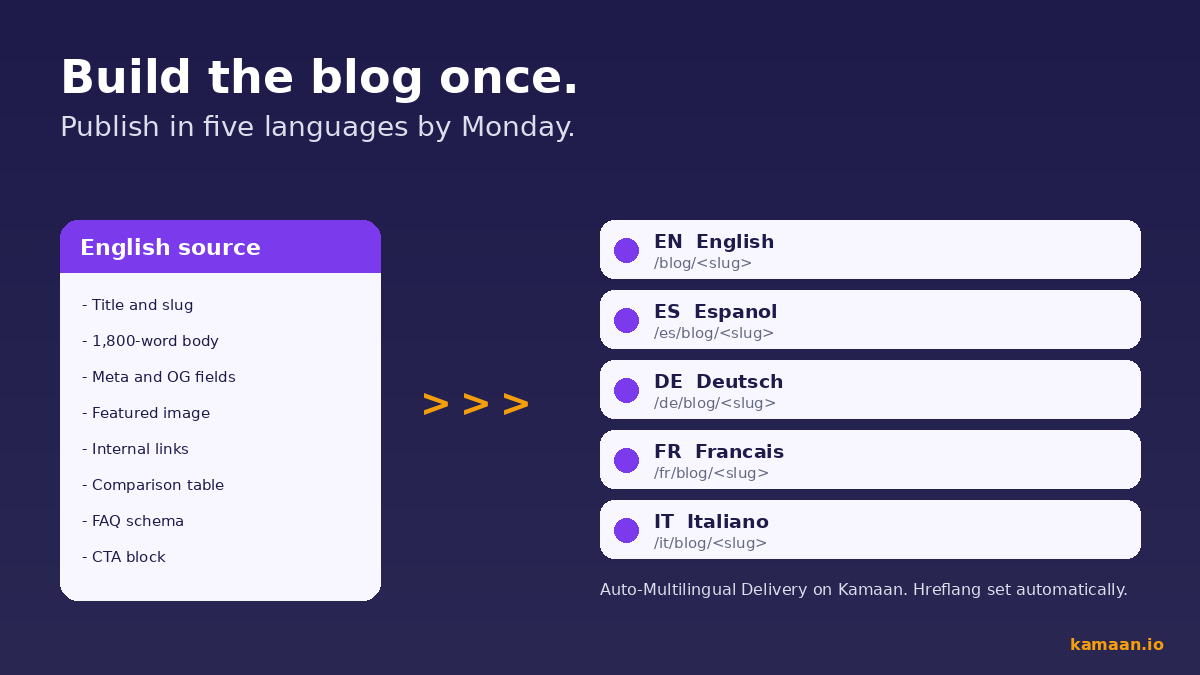
A multilingual blog is one URL tree that serves the same article in two or more languages, with three technical pieces wired correctly: URL structure, hreflang tags, and localised slugs and meta fields. The URL structure tells Google and visitors which language they are on. The most common patterns are subdirectories (example.com/de/blog/post), query parameters (example.com/blog/post?lang=de), and country-code top-level domains (example.de/blog/post). Google's official guidance recommends subdirectories for most blogs because they consolidate link equity onto one domain and are cheaper to manage than separate ccTLDs.
Hreflang tags are the second piece. Each language version of an article needs a tag pointing at every other language version, including itself. Without hreflang, Google often shows the wrong language in search results, and your translated articles compete with each other instead of ranking in their own markets.
The third piece, often skipped, is slug localisation. An article titled "How to Build a Multilingual Blog" should not live at /de/blog/how-to-build-multilingual-blog. The German version needs a German slug: /de/blog/mehrsprachigen-blog-erstellen. Translated slugs improve click-through rates on German SERPs and signal language consistency to crawlers.
Here is how those three pieces look as one architecture.
The real cost of the manual approach
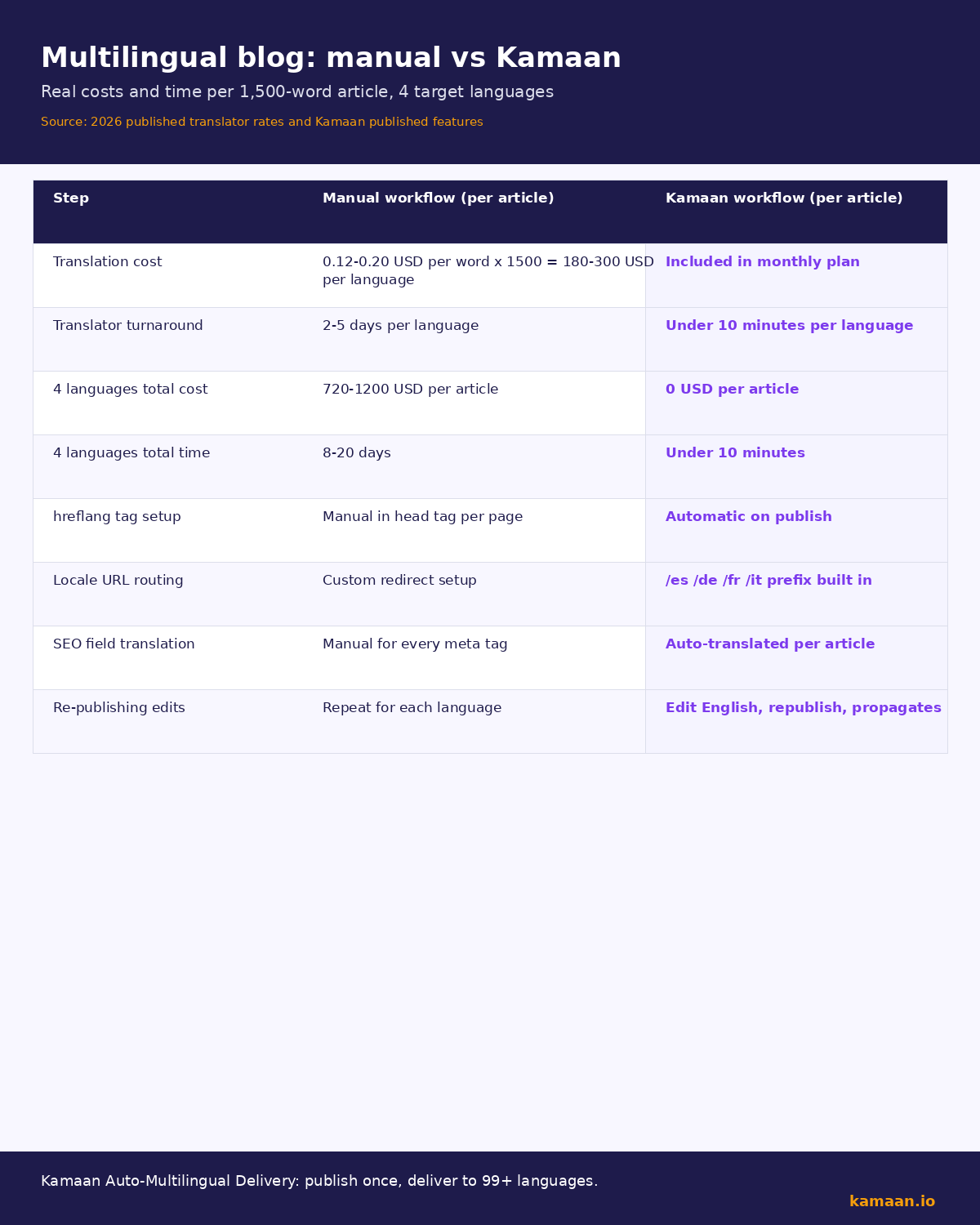
Industry rates for SaaS content translation in 2026 sit at 0.12 to 0.20 USD per word for professional human translation, per published rate cards from Smartling, Lokalise, and major freelance marketplaces. A 1500-word English article costs 180 to 300 USD to translate into one language. Four languages (es, de, fr, it) puts you at 720 to 1200 USD per article before any agency markup, project management fees, or revision cycles.
Turnaround is the second cost. A translation agency typically returns four-language deliverables in 8 to 20 business days, depending on the source article's technical density and whether you need glossary alignment. For a SaaS blog publishing weekly, that means your German readers are reading two to four week old content while your English readers see this week's news.
Tool sprawl is the third cost. A typical manual stack involves: a headless CMS for English, a translation memory tool (memoQ, Phrase), a project manager (Smartsheet, Asana), a hreflang plugin or custom code in the frontend, and a deploy pipeline that handles five locales. Each tool has a subscription, an admin, and an integration that breaks twice a year. For deeper context on choosing the CMS layer, see our guide to what a headless CMS is and when you need one.
| Step | Manual workflow | Kamaan workflow |
|---|---|---|
| Write English article (1500 words) | 4 to 6 hours | 4 to 6 hours (or via Claude/ChatGPT) |
| Order translations into 4 languages | 720 to 1200 USD, 8 to 20 days | Included, same minute |
| Localise slugs | 30 minutes per language manually | Automatic |
| Set hreflang on all 5 versions | 1 to 2 hours in CMS or code | Automatic |
| Translate meta title, description, OG fields | 4 to 8 hours across vendors | Automatic |
| Publish across all locales | Manual deploy per locale | One publish event |
URL structure decisions
Pick subdirectories. The Aleyda Solis / Sistrix audit of the top 10,000 international sites found that roughly 75% have at least one hreflang error, with the most common being missing return tags, wrong language codes (using en-uk instead of en-gb), and self-referencing tags pointing at the wrong canonical. Subdirectories make those errors easier to spot and easier to fix because everything lives under one domain, and a free hreflang tag generator can build the correct return tags for each language version before you deploy.
The recommended pattern is example.com/lang/blog/<slug>, with the locale prefix BEFORE the blog segment. This matters: /blog/de/post tells search engines you have a German section inside your blog, which is weaker than /de/blog/post which tells them you have a fully German subsite that happens to contain a blog. The second pattern lets you expand into German pricing pages, German docs, and a German homepage later without restructuring URLs.
Avoid query parameters (?lang=de). Google treats them as the same URL with a filter, which means link equity does not split cleanly between language versions and many international users distrust them as language switches. Avoid ccTLDs (example.de) unless you have a dedicated country team, legal requirements (German data residency), or an existing brand presence in that country. ccTLDs split your authority across multiple domains and triple your DNS and hosting overhead.
For a dedicated walkthrough of the three layers (URL structure, hreflang rules, translation method) and why 75 percent of international sites get hreflang wrong, see our multilingual SEO guide.
How Auto-Multilingual Delivery works
Kamaan's Auto-Multilingual Delivery flips the manual workflow. You write and publish one English article. Kamaan generates es, de, fr, it (or any of 99+ languages you have enabled) within the same minute, sets hreflang tags on every version, localises each slug into the target language, translates the meta title, meta description, OG title, OG description, and Twitter card fields, and exposes all five versions through REST API Delivery and the MCP Server.
The translation model is tuned for SaaS terminology and preserves your product names, feature names, and code blocks verbatim. Internal links in the English article are rewritten to their localised equivalents, so a link from the German article to a related German post stays in German, not English.
If you run multiple product blogs, Multi-Site Management lets one Kamaan account serve all of them under separate site IDs, each with its own brand voice profile and language configuration. Publishing a German article on Site A does not touch Site B. For context on the broader stack decision, see our roundup of the best headless CMS options for startups.
Below is the cost and time difference visualised side by side.
Common mistakes that kill multilingual SEO
Five mistakes show up in nearly every audit:
- Running an English article through Google Translate or DeepL and publishing without hreflang. Google can detect machine translation, and without hreflang the duplicate-language content competes with itself across markets.
- Keeping English slugs on translated pages (
/de/blog/how-to-build-multilingual-blog). The slug is a ranking signal and a user-trust signal. German users distrust English URLs in German search results. - Translating the body but not the meta description, OG title, or Twitter card. Social previews and SERP snippets stay in English, which kills click-through rates on non-English platforms.
- Forgetting the self-referencing hreflang tag. Every version must include a hreflang tag pointing at itself, not just at the other languages. Missing self-references are the second most common hreflang error in audits.
- Localising internal-link slugs inconsistently. If the English article links to
/blog/headless-cmsand the German version still links to/blog/headless-cmsinstead of/de/blog/headless-cms, you leak German readers into the English site and break the language tree.
Practical setup walkthrough
- Pick your URL pattern. Use
/lang/blog/<localised-slug>with the locale prefix before the blog segment. Decide your language set up front: most SaaS teams start with es, de, fr, it for European reach, then add pt-br, ja, and zh-cn for global Tier 1 markets. - Set up your CMS to expose locale-aware endpoints. If you are on Kamaan, this is built in: one site ID handles all locales through one REST API Delivery endpoint with a
?lang=parameter, or through the MCP Server which exposes each locale as a separate resource. - Wire hreflang at the frontend level. Every page rendered by your Next.js, Astro, or Remix app should output
<link rel="alternate" hreflang="<code>" href="<url>" />for every available locale, including the self-reference. Pull the locale list from Kamaan's API so adding a new language does not require a code change. - Localise internal links automatically. When rendering article body content, rewrite any
/blog/<slug>link to/<current-locale>/blog/<localised-slug>using the locale map exposed by your CMS. Kamaan's API returns this map per article. - Submit one sitemap per locale. Generate a sitemap for
/blog/,/de/blog/,/es/blog/, etc., and submit each to Google Search Console. This gives you per-locale indexing data and surfaces hreflang errors faster than waiting for the international report.
Real-world scenarios
A two-person SaaS team running a developer tools blog publishes one English article per week. They write it in Claude through Kamaan's Claude and ChatGPT publishing workflow, Kamaan auto-publishes English, then within the same minute generates es, de, fr, ja translations with localised slugs and hreflang. Their next-fortnight German traffic doubles because the German version goes live the same day as the English one, not three weeks later.
A four-person content team running three product blogs for a parent company uses Multi-Site Management to keep brand voice profiles separate. Site A is a B2B HR tool with formal German. Site B is a consumer fitness app with casual German. Each site has its own translation profile, so the same German translator-model never mixes the registers. The team's translation spend across all three blogs drops from roughly 4500 USD per month to zero, because Auto-Multilingual Delivery is included in their flat Kamaan rate.
FAQ
How many languages should a SaaS blog launch with?
Start with English plus three to five high-traffic Tier 1 languages: Spanish (es), German (de), French (fr), Italian (it), and Brazilian Portuguese (pt-br) cover most of Europe and Latin America. Adding Japanese and Simplified Chinese makes sense once you have product-market fit in those regions. Launching with 20 languages on day one creates indexing and crawl-budget problems on a low-authority domain.
Will Google penalise machine-translated blog content?
Google's spam policy distinguishes between low-quality auto-generated content and high-quality translated content. Machine translation that is reviewed, edited, or generated by a tuned LLM with industry context is treated as normal content. Raw Google Translate output on a thin site can trigger spam classifiers. Kamaan's translation pipeline uses tuned models with SaaS context and preserves feature names verbatim, which keeps output above Google's quality threshold.
Do I need a different domain for each language?
No. Subdirectories on one domain (example.com/de/) are Google's recommended pattern for most cases. ccTLDs (example.de) only make sense when you have country-specific legal requirements, a dedicated country team, or an existing local brand presence.
How do I handle hreflang for a region-specific language like Mexican Spanish?
Use the full locale code in your hreflang tag: hreflang="es-mx" for Mexican Spanish, hreflang="es-es" for Spain Spanish. If you only have one Spanish variant, use hreflang="es" and let Google route. Kamaan supports both, configured per site.
What if my English article changes after the translations are published?
Kamaan tracks the parent article ID. When you re-publish the English version, you can trigger a re-translation of the changed sections only, or leave the existing translations and add a content-update note. The MCP Server exposes both flows so you can pick per article.
How does this work with a static site generator?
Kamaan's REST API Delivery returns each locale as a JSON resource you can fetch at build time. Next.js, Astro, and Remix can all generate static pages per locale from one API call. The hreflang tags are returned alongside the article body so the build step writes them directly into the page head.
Can I edit translations after Kamaan generates them?
Yes. Each translation is an independent article in Kamaan with its own slug, body, and SEO fields. Edit it in the dashboard or through the MCP Server, and your edits persist across future re-translations of the parent.
What does this cost compared to an agency?
Kamaan's flat rate covers unlimited sites, unlimited articles, and 99+ languages with auto-translation. A typical four-language agency project for a 1500-word article runs 720 to 1200 USD per article. A SaaS team publishing two articles per week saves 5760 to 9600 USD per month at four languages, before counting tool subscriptions for translation memory and project management.
Related on Kamaan
-
Kamaan's Auto-Multilingual Delivery: publish once in English and ship 99+ languages on the same publish.
Start building with Kamaan
Skip the agency, skip the five-tool stack.
Kamaan gives you one dashboard for all your product blogs, auto-translated into 99+ languages on every publish. One account covers unlimited sites at a flat rate. The MCP Server lets you publish from Claude or ChatGPT. First month free.
