

You launched a SaaS product, added a /blog to your domain, and now the blog has its own problem: every new article needs to ship in five languages, the marketing site is on a different stack than the product, and the editor wants to schedule posts without opening a terminal. Your two real choices are a traditional CMS (WordPress, Drupal, Joomla) that owns the frontend, or a headless CMS (Kamaan, Contentful, Sanity) that hands content to your frontend over an API. The choice is not "which one is better." It is "which one matches what a SaaS team actually has to ship."
This guide compares both architectures across nine dimensions that matter for SaaS, with concrete 2026 pricing and concrete failure modes. We finish with what to pick if you are a solo founder, a multi-product team, or a venture-backed startup with a frontend engineer.
Quick takeaways
- Traditional CMS = monolithic. Backend, database, and frontend live in one PHP or Ruby application. Headless CMS = decoupled. Content lives behind a REST or GraphQL API; your frontend is whatever you want it to be.
- The honest tradeoff: traditional gives you a familiar editor and a free theme. Headless gives you framework freedom, multi-channel delivery, and built-in multilingual.
- Pricing entry points in 2026: WordPress is $30 to $80 per month including hosting and a multilingual plugin. Contentful jumps from free to $300 per month at the first paid tier. Kamaan is free for the first month, then a flat rate with unlimited sites included.
- For SaaS teams shipping in more than one language, headless wins on day one. The math stops working for traditional CMS the moment you add Polylang or WPML to a multi-site setup.
- If your team is one founder, one frontend engineer, and you sell internationally, a headless blog CMS removes more friction than it adds. If your team has zero developers and one part-time content writer, WordPress is still the pragmatic answer in 2026.
What "headless" and "traditional" actually mean
A traditional CMS owns the full stack. WordPress is the canonical example: PHP backend, MySQL database, theme system that renders HTML pages, admin dashboard for editors. When you write a post in WP-Admin, you are also writing the page that ships to readers. The same code that stores content also styles and serves it.
A headless CMS strips out the rendering half. Content is stored in a database and exposed over an API (REST, GraphQL, or both). What renders that content is up to you: a Next.js app, a Nuxt site, an Astro static export, an iOS app, an email template, even a Claude conversation pulling content over MCP. The CMS does one job: hold the content and serve it as structured JSON.
This is not a small architectural difference. It is the difference between "the blog is a directory inside your WordPress install" and "the blog is an API your product calls." For a SaaS team that already has a product stack (a Next.js app, a TypeScript backend, a CI pipeline that ships to Vercel or Cloudflare), the headless approach matches what already exists. The traditional approach forces you to maintain a second stack alongside your product.
For deeper background on what makes a CMS "headless," see our plain-English guide to headless CMS. The rest of this article assumes you already understand the basic shape and compares the two architectures on what they cost a real SaaS team.
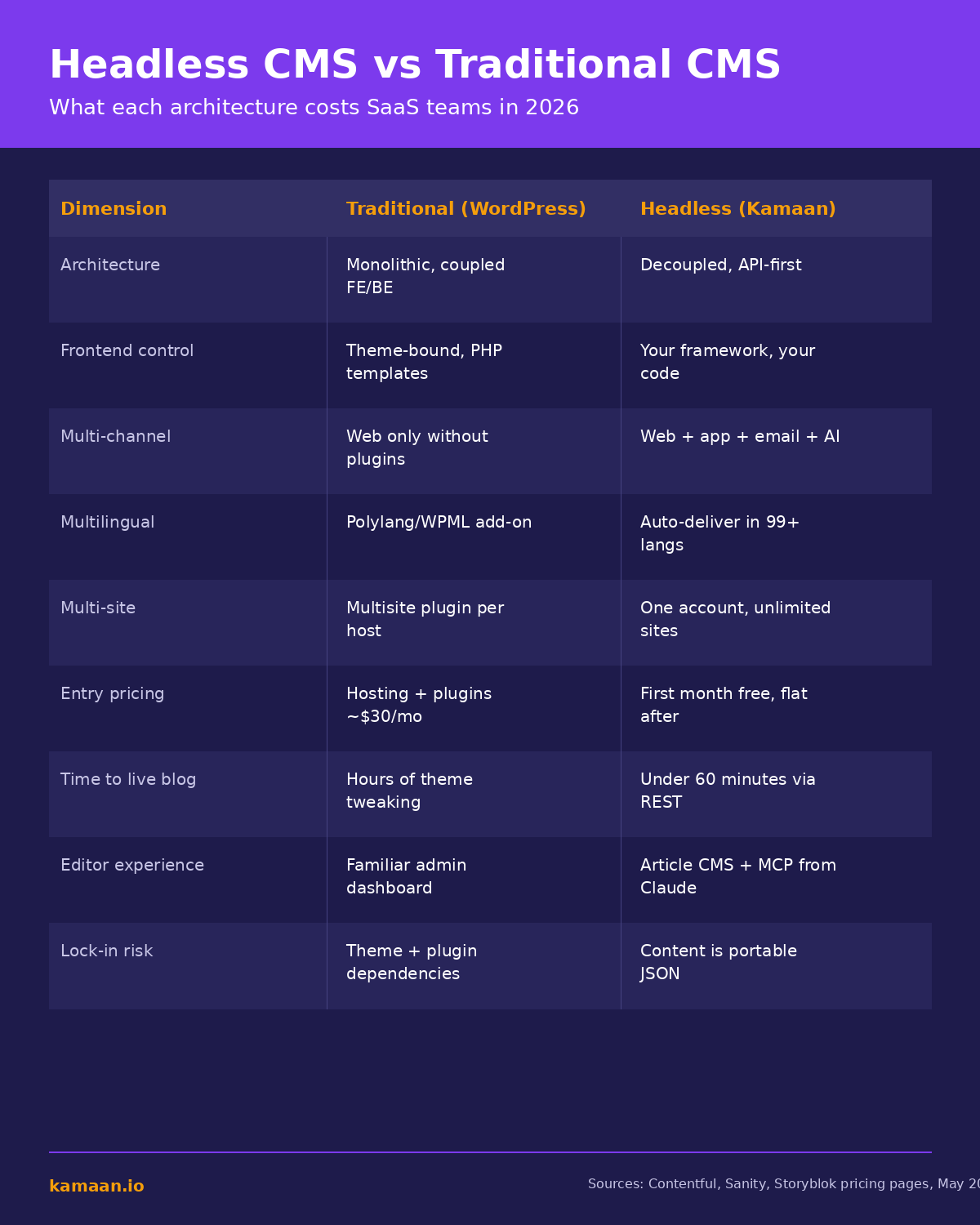
The 9-dimension comparison table
| Dimension | Traditional CMS (WordPress) | Headless CMS (Kamaan) |
|---|---|---|
| Architecture | Monolithic, frontend coupled to backend | Decoupled, API-first |
| Frontend control | Theme-bound, mostly PHP templates | Your framework: Next.js, Nuxt, SvelteKit, Astro, anything |
| Multi-channel delivery | Web only without plugins | Web, app, email, AI assistants, anywhere JSON goes |
| Multilingual support | Polylang or WPML plugin, configured per site | Auto-Multilingual Delivery, 99+ languages on publish |
| Multi-site management | WordPress Multisite plugin, single host | One account, unlimited sites, flat pricing |
| Entry pricing (2026) | Hosting ($10 to $30) plus multilingual plugin ($99 to $299/year) | First month free, then flat monthly rate covering everything |
| Time to first live blog post | 2 to 4 hours of theme setup, plugin install, hreflang config | Under 60 minutes via REST API on your existing frontend |
| Editor experience | Familiar WP-Admin, decades of training material | Article CMS plus publish-from-Claude via MCP Server |
| Lock-in risk | Theme and plugin dependencies, custom field schemas | Content is portable JSON, exports cleanly to any stack |
Three of those rows decide most SaaS bets: multilingual, multi-site, and time to first post. Everything else is preference. We will go through those three in the next section.
Why traditional CMS breaks for multilingual and multi-site SaaS
WordPress can do multilingual via Polylang ($99/year Pro) or WPML ($99 to $299/year). Both work, both have the same failure mode: the plugin does not translate; it lets you store translations. You still duplicate every post and translate manually. Publish 4 articles a month in 5 languages and you are managing 20 article-versions by hand.
Multi-site is worse. WordPress Multisite serves multiple sites from one install, but you still own one host, one PHP runtime, one update cycle. Three SaaS products = three site definitions, three Polylang configurations, and managed WordPress hosts (Kinsta, WP Engine, Pressable) bill per-site or per-visit, not flat.
A headless blog CMS built for SaaS handles both natively. Kamaan publishes once and Auto-Multilingual Delivery ships Spanish, German, French, and Italian versions immediately. Kamaan's Multi-Site Management covers unlimited sites at a flat rate; the 3-product founder pays the same as the 1-product founder.
Contentful, Sanity, and Storyblok solve multilingual but stumble on multi-site pricing. Contentful charges $300/month at the first paid tier plus per-environment fees. Storyblok is $99/month base + $15/seat on Grow and meters by space, so three products means three subscriptions. Sanity is $15 per occupied seat. The Sanity startup program (under 20 employees, under $5M funding) gives Growth free for one year.
For the deeper technical layer (URL structure, hreflang rules, translation method), our multilingual SEO guide covers the three things that decide whether translated content actually ranks. For the WordPress-specific route, see what running WordPress headless actually involves.
Where traditional CMS still wins
If your team has zero developers and one part-time content writer, WordPress is still the right tool in 2026. Massive plugin ecosystem, abundant themes, every freelancer on Upwork knows it. The dashboard is familiar, the cost is low, the risk is bounded.
Headless CMS adds engineering responsibility: you own the frontend, the rendering, the SEO tags. For a marketing-led team without developers, that is a burden. For a product team that already writes code, it is the natural fit. Also note the switching cost: content teams of 3+ writers trained on WordPress can take a year to adapt to a different editor interface.
If you want the honest tradeoff broken out further, our headless CMS benefits and tradeoffs guide names which benefits arrive on day one, which compound in year two, and the five real costs you take on.
How a SaaS team actually picks
Three real questions get you most of the way to a decision.
Question 1: Does your blog ship in more than one language? If yes, headless. Multilingual WordPress is a recurring tax on every article; Auto-Multilingual Delivery removes that tax permanently.
Question 2: How many product sites does your team operate? If three or more, headless wins on cost. One Kamaan account covers all of them at a flat rate. WordPress requires one install per site or a Multisite setup that consolidates infrastructure but not editorial workflow.
Question 3: Does your team have a frontend engineer who can spend a day wiring up a Next.js page that consumes a REST API? If yes, headless is straightforward. If no, WordPress with a managed host is the answer.
The trap is the middle case: a multi-language solo founder with no engineer. Hosted headless tools (Kamaan, ButterCMS) are designed for exactly that. Kamaan's Developer Setup Documentation walks through Next.js, Nuxt, SvelteKit, and Astro: 30 to 60 minutes one time, then never again.
Real-world scenarios
A bootstrapped founder running three SaaS products (an invoicing tool, a scheduling app, and an analytics dashboard) publishes 6 articles a month across all three blogs. The WordPress version is three WP installs, three Polylang configurations, 24 manual translations a month, and three managed-host subscriptions at roughly $80 each. The Kamaan version is one account, 6 publishes, 24 translations auto-delivered, one invoice. The founder gets back roughly 12 hours per month on translation logistics alone.
A 4-person SaaS startup ships a Next.js marketing site, an iOS app, and a customer help center. The marketing team wants blog content surfacing in all three. WordPress serves the marketing site cleanly but cannot drive the iOS app or help center without an additional REST API plugin and glue code. A headless CMS publishes once and the same JSON powers all three surfaces. The startup saves the cost of building three rendering pipelines.
FAQ
Is a headless CMS just a database with an API?
In the simplest description, yes. The differences from "a CMS in a Postgres database" are the editor experience, the SEO metadata model, the multi-language and multi-site primitives, and the API contracts. Kamaan's REST API Delivery returns content in standard JSON shapes that work the same against any framework.
Can WordPress be headless?
Yes, via its built-in REST API or WPGraphQL, with a separate framework rendering the frontend. The drawback: you keep WordPress's hosting, security, and plugin-maintenance burden AND take on the headless frontend burden. You pay both costs without getting the simplicity of either pure approach. For most SaaS teams, a purpose-built headless CMS is cleaner.
What is the price difference at small scale?
At small scale (one site, one editor, low traffic), managed WordPress + WPML lands around $30 to $50/month. Kamaan is free for month one, then a flat rate including Auto-Multilingual Delivery and unlimited sites. Contentful jumps from free to $300/month. Sanity is free under 3 seats, $15 per occupied seat after. The math shifts decisively toward headless as soon as you cross 2 languages or 2 sites.
Will Google rank a headless blog as well as a WordPress blog?
Yes, if your frontend emits clean server-rendered HTML with correct meta tags, structured data, and hreflang annotations. Google does not care how the content gets to the page; it cares what the page looks like when rendered. SSR and static frameworks (Next.js, Nuxt, SvelteKit, Astro) all qualify. Kamaan emits the SEO fields and hreflang server-side; your frontend just renders them.
How fast can I move an existing blog from WordPress to a headless CMS?
For a small blog (under 100 posts), most teams finish in a weekend: export from WordPress, import into the headless CMS, rebuild the frontend against the new API, set 301 redirects. Kamaan's Developer Setup Documentation covers the import-and-redirect pattern. For a 1000-post blog, plan a phased migration and run a translation pass at the same time, since you are touching every article anyway.
What happens if my headless CMS vendor goes out of business?
Your content is portable. Headless data is structured JSON you can export at any time, and the path off is the path on: export JSON, transform, import. The lock-in concern that exists with proprietary editor formats (closed page builders, custom blocks) does not apply the same way. Kamaan stores content in clean JSON that round-trips to any other CMS.
Do I lose the WordPress plugin ecosystem if I go headless?
You lose plugins, you gain framework packages. The Next.js, Nuxt, SvelteKit, and Astro ecosystems cover analytics, forms, comments, search, image optimization, and SEO. The integration model is NPM packages plus env variables instead of WP-Admin clicks. You do lose WP-only specifics like some membership and affiliate plugins.
Is there a hybrid approach?
Yes. Some teams keep WordPress as the editorial environment, use it headlessly via REST API or WPGraphQL, and render the frontend with Next.js or Astro. It is a real option for teams with heavy WordPress investment. For greenfield SaaS blogs, a purpose-built headless option (Kamaan, Contentful, Sanity) is usually cleaner.
Related on Kamaan
- What Is a Headless CMS: A Plain-English Guide for SaaS Teams. The definitional primer on headless architecture and why SaaS teams pick it.
- Best Headless CMS for Startups: An Honest Comparison With Pricing. Kamaan vs Contentful vs Sanity vs Storyblok vs Ghost on 8 dimensions.
- How to Add a Blog to Your SaaS Product: A Developer Guide. The implementation walkthrough for wiring a headless blog into an existing SaaS frontend.
- How to Build a Multilingual Blog: A Complete Guide for SaaS Products. The deep dive on multilingual blog setup, hreflang, and Auto-Multilingual Delivery.
Start building with Kamaan
One CMS for every product blog, every language, every framework.
Kamaan gives you one dashboard for all your product blogs, auto-translated into 99+ languages on every publish. One account covers unlimited sites at a flat rate. The MCP Server lets you publish from Claude or ChatGPT. First month free.
