

You are in a Claude conversation outlining your next blog post. You have the angle, the structure, the FAQs. Then comes the wall: open a new tab, log into the CMS, paste, format, add the meta description, set the slug, attach the featured image, hit publish. Twenty minutes of context switching to get a draft live. This is the gap a CMS MCP Server closes. The Model Context Protocol lets your AI tools talk directly to your CMS. Claude becomes the dashboard. Cursor becomes the dashboard. ChatGPT becomes the dashboard. The actual CMS interface becomes a rendering layer you visit only when you want to.
Quick takeaways
- An MCP Server is the bridge that lets Claude, Cursor, and any MCP client call your CMS as if it were a built-in tool.
- The Kamaan MCP Server exposes article creation, editing, publishing, listing, and site switching as tools. Each one is a tool call in the conversation, not a dashboard visit.
- Setup is one config block in your Claude or Cursor settings. No new SDK to learn, no custom integration to maintain.
- Multi-product founders use the MCP Server to operate every product blog from a single Claude conversation by switching site_id mid-thread.
- Kamaan is the operational layer for your whole content stack: write, edit, translate, publish, and manage across every site from Claude, ChatGPT, Cursor, or any MCP client. It is not just publishing from Claude; it is operating your whole content operation from your AI tools.
What MCP is, in three sentences
The Model Context Protocol is an open standard that lets AI applications connect to external tools and data through a small set of typed primitives: tools, resources, and prompts. A host like Claude Desktop or Cursor starts an MCP client session. That client maintains a JSON-RPC channel with an MCP server, which exposes a list of capabilities the AI can invoke. That is the entire model.
In practice, you get to skip the part where you write a custom integration for every (AI, tool) pair. Anthropic launched MCP at the end of 2024, OpenAI and Google support it, the official registry now lists thousands of servers, and every major IDE and agent platform connects through the same protocol. If shipping your own server is the next thing on the list, Locul's free skills directory collects Claude instruction files you can install without an account.
What a CMS MCP Server actually does
A CMS MCP Server takes the operations you would normally perform in a dashboard (create article, edit body, set status to published, list existing articles for context, fetch translations) and exposes them as tools the AI client can call by name with typed arguments. The conversation drives the operation. The dashboard becomes optional.
For a SaaS founder running a blog, that means: outline an article in Claude, ask Claude to call create_article, iterate on the draft inline, ask Claude to call update_article with the revised body, then ask Claude to call publish_article. The whole flow lives in one conversation. The CMS does the storage, the SEO field handling, the translation pipeline, the multi-site routing. The conversation does the writing.
The six tools the Kamaan MCP Server exposes
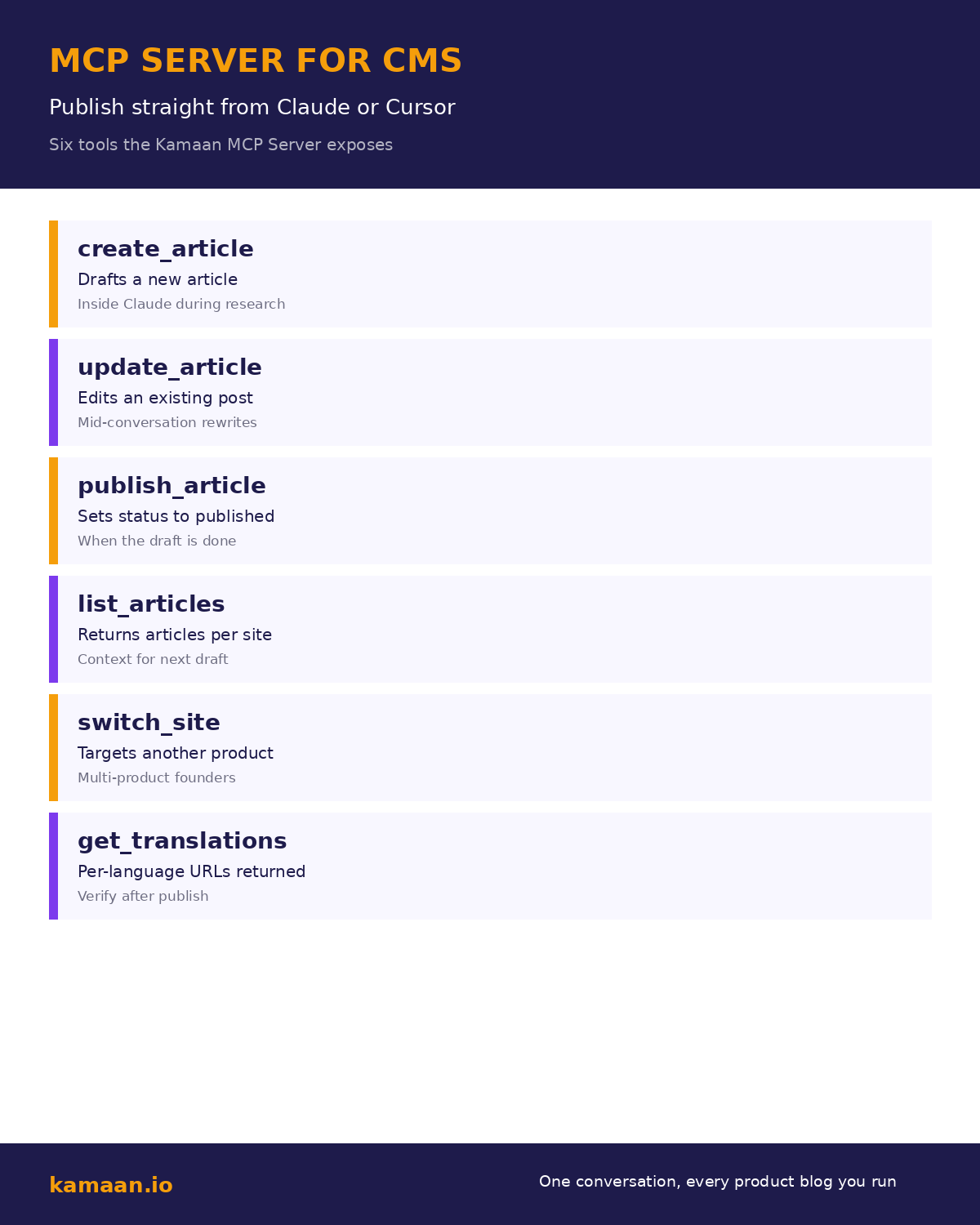
The Kamaan MCP Server ships a deliberately small toolset. Six tools cover the entire blog operation a founder needs in conversation. The infographic below shows each one with the moment in a workflow when it fits.
| Tool | What it does | When to call it |
|---|---|---|
| create_article | Drafts a new article with title, body, and metadata | After outlining in Claude |
| update_article | Edits an existing article's body or fields | During mid-conversation rewrites |
| publish_article | Sets the article status to published | When the draft is finished |
| list_articles | Returns existing articles for the active site | When you want context for the next piece |
| switch_site | Targets a different SaaS product in the same account | Multi-product founders mid-thread |
| get_translations | Returns the per-language URLs after a publish | When verifying that Auto-Multilingual Delivery shipped |
That is the whole toolset for now. The deliberate scope matters: every tool maps to a single conversation gesture. There is no configure_advanced_workflow because there is no workflow to configure; the conversation is the workflow.
Why this beats a dashboard
Three frictions disappear when the CMS shows up as MCP tools inside your AI client.
Context switching is gone. You stop tabbing out of Claude to paste a draft, then tabbing back to keep writing. The article lives in the conversation. The dashboard is one of the panes you no longer open.
Multi-site management is one parameter. A solo founder running three SaaS products on three blogs used to open three dashboards, copy three sets of credentials, and remember which tab was which. With the Kamaan MCP Server, the active site is a switch_site call. Same conversation, different blog.
Multilingual stays automatic. When publish_article returns, Auto-Multilingual Delivery has already started the translation pipeline. By the time the conversation moves to the next article, the Spanish, German, French, and Italian versions are live at their own URLs with correct hreflang. get_translations returns the URLs so you can drop them into the verification step of the same conversation.
Setting up the Kamaan MCP Server in Claude or Cursor
The setup is one configuration block. For Claude Desktop, edit ~/Library/Application Support/Claude/claude_desktop_config.json (macOS) or the Windows equivalent. Add the Kamaan MCP Server block:
{
  "mcpServers": {
    "kamaan": {
      "command": "npx",
      "args": ["-y", "@kamaan/mcp-server"],
      "env": {
        "KAMAAN_API_KEY": "your-api-key-here",
        "KAMAAN_DEFAULT_SITE_ID": "your-default-site-id"
      }
    }
  }
}
Restart Claude Desktop. The Kamaan tools appear in the tool list inside any conversation. Call them by asking Claude in natural language: "Create a draft titled X with the body I just wrote," "Publish that article," "Switch to my second product's site."
For Cursor, the same JSON block goes into the Cursor MCP settings. For Claude Code, it goes into your project's .mcp.json. For ChatGPT, the equivalent setup uses ChatGPT Actions and the same API surface.
Real-world scenarios
A solo SaaS founder is outlining a launch announcement in a Claude conversation. She asks Claude to draft the article, then iterates on the body for ten minutes. When she is happy, she asks Claude to call create_article and publish_article against her primary site. The article goes live at yoursite.com/blog/launch-announcement. Within minutes the Spanish, German, French, and Italian versions are live at their respective URLs. She calls get_translations to verify, drops the four URLs into her newsletter draft, and never opens the Kamaan dashboard.
A multi-product founder runs three SaaS products on three separate Kamaan sites. He is in Cursor working on product A's documentation, decides the new feature deserves a blog post, asks Cursor to draft it using the MCP Server. Once published, he asks Cursor to switch_site to product B and draft a cross-promotion post there. Two blogs updated, two conversations, zero dashboards. The total operation takes the time of writing the articles, with no overhead from the publishing step.
What is not in the MCP Server (yet)
Three operations stay in the dashboard for now: site creation, plan and billing management, and bulk content import. The first is a one-time setup. The second is an operational concern that should not live in a content conversation. The third is a migration tool that benefits from a visual progress indicator. Everything else, the day-to-day operation, moves into the conversation.
If you operate out of ChatGPT instead of Claude or Cursor, the OpenAI-side mirror of this setup is documented in ChatGPT Actions for blog publishing: same Kamaan backend, custom GPT with an OpenAPI schema in place of an MCP server.
Related on Kamaan
-
Publish blog posts from Claude and ChatGPT. The parent pillar that frames the AI-native CMS workflow this MCP Server enables.
-
How to add a blog to your SaaS product. The developer guide for embedding the rendered blog in your frontend.
-
Multi-site CMS: one account, multiple domains. How the multi-site pricing model makes operating every product blog from one conversation financially viable.
-
What is a headless CMS. The category definition for readers new to the concept.
-
Headless CMS Next.js integration. The render-side pattern that turns the published content into a live blog.
-
How to use Claude to write and publish a blog post in one conversation. The full six-step walkthrough of running the entire flow from a single Claude chat.
-
AI content workflow for SaaS blogs: from outline to published in one session. The connected six-step flow that turns one Claude or ChatGPT chat into a live multilingual blog post.
FAQ
What is MCP?
The Model Context Protocol is an open standard from Anthropic, supported by major AI clients including Claude, Cursor, ChatGPT, and the leading IDE integrations. It defines a small client-server contract for AI applications to invoke external tools. An MCP Server exposes a list of typed tools. An MCP client lets the AI call them.
How is the Kamaan MCP Server different from the REST API?
The REST API is for your frontend to fetch content. The MCP Server is for your AI client to write and publish content. Same product, two surfaces. The MCP Server is built on top of the same authentication and data model as the REST API.
Can I use this with Cursor and ChatGPT, not just Claude?
Yes. MCP is an open protocol with broad client support. The same Kamaan MCP Server runs against Claude Desktop, Cursor, Claude Code, and any other MCP-compatible client. For ChatGPT specifically, the ChatGPT Actions integration provides the same surface through OpenAI's tool-use mechanism.
Do I need to write any code to use the MCP Server?
No. The server runs through npx with one configuration block. You add the block to your Claude or Cursor config and restart the app. There is no SDK to install, no integration code to maintain, and no custom adapter to write.
How do I authenticate?
A single API key per account. The key sits in the env block of your MCP configuration. It is scoped to your account and all the sites within it. Site switching happens through tool calls, not through separate credentials.
Can I publish to multiple sites from one conversation?
Yes. That is the Multi-Site Management feature surfacing through MCP. Call switch_site with a different site_id, then call create_article or publish_article against the new active site. The conversation context stays the same; only the publishing target changes.
What happens if the MCP Server is offline?
Your published content keeps serving from the Kamaan REST API and CDN regardless of the MCP Server status. The MCP Server only affects the publishing side. If it is offline, you fall back to the dashboard for that session. Published content is unaffected.
Does the MCP Server handle translations?
Indirectly. The publish_article tool triggers Auto-Multilingual Delivery on the server side, which generates and publishes 99+ language versions at their own URLs with correct hreflang. The get_translations tool returns those URLs so you can confirm the multilingual publish from inside the same conversation.
Start building with Kamaan
One conversation, every product blog you run
Kamaan gives you one dashboard for all your product blogs, auto-translated into 99+ languages on every publish. One account covers unlimited sites at one flat monthly rate. The MCP Server lets you publish from Claude or ChatGPT. First month free.

