

You publish a new article in English on Monday. By Friday, you've copy-pasted it through DeepL into Spanish, German, French, and Italian, fixed five formatting bugs in the WordPress editor, and forgotten to update the hreflang tags on the Spanish version. Auto-translation was supposed to save the week. Instead, it ate three afternoons.
The promise of "auto-translate your blog" is older than headless CMS. The execution is what keeps breaking. Plugins translate strings but not structure. Subscription tools price per word and punish growth. Manual paste-into-DeepL works until your second article. None of these solve what a SaaS founder actually needs: one publish, every language live, every hreflang correct, no separate invoice.
This article walks through where each common approach breaks, what the real costs look like at 50 articles a year, and how Kamaan's Auto-Multilingual Delivery handles the same job inside the CMS.
Quick takeaways
- Weglot's Pro plan is $87 a month for 200,000 translated words across 5 languages. A 50-article-a-year blog at 1,800 words per article in 4 target languages burns 360,000 words, well over that ceiling.
- DeepL API runs $5.49 a month plus $25 per million characters: roughly $60 a year for the same workload, plus 20 to 40 hours of developer time to wire it into your CMS.
- Manual paste-into-DeepL is the silent killer: 18 to 25 minutes per article per language, which is 60 to 83 hours of founder time annually plus the hreflang errors no one catches.
- Kamaan's Auto-Multilingual Delivery publishes every article in every language on your plan the moment you hit publish in English, each at its own URL with correct hreflang. One account covers unlimited sites at one flat monthly rate. First month free.
- Kamaan is the command center for multi-product founders and agencies who run many SaaS blogs: manage every blog from one dashboard, and run every operation across all of them from Claude, ChatGPT, Cursor, or any MCP client.
What "auto-translate blog posts" actually has to do
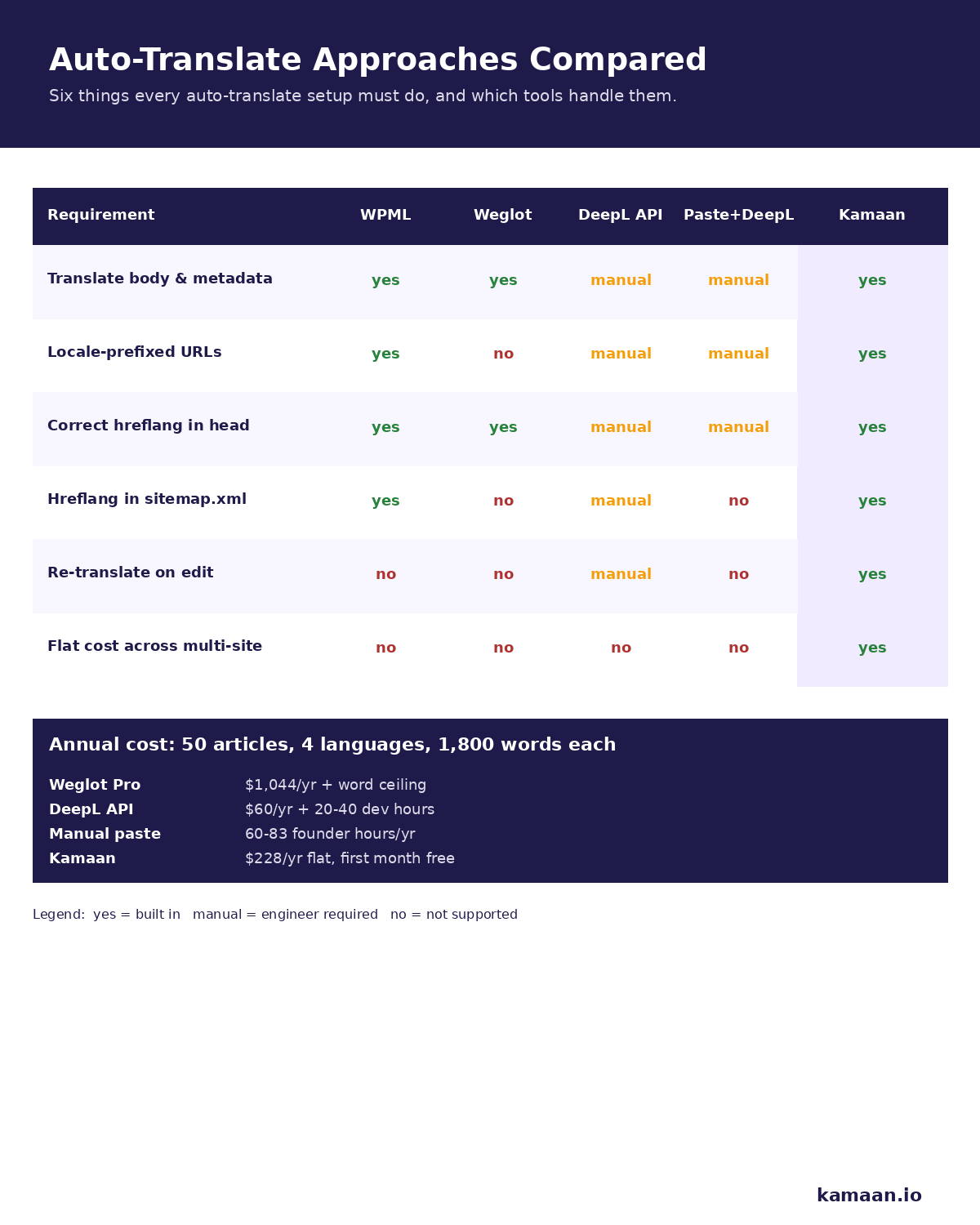
Translation is the obvious part. It is also the smallest part of the problem. A working auto-translate setup has to do six things every time a post goes live:
- Translate the article body, preserving markdown, code blocks, and links.
- Translate metadata: title, meta description, og fields, image alt text, slug.
- Create one URL per language at a stable pattern Google can index.
- Emit correct hreflang tags pointing every language version at every other.
- Update the sitemap.xml so each new translated URL is discoverable.
- Re-run the same pipeline every time the English version changes.
Most tools handle step 1 and stop there. Founders find out at step 4 or 5, usually when Search Console flags the hreflang errors three months later.
The plugin path: WPML, Polylang, and similar WordPress-shaped solutions
The plugin route works if you run WordPress and only WordPress. WPML and Polylang translate posts inside the WordPress database, generate language-prefixed URLs, and handle hreflang at the theme level. They also bind you to WordPress.
The breakage starts when the headless question comes up. If you serve your blog from a Next.js or Astro frontend through WP-REST, the language switching logic lives in places the headless frontend cannot reach without custom adapters. The plugin path is fine for a brochure site. For a SaaS product with a marketing blog that should match the product's frontend stack, it imposes architectural decisions that conflict with how the rest of the product is built.
Why Weglot's per-word pricing breaks small SaaS budgets
Weglot is the cleanest off-the-shelf translation product for a non-developer. Drop in a script tag, pick languages, get a translated frontend. The pricing wall arrives quickly.
The Pro plan at $87 a month covers 200,000 translated words across 5 languages. A 1,800-word article translated into 4 languages consumes 7,200 words from that quota. At 50 articles a year, you burn 360,000 words. That's $87 a month with hard overages, or a step up to higher tiers that close in on $300 a month. The Free plan caps at 2,000 words in one language. The Starter tier at $17 a month gives you 10,000 words in one language, which is roughly two articles of a four-language blog.
There's a second issue Weglot users discover slowly: the translated copy lives on Weglot's CDN and is layered onto the original page client-side. Google indexes it, but the translated URLs are served from a Weglot subdomain or path. You don't own the rendered HTML the way you do with server-side language routes. For a SaaS company that wants the blog to be part of the product's domain authority, that matters.
Why DeepL plus manual paste breaks at scale
DeepL's API is the developer's preferred translation engine. Quality is genuinely better than Google Translate for European languages, and the pricing is honest: $5.49 a month base plus $25 per million characters. A 1,800-word article is about 12,000 characters in English. Four languages and 50 articles a year give 2.4 million characters annually, or about $60 a year in DeepL fees.
That number is real. It's also incomplete. To actually use the DeepL API, somebody has to build a worker that picks up new posts, pass each post body through DeepL preserving markdown, translate the title and meta fields separately, write each translation back to the CMS with the right language code, emit hreflang tags in the frontend that point every language at every other, and update the sitemap.xml. A developer can build this in 2 to 4 days and maintain it forever. Most SaaS founders do not have that developer to spare.
The manual paste-into-DeepL workflow is what most teams default to. Publish in English, open DeepL, paste, copy, open the CMS, paste, fix the heading levels DeepL stripped, fix the links DeepL ate, re-upload the inline images, set the language tag, save, repeat. A small audit puts per-article overhead at 18 to 25 minutes per language. Across 4 languages and 50 articles a year, that's 60 to 83 hours of founder time annually. The bigger cost is the half-broken state of the translated articles: missed hreflang on five posts, two articles where the Spanish slug includes accented characters that break URL routing, one set of og:image tags pointing at the English version's CDN URL.
Three failures that show up in every approach
Hreflang drift. Every time the English article changes, the language versions have to be re-translated or at least marked as out-of-date. Almost no setup does this automatically. Google sees inconsistent versions and may stop ranking the translated copies.
Slug breakage. Translated titles produce translated slugs, and translated slugs often include diacritics or punctuation that break clean URL routing. A Spanish version with /como-anadir-blog/ is fine. A Spanish version with /cómo-añadir-blog/ may break in some CDNs, frameworks, or analytics tools.
Sitemap silence. Sitemap.xml needs to list every translated URL with the right hreflang annotation. WPML does this. Most other approaches do not. Without it, translated articles are still indexable but discoverability is lower.
Getting past those failures is a localization problem rather than a translation one, which our guide to how to localize blog content covers step by step.
What Kamaan's Auto-Multilingual Delivery does instead
Kamaan handles auto-translate as a property of the CMS, not as an add-on. The Auto-Multilingual Delivery feature publishes a version of every article in every language on your plan the moment you hit publish in English, each at its own URL with correct hreflang. Here is what that looks like:
- You write the article in English in Kamaan's Article CMS, or push it in through the MCP Server from Claude, ChatGPT, Cursor, or any MCP client.
- On publish, Kamaan generates the translated body, title, meta description, og fields, image alt text, and slug for every target language on your plan.
- Each translation goes live at the locale-prefixed URL pattern: /es/blog/slug, /de/blog/slug, /fr/blog/slug, /it/blog/slug.
- The hreflang tags on every version point at every other version automatically.
- The sitemap.xml updates to include the new URLs.
- Edit the English version later and the translations re-flow on the next save.
AI credits apply only if you have Kamaan run the translations. If you provide translations from Claude, ChatGPT, or your own LLM, no AI credits are consumed. That detail matters for founders who already pay for LLM access and want to bring their own translator. The pricing model is supporting proof: one Kamaan account covers your blogs at one flat monthly rate, no per-site fees, first month free. The lead reason to use it is the operating model.
Two real workflows
A bootstrapped founder runs a B2B SaaS product and publishes one blog article a week. They sit in Cursor, draft the article using Claude against the Kamaan MCP Server, and hit publish from the same chat. The article goes live in English at kamaan.io/blog/slug and is auto-delivered in Spanish, German, French, and Italian at the locale-prefixed URLs. The founder did not open a dashboard, paste anything into DeepL, or edit hreflang by hand.
An agency runs three client SaaS blogs from one Kamaan account. Each client has 4 target languages. The operator publishes weekly across all three, switching between sites in the dashboard or running everything through one MCP-driven Claude session. Three blogs, twelve translated versions per week, one monthly invoice, no per-site billing.
FAQ
Can I auto-translate my existing WordPress blog?
You can with WPML or Polylang inside WordPress, or with Weglot layered on top. None of these give you a headless CMS architecture or a flat-rate cost across multiple sites. If you plan to keep the blog on WordPress, the plugin route is the path of least resistance. If you're going headless, an integrated CMS like Kamaan is the cleaner option.
Does Google penalize machine-translated content?
Google has clarified its position several times: machine-translated content is acceptable when it is reviewed and useful to readers. The penalty target is low-effort translated spam at scale. A well-tuned auto-translate setup with human review of high-traffic articles ranks fine.
How do hreflang tags actually work?
Hreflang tags tell Google which language version of a URL to show to which audience. Every language version of an article points at every other language version, including itself. Most auto-translate setups get the head tags right and forget the sitemap entries, so it helps to validate your markup with a free hreflang tag generator.
Is DeepL better than Google Translate for blog content?
For European languages, yes, in most third-party comparisons. DeepL preserves tone better in Spanish, German, French, and Italian. Google Translate has wider language coverage at lower cost. For a SaaS blog targeting the four DeepL languages, DeepL produces tighter copy out of the box.
How much does it really cost to translate 50 articles into 4 languages annually?
Weglot Pro is $1,044 a year and bumps into the word ceiling around 27 articles. DeepL API plus a developer to maintain the pipeline runs $60 a year in API fees plus 20 to 40 hours of developer time. Manual paste-into-DeepL is free in dollars and 60 to 83 hours in founder time, plus the cost of the missed hreflang errors. Kamaan is one flat monthly rate with translations auto-delivered on publish, first month free.
What happens when I update the English article later?
The translations re-flow automatically. Kamaan re-translates on the next save. Most other approaches require you to manually mark each translation as out-of-date and re-translate, which is one of the biggest sources of hreflang drift in real-world setups.
Related on Kamaan
- How to Build a Multilingual Blog: A Complete Guide for SaaS Products. The full setup guide for a multi-language blog: architecture, URL structure, hreflang, sitemap, and content workflow.
- Multilingual SEO: What It Is, Why It Matters, and How to Get It Right. The SEO side: ccTLD vs subdomain vs subfolder, hreflang specifics, and how to rank in non-English markets.
- Hreflang Tags Explained: The Right Way to Set Them Up for a Blog. Code-level walk-through of hreflang in head, in sitemap.xml, and in HTTP headers.
- What Is a Headless CMS: A Plain-English Guide for SaaS Teams. The definitional anchor for the headless CMS category.
Start building with Kamaan
99+ languages on every publish, with hreflang, sitemap, and slugs handled for you
Kamaan gives you one dashboard for all your product blogs, auto-translated into 99+ languages on every publish. One account covers unlimited sites at one flat monthly rate. The MCP Server lets you publish from Claude or ChatGPT. First month free.
