

Your hreflang implementation is probably broken. The error usually does not surface in your traffic dashboard. It surfaces months later when the Spanish version of an article ranks number 4 in Spain, the German version does not appear at all in Germany, and the French version somehow ranks for English queries in Canada. The fix is rarely a code change. It is almost always a structural misunderstanding of what hreflang is, where it goes, and which validation rule got broken.
This guide shows you the three places hreflang can live (HTML head, XML sitemap, HTTP headers), the rules Google actually enforces, the five mistakes that cause most ranking failures, and what Kamaan's Auto-Multilingual Delivery emits automatically so you do not have to think about any of this.
Quick takeaways
- Hreflang is a relationship signal, not a ranking signal. It tells Google which version to show in which market. It does not move you up the SERP.
- Three implementation methods exist: HTML link tags in
<head>, XML sitemapxhtml:linkannotations, and HTTPLinkheaders. Pick one and stick with it. Mixing them is the single most common source of validation errors. - Every hreflang annotation must be reciprocal. Page A points to Page B, Page B points to Page A. Miss this and Google ignores both annotations silently.
- The
x-defaultvalue tells Google what to serve when no language version matches. Without it, Google guesses. - Hreflang URLs must return HTTP 200. A 301 redirect or a 404 breaks the entire annotation cluster, not just the broken page.
What hreflang actually does (and what it does not)
Hreflang is a tag that tells search engines: "this page exists in another language or region at this URL." That is the entire scope. It does not tell Google a page is more important. It does not boost rankings. It does not replace a sitemap. It does not substitute for translated content.
What hreflang does do is solve a specific problem: when Google has crawled five language versions of the same article, which one should it surface for a search in Madrid versus Berlin versus Lyon? Without hreflang, Google guesses based on signals like the page's content language, the user's IP, and the domain TLD. With hreflang, Google has a definitive map.
The mechanism is a relationship declaration. Each page in a language cluster references every other page in the cluster, including itself. If your blog has English, Spanish, German, French, and Italian versions of an article, every one of those five pages declares all five URLs with their language codes.
The format is precise. Language codes follow ISO 639-1 (two letters, lowercase): en, es, de, fr, it. Region codes are optional and follow ISO 3166-1 Alpha 2 (two letters, uppercase): en-US, en-GB, es-MX, es-ES. You combine them with a hyphen: en-US, de-AT, fr-CA. There is no three-letter code support. There is no underscore separator. There is no nesting.
The three implementation methods compared
You can put hreflang annotations in one of three places. The right choice depends on how many languages you serve and whether you control the server response.
The chart below maps the tradeoffs of each approach so you can pick the right one for your blog.
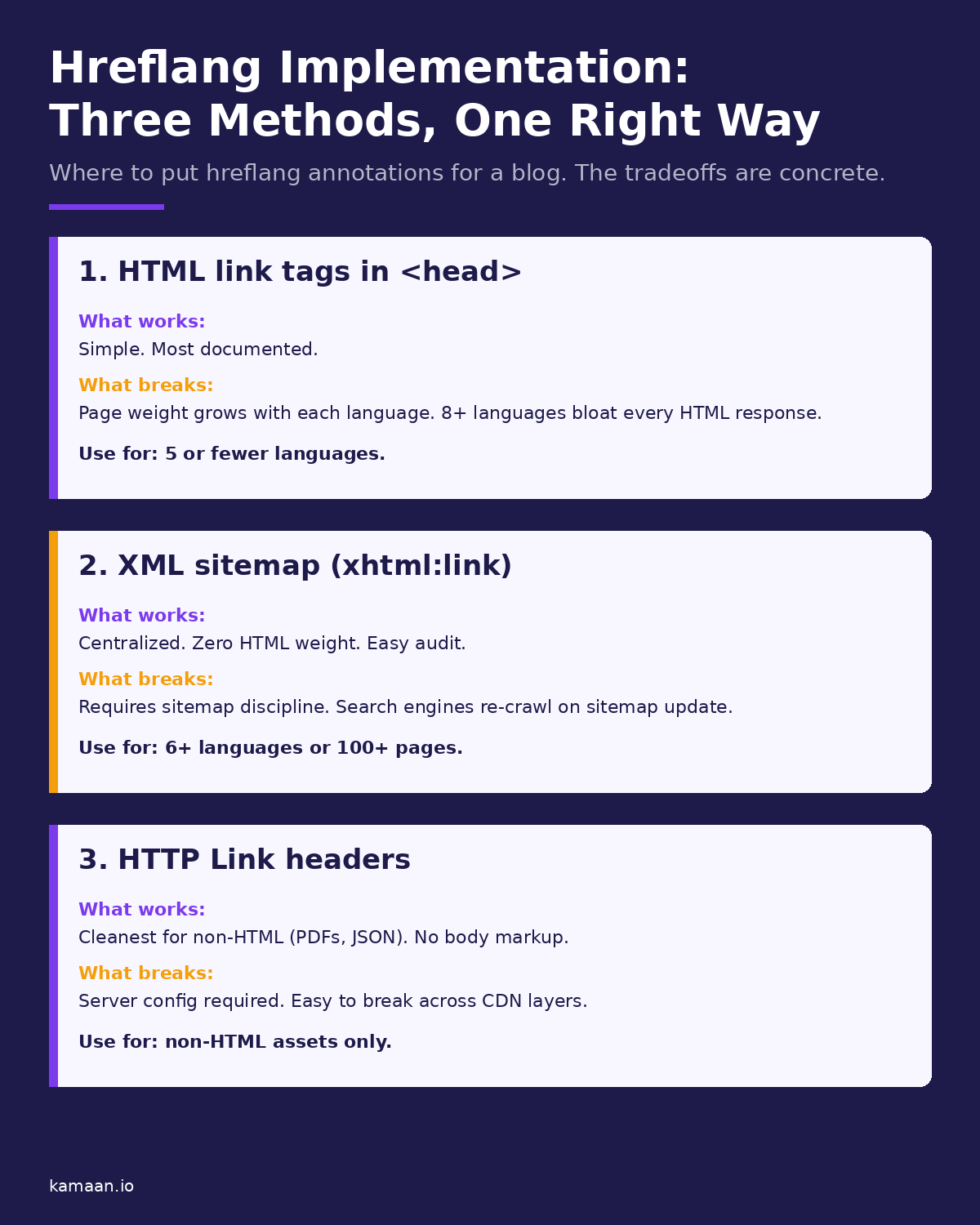
| Method | Where it lives | Best for | What breaks it |
|---|---|---|---|
HTML <link> tags |
In <head> of every page |
Sites with 5 or fewer languages | Page weight grows with each language. Easy to forget one. |
| XML sitemap | In xhtml:link inside each <url> |
Sites with 6+ languages, 100+ pages | Sitemap discipline required. Re-crawl latency. |
HTTP Link headers |
In server response headers | Non-HTML files (PDFs, JSON, images) | Server config required. CDN layers strip headers. |
HTML <link> tags sit in the <head> of every page in the cluster:
<link rel="alternate" hreflang="en" href="https://example.com/blog/article" />
<link rel="alternate" hreflang="es" href="https://example.com/es/blog/article" />
<link rel="alternate" hreflang="de" href="https://example.com/de/blog/article" />
<link rel="alternate" hreflang="x-default" href="https://example.com/blog/article" />
Easy to inspect with View Source. The downside surfaces past five languages: HTML weight climbs with each addition.
XML sitemap annotations move the hreflang map into the sitemap as xhtml:link elements inside each <url>:
<url>
  <loc>https://example.com/blog/article</loc>
  <xhtml:link rel="alternate" hreflang="en" href="https://example.com/blog/article" />
  <xhtml:link rel="alternate" hreflang="es" href="https://example.com/es/blog/article" />
</url>
Right choice past five languages or a hundred pages. Centralized, auditable, clean HTML. The cost is re-crawl latency.
HTTP Link headers are the right choice only for non-HTML files (PDFs, JSON endpoints). The server emits a Link header. Requires server config and is brittle across CDN layers that strip custom headers. Do not use for HTML pages when an alternative exists.
The five mistakes that kill rankings
Most hreflang failures fall into one of five categories. Every one of them is fixable in under an hour once you know what to look for.
Mistake one: missing return tags. Every hreflang declaration must be reciprocal. If your English article declares the Spanish version at /es/blog/article, the Spanish article must declare the English version at /blog/article. If either direction is missing, Google calls this a "no return tag" error in Search Console and ignores both annotations. This is the most failed validation rule in international SEO, and it usually surfaces months after a partial translation rollout, when one language version was published and the others were forgotten.
Mistake two: wrong language or region codes. The codes are precise and unforgiving. Use uk for Ukrainian, never ua. Use zh-Hans for simplified Chinese, not zh-CN. Three-letter codes do not work. A common silent failure: writing en-UK instead of en-GB (the United Kingdom is GB in ISO 3166-1, not UK).
Mistake three: missing x-default. The x-default value tells search engines which page to serve when no language version matches the user. Without it, Google decides on its own, usually serving whichever version it crawled most. Always include an x-default pointing to your primary version. For a blog whose primary language is English, set x-default to the English URL.
Mistake four: hreflang pointing to a non-200 URL. Every URL in your annotation cluster must return HTTP 200. A 301 redirect, a 404, or a 500 breaks the entire annotation set. If you redirect /de/blog/old-slug to /de/blog/new-slug, your hreflang must point to the new slug, not the redirect. If the German translation does not exist yet, do not declare hreflang for German. A broken pointer is worse than a missing one.
Mistake five: canonical tag conflict. If your Spanish page hreflang-targets https://example.com/es/blog/article but that page has a <link rel="canonical"> pointing to the English URL, Google follows the canonical and ignores the hreflang. Every page in a hreflang cluster must self-canonicalize. The Spanish page canonicalizes to itself. The German page canonicalizes to itself. Cross-language canonicals defeat hreflang silently.
How to verify your implementation
Three checks cover most failure modes.
Use Google Search Console. Navigate to Legacy tools and reports, then to International Targeting. The "No return tags" report lists every page where reciprocity broke. The "Unknown language code" report lists every invalid code. These two reports surface the majority of real-world hreflang errors.
Crawl with a tool. Screaming Frog, Sitebulb, or Ahrefs Site Audit will validate hreflang clusters at scale. Crawl your full site, filter by hreflang errors, and you will see every cluster with a missing return tag, a wrong code, or a non-200 target. A spot check on five articles is not enough. A multi-language blog typically has hundreds of clusters.
Test the headers and tags directly. curl -I https://example.com/blog/article shows the response headers, including any Link headers. View Source on the page shows the <link> tags. The XML sitemap is one URL away. If you cannot find your hreflang in any of those three places, you do not have hreflang implemented, regardless of what your CMS dashboard claims. To hand-build a valid annotation set to check against, a free hreflang tag generator produces the reciprocal <link> block for you.
What Kamaan emits automatically
Kamaan's Auto-Multilingual Delivery handles the hreflang implementation for you. When you publish an article in English, Kamaan auto-creates the Spanish, German, French, and Italian versions, gives each a localized slug, and emits the full reciprocal hreflang annotation set on every version. The defaults are correct out of the box.
Specifically, Kamaan emits HTML <link> tags in the <head> of every blog page, with the full set of language alternates, including x-default pointing to the English version. The translated URLs follow the /{lang}/blog/{slug} pattern (locale prefix before blog), which matches Google's recommendation for subfolder-based multilingual sites. Every URL self-canonicalizes. Reciprocity is guaranteed because the same publish action creates all five versions in one transaction.
For larger blogs with many languages, Kamaan additionally emits the hreflang map in the XML sitemap as xhtml:link annotations. You get both methods for free, which is the redundancy Google's documentation recommends for blogs that operate at scale.
The point is not that Kamaan does something nobody else can. The point is that you stop spending engineering time on hreflang. Auto-Multilingual Delivery publishes Spanish, German, French, and Italian versions of every article the moment you hit publish in English, with valid hreflang on every one, and zero extra steps.
A practical setup checklist
Before you publish a multilingual blog, work through this list once. Then automate it (or use a CMS that handles it for you).
- Pick one implementation method. HTML tags for 5 languages or fewer. XML sitemap for 6 or more. HTTP headers only for non-HTML.
- Confirm every page in every language has an
x-defaultannotation pointing to the primary language version. - Confirm reciprocity. Every page in the cluster references every other page, including itself.
- Confirm every URL in every annotation returns HTTP 200 (no redirects, no 404s).
- Confirm every page in the cluster has a self-referencing canonical, not a cross-language canonical.
- Submit the sitemap (or wait for re-crawl).
- Check Search Console International Targeting after 7-14 days for return-tag errors.
If any step in this list is automated by your CMS, you have one less thing to break. If your CMS does not do any of these things, you are doing it manually and you will get one of them wrong eventually.
Real-world scenarios
A founder running a B2B SaaS invoicing tool publishes one article on their new recurring billing feature. Within ten minutes, Kamaan has auto-published Spanish, German, French, and Italian versions at /es/blog/, /de/blog/, /fr/blog/, and /it/blog/, each with the full reciprocal hreflang block emitted in HTML <head> and mirrored in the XML sitemap. Google Search Console's International Targeting report shows zero "no return tag" errors. The founder did not write a line of hreflang configuration.
A solo developer ran a Next.js blog with manual hreflang in <head> for three languages. Adding a fourth language broke reciprocity on 60 percent of older articles because the new tag was only added to new posts. Migration to Kamaan handled the historical articles too: the next publish triggered a full re-emit of the hreflang map for every published article in every language. The error count in Search Console dropped from 412 to 0 within one re-crawl cycle.
FAQ
Do I need hreflang if I only have one language?
No. Hreflang is a relationship signal between language or region variants. With one language, there is nothing to relate. Skip it.
Do hreflang tags help SEO directly?
No, not in the ranking sense. Hreflang does not move you up the SERP. What it does is ensure the right version of your page ranks in the right market. That can translate to traffic gains, but it is a routing improvement, not a ranking boost.
Can I use hreflang on a single-page app with client-side routing?
Yes, but with caveats. The hreflang annotation must be in the initial HTML response, not injected after JavaScript runs. Googlebot reads the initial response. If your <link rel="alternate"> tags only appear after client-side hydration, Google will not see them. Server-render the head, or use the sitemap method.
What is the difference between x-default and en?
x-default is a fallback for when no language matches the user. en targets English-language searchers specifically. You need both. x-default is not a substitute for en, and en is not a substitute for x-default.
How long does it take for hreflang changes to take effect?
Google has to re-crawl every page in the cluster, which can take days to weeks depending on your crawl budget. The Search Console International Targeting report updates on its own schedule and may lag by 7-14 days even after Google has re-crawled.
Why does my sitemap-based hreflang work but my HTML hreflang does not?
Two common causes. Either the HTML tags are being injected client-side after Googlebot has finished reading the page, or you have a canonical conflict where the page hreflang-targets one URL but canonicalizes to a different one. Check both.
Related on Kamaan
-
How to Build a Multilingual Blog: A Complete Guide for SaaS Products. The parent pillar covers the full multilingual setup from URL structure to translation workflow.
-
Multilingual SEO: What It Is, Why It Matters, and How to Get It Right. Where hreflang fits in the broader international SEO picture.
-
What Is a Headless CMS: A Plain-English Guide for SaaS Teams. The architectural context behind why a headless CMS handles multilingual better than a traditional CMS.
-
How to Add a Blog to Your SaaS Product: A Developer Guide. The integration angle: how to wire a multilingual blog into an existing product.
-
Auto-Translate Blog Posts: What Works, What Breaks, and What Kamaan Does Instead. Where each common auto-translate approach drifts on hreflang, slugs, and sitemaps, and the flat-rate alternative inside the CMS.
Start building with Kamaan
Valid hreflang on every publish, zero config
Kamaan gives you one dashboard for all your product blogs, auto-translated into 99+ languages on every publish. One account covers unlimited sites at a flat rate. The MCP Server lets you publish from Claude or ChatGPT. First month free.
