

You translated forty blog posts into Spanish, German, and French, watched the traffic barely move, and now you are wondering where the money went. The usual answer is that you translated the words and skipped everything else. Content localization is the part that actually moves the needle: adapting the whole piece, not just its language, so a reader in Madrid or Munich feels like it was written for them. Done at the scale of a real blog, across every language and every product you run, it is either a slow manual grind or a setting you switch on once.
Quick takeaways
- Content localization is adapting content to a target market's language, culture, formats, and search behavior. Translation is one step inside it, not the whole job.
- The highest return comes from localizing your top-traffic pages first, not everything at once. Prioritize before you translate a single word.
- Real localization touches five things: language, cultural fit, formats (dates, currency, units), SEO (keywords, meta, hreflang), and per-locale URLs.
- Doing it by hand across five languages and ten product blogs breaks fast. The hreflang usually ends up wrong.
- Kamaan's Auto-Multilingual Delivery publishes a version in every language on your plan the moment you hit publish in English, each at its own URL with correct hreflang.
What content localization actually means
Content localization is the process of adapting a piece of content so it fits the language, culture, and expectations of a specific market. The word "localization" is often shortened to "l10n," where the 10 stands for the ten letters between the "l" and the "n."
The distinction that trips people up is localization versus translation. Translation converts the words from one language to another and stops there. Localization keeps going: it adapts the examples, the tone, the currency, the date format, the units, the imagery, and the search terms so the content reads as if it originated in that market. A translated article is understood. A localized article resonates.
Here is the plain version. If your English post says "save $99 a year and file your taxes before April 15," a translation gives a German reader those exact words in German, including the dollar sign and a US tax deadline that means nothing in Germany. Localization swaps the currency to euros, drops the irrelevant deadline, and adjusts the example to something a German reader recognizes. Same message, adapted experience.
Why translation alone leaves traffic on the table
Most teams stop at translation because it is the visible 80 percent of the work. The problem is that the invisible 20 percent is where the conversions live.
A translated blog often ranks poorly in its target market for a simple reason: the keywords are wrong. The literal translation of your English focus keyword is frequently not what people in that country actually type into Google. Direct translation also misses local intent, so you can rank for a phrase nobody searches. Then there is trust. Prices in the wrong currency, dates in the wrong format, and examples pulled from a country your reader has never visited all quietly signal "this was not made for you," and readers bounce.
The competitors who write about this topic, the large translation-management vendors, describe localization well but sell it as a heavyweight enterprise program with a services team attached. For a SaaS founder or a small marketing team running a blog, that framing is intimidating and mostly beside the point. You do not need a localization department. You need a repeatable process and a CMS that handles the mechanical parts so you can focus on the parts that need a human.
The five layers of real localization
Every genuinely localized article has been adapted on five layers. Skip any one and the piece drifts back toward "translated but foreign."
- Language. The base translation. Accurate, natural, idiomatic. This is table stakes, not the finish line.
- Cultural fit. Tone, humor, idioms, examples, and imagery adjusted to the market. A joke that lands in the US may confuse or offend elsewhere. Swap regional references for local ones.
- Formats. Dates, currency, units, phone numbers, address formats, and number separators. Germany writes 1.000,50 where the US writes 1,000.50. These small details decide whether a page feels native.
- SEO. Local keyword research (not a translated keyword), translated and rewritten meta titles and descriptions, and localized internal links. This is the layer most teams forget, and it is the one that decides whether the localized page is ever found.
- URLs and hreflang. Each language version lives at its own URL, and the pages are wired together with hreflang tags so Google shows the right version to the right user. Get this wrong and Google may treat your language versions as duplicate content.
The first three layers need a human or a very good model with review. The last two are mechanical and error-prone by hand, which is exactly where a headless CMS earns its place.
How to localize blog content, step by step
Here is a process a two-person team can actually run, without a localization vendor.
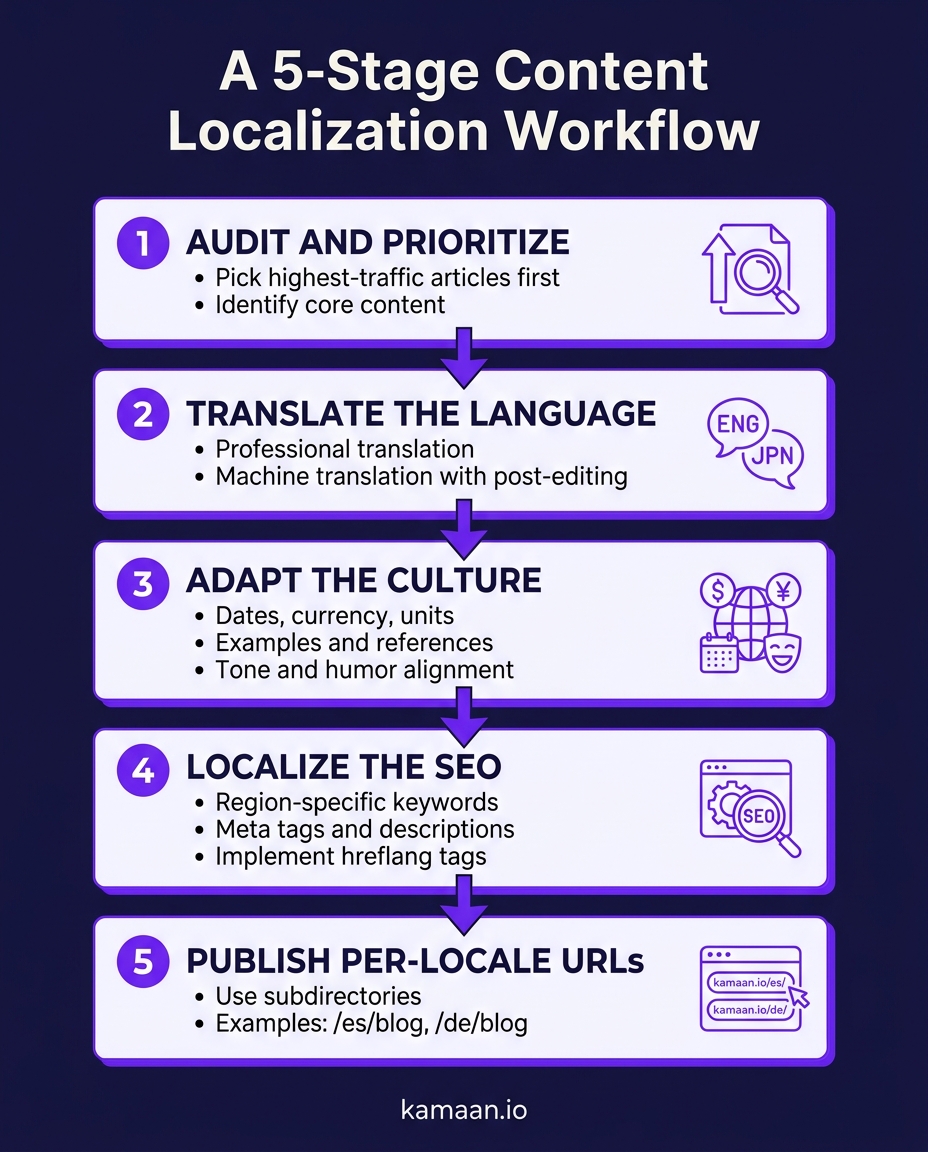
Step 1: Prioritize before you translate. Pull your analytics and list the blog posts by organic traffic and conversion value. Localize the top performers first. Localizing your best 20 articles into three languages beats localizing all 200 into one, because you concentrate effort where readers already are.
Step 2: Do local keyword research per market. For each priority article and each target language, find the term people in that country actually search. This often differs from a literal translation. Write the localized meta title and description around the real local keyword, not the translated English one.
Step 3: Translate, then adapt. Produce the base translation, then pass through the cultural and format layers: examples, currency, dates, units, imagery. Read it as a native speaker would. Cut anything that only makes sense in the source market.
Step 4: Localize the on-page SEO. Rewrite the meta fields for the local keyword. Point internal links to the same-language versions of your other articles, not back to the English ones.
Step 5: Publish at a clean URL structure with correct hreflang. Put each language at its own path and emit hreflang tags that connect the set. The subfolder URL structure, like /es/blog/your-post, is the pattern most teams should default to, because it keeps all your language versions under one domain that shares authority.
For the deeper mechanics of the last step, the hreflang tags guide and the multilingual SEO guide cover exactly what Google needs to see.
Where content localization breaks at scale
The five-step process is clean on paper. It falls apart the moment you multiply it out.
One article in four languages is four versions. Twenty priority articles in four languages is eighty versions. Add a second and third product blog and you are maintaining hundreds of pages, each needing its own URL, its own hreflang set, and its own localized meta fields. Every time you edit the English original, all the localized versions drift out of sync. Teams try to run this out of spreadsheets and a pile of browser tabs, and the hreflang, being the fiddliest and least visible part, is almost always where it goes wrong.
This is the point where the choice of tool stops being cosmetic. A CMS that treats multilingual as a bolt-on leaves you doing the mechanical layers by hand for every version. A CMS built multilingual-first does them for you.
The chart below breaks the localization workflow into the five stages every article passes through, from prioritizing which pages to localize down to publishing them at per-locale URLs.
How Kamaan handles the mechanical layers for you
Kamaan is a headless blog CMS built for people who run more than one blog, and its multilingual model is designed around the exact failure points above.
You write and publish once in English. Kamaan's Auto-Multilingual Delivery then publishes a version of that article in every language on your plan, each at its own URL, with the hreflang tags emitted correctly server-side. The per-locale URL structure and the hreflang wiring, the two mechanical layers teams get wrong by hand, are handled for you. You are left to focus on the human layers: making sure the cultural fit and the local examples are right.
Because Kamaan is a command center for multiple blogs under one account, this holds across every product you run. One dashboard, one place to publish, and every localized version stays connected to its English source instead of drifting into a separate spreadsheet. If you prefer to bring your own translations from an LLM or a human editor, you can, and if you want the workflow inside the AI tool you already write in, the same publishing runs through the Kamaan MCP Server and ChatGPT Actions.
Translation is the part you can see. Localization is the part that decides whether anyone in that market ever finds the page, and stays.
A worked example
A founder runs a B2B invoicing SaaS with a blog that gets most of its traffic from twelve cornerstone articles. She wants German, French, and Spanish versions but has no localization team and no appetite for eighty spreadsheet rows. She localizes the twelve articles herself: local keyword per market, currency and date formats adjusted, examples swapped. Then she publishes each one in Kamaan on the Growth tier, which covers three languages, and Auto-Multilingual Delivery puts each version live at its own /de/blog, /fr/blog, and /es/blog path with correct hreflang. She never hand-writes a single hreflang tag, and when she updates the English original later, she updates it in one place.
FAQ
What is content localization?
Content localization is the process of adapting a piece of content to fit the language, culture, formats, and search behavior of a specific target market. It goes beyond translating the words to also adjust examples, currency, dates, tone, imagery, and SEO so the content feels native to that market.
What is the difference between content localization and translation?
Translation converts text from one language to another and focuses on accuracy. Localization is the broader process that includes translation plus cultural adaptation, format changes, and localized SEO. You can translate without localizing, but you cannot localize without first translating.
What is an example of content localization?
A US blog post that mentions prices in dollars, a US tax deadline, and an American sports reference gets localized for Germany by switching to euros, dropping the irrelevant deadline, and swapping the reference for one a German reader recognizes. The message is the same; the experience is adapted.
How do you localize blog content?
Prioritize your top-traffic articles, do local keyword research for each market, translate and then adapt the culture and formats, rewrite the on-page SEO for the local keyword, and publish each version at its own URL with correct hreflang tags connecting the set.
Which content should you localize first?
Localize your highest-traffic and highest-conversion pages first, then expand. Concentrating effort on your best 20 articles across a few languages returns more than spreading a thin translation across your entire archive.
Does content localization help SEO?
Yes, when done properly. Localized keyword research, translated meta fields, per-locale URLs, and correct hreflang tags let each language version rank in its own market. Translation alone often ranks poorly because the literal keyword is not what local users actually search.
How does a headless CMS help with content localization?
A multilingual-first headless CMS handles the mechanical layers, the per-locale URLs and the hreflang tags, automatically. Kamaan's Auto-Multilingual Delivery publishes a version in every language on your plan when you publish in English, so you focus on the cultural adaptation instead of the wiring.
Related on Kamaan
- How to Build a Multilingual Blog: A Complete Guide for SaaS Products
- Multilingual SEO: What It Is, Why It Matters, and How to Get It Right
- Auto-Translate Blog Posts: What Works, What Breaks, and What Kamaan Does Instead
- Blog URL Structure for Multiple Languages: Subfolders, Subdomains, or Query Params
- Hreflang Tags Explained: The Right Way to Set Them Up for a Blog
Start building with Kamaan
Publish once, go live in 99+ languages
Kamaan covers three product blogs on the Growth tier, with auto-translate into three languages on every publish, chosen from 99+ available, hreflang done for you server-side, and the MCP Server for publishing from Claude or ChatGPT. 30 days free on every plan.
