

You already write blog posts in ChatGPT. The annoying part starts when the draft is done: you copy it out, open the CMS in another tab, paste into a rich-text editor, fix the formatting that broke on the way, fill the SEO fields one at a time, then click publish. ChatGPT Actions remove that last hop. A custom GPT with one configured Action can call your headless CMS directly and post the article from inside the same conversation that wrote it. This is the OpenAI-side mirror of what Claude users get through MCP.
This guide shows the setup end to end against Kamaan, the command center for multi-product founders and agencies who run many SaaS blogs: manage every blog from one dashboard, and run every operation across all of them from Claude, ChatGPT, Cursor, or any MCP client. You will see the OpenAPI schema shape, the auth choice, and what a publish-from-ChatGPT session actually looks like once it works.
Quick takeaways
- A custom GPT becomes a publishing client once you paste an OpenAPI schema and pick an auth method. No code on your side.
- API key auth is the fastest path for a private GPT used by one founder. OAuth is the right call once the GPT is shared with a team.
- With Kamaan, the same
publish_articleendpoint that powers the MCP Server is reachable from ChatGPT Actions. One API, two AI clients. - Kamaan's Auto-Multilingual Delivery runs at publish time regardless of which client made the call. Publish from ChatGPT in English, get Spanish, German, French, and Italian live at the same time on Growth and above.
- Setup is around 20 minutes for first post if you already have a Kamaan API key. The CMS-side benchmark stays at about 14 minutes once the GPT is configured.
What ChatGPT Actions actually are
A custom GPT is a configured wrapper around the same underlying model, with its own instructions, knowledge files, and a list of Actions it can call. An Action is an HTTP endpoint described in OpenAPI 3 that ChatGPT decides when to invoke based on the conversation. You write the schema once. After that, the model reads the user's intent, fills in the parameter values, fires the request, and reads the response back into the chat.
For a blog publishing setup, the relevant endpoints on the CMS side are usually the small set: list articles, create article, update article, set SEO fields. You describe each one in the schema and give it a clear operationId and description. ChatGPT picks the right one based on what the founder asks for.
The pattern competitors miss: this is not "ChatGPT with a publish button." It is ChatGPT with the CMS as a callable tool, the same way the Kamaan MCP Server makes the CMS callable from Claude or Cursor. Same backend, different AI client.
The OpenAPI schema you actually need
The schema is the entire spec. ChatGPT reads it once when you save the GPT and uses it on every call. Keep it minimal: each endpoint you do not need is one more chance for the model to pick the wrong tool.
Smallest useful schema for blog publishing against a Kamaan-style REST API. Replace the server URL with your own.
{
  "openapi": "3.1.0",
  "info": {
    "title": "Kamaan Blog API",
    "version": "1.0.0",
    "description": "Publish, update, and read blog articles from a custom GPT."
  },
  "servers": [
    { "url": "https://api.kamaan.io/v1" }
  ],
  "paths": {
    "/articles": {
      "post": {
        "operationId": "publishArticle",
        "summary": "Create and publish a new blog article",
        "description": "Creates a new article and publishes it immediately. Auto-translates into every language on the plan when the tier supports it.",
        "requestBody": {
          "required": true,
          "content": {
            "application/json": {
              "schema": { "$ref": "#/components/schemas/ArticleInput" }
            }
          }
        },
        "responses": {
          "200": {
            "description": "Article created and published",
            "content": {
              "application/json": {
                "schema": { "$ref": "#/components/schemas/Article" }
              }
            }
          }
        }
      }
    }
  },
  "components": {
    "schemas": {
      "ArticleInput": {
        "type": "object",
        "required": ["site_id", "title", "content", "language", "status"],
        "properties": {
          "site_id": { "type": "string", "description": "Kamaan site identifier" },
          "title":   { "type": "string" },
          "content": { "type": "string", "description": "Markdown body" },
          "language":{ "type": "string", "example": "en" },
          "status":  { "type": "string", "enum": ["draft", "published"] },
          "featured_image_url": { "type": "string" }
        }
      },
      "Article": {
        "type": "object",
        "properties": {
          "id": { "type": "string" },
          "slug": { "type": "string" },
          "url": { "type": "string" }
        }
      }
    }
  }
}
That is the publish path. Add GET /articles for listing, PATCH /articles/{id} for edits, and a small SEO endpoint for meta_title, meta_description, and keywords. Five endpoints is plenty for a blog GPT.
Auth: API key vs OAuth
ChatGPT supports three auth modes for Actions: none, API key, and OAuth. None is fine for read-only public endpoints and nothing else. The real choice is between the other two.
API key is the right call when one founder uses the GPT privately. You generate the key in the Kamaan dashboard, paste it into the GPT's auth screen with Authorization: Bearer <key> as the format, and you are done. Setup is two minutes. The trade-off: the key is now embedded in the GPT config. If you share the GPT, you share publishing rights.
OAuth is the right call once the GPT is shared with a team or published in the GPT store. ChatGPT walks each user through a sign-in flow against your CMS, gets a per-user token, and stores it server-side at OpenAI. You set the client ID, client secret, authorize URL, token URL, scope, and callback. The callback URL is the one ChatGPT generates after you save; you copy it into your OAuth client's allowed-redirects list.
Production note from OpenAI's own GPT Actions documentation: every domain in the OAuth flow has to be the same as the API domain you call. The exception is the big three identity providers, but for a CMS you control end to end, this lines up cleanly.
A real publish-from-ChatGPT session
A founder opens the custom GPT and types: "Write a 1,500-word article on blog webhook notifications, target the keyword 'blog webhook', then publish to the dev blog on Kamaan and set the SEO fields."
ChatGPT generates the draft inline. After two rounds of edits the founder says "publish it." ChatGPT calls the publishArticle Action with the body filled in, hits the SEO endpoint, and replies: "Published at kamaan.io/blog/blog-webhook-notifications. Spanish, German, French, and Italian versions are live too." No dashboard, no copy-paste, no formatting cleanup. Publishing collapses into the same conversation that wrote it.
How this compares to MCP, and to the dashboard
The chart below lays out the three common paths a founder can use to publish to a SaaS blog: ChatGPT Actions, the Kamaan MCP Server (Claude, Cursor, any MCP client), and the regular browser dashboard.
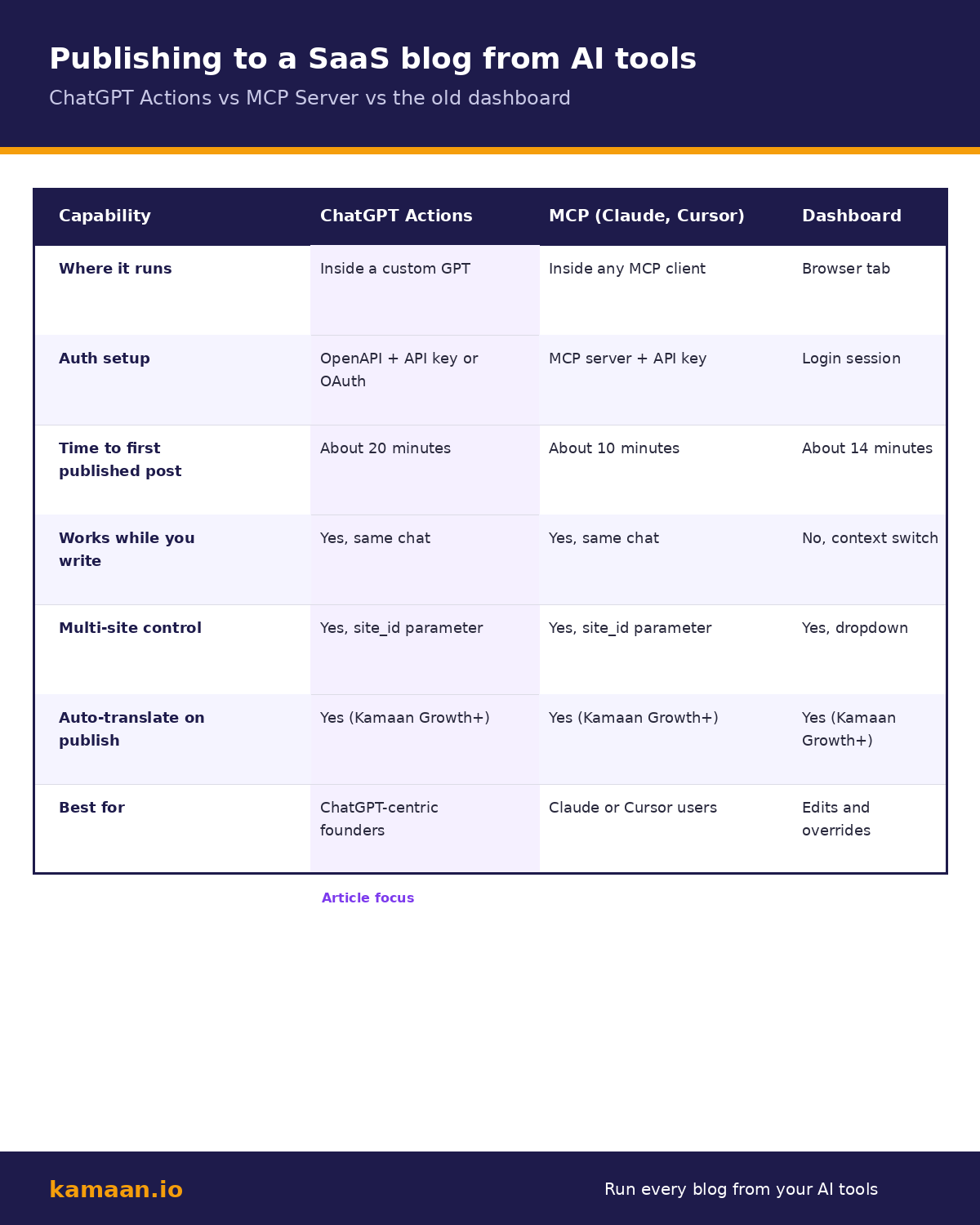
None of these wins universally. ChatGPT Actions fit founders whose content workflow already lives in ChatGPT. MCP fits Claude or Cursor users. The dashboard is the right place for edits, audits, and scheduling.
On the Kamaan side, all three call the same API and respect the same plan. Auto-Multilingual Delivery runs at publish time on Growth and above, hreflang gets emitted, and the article goes live across every language on your plan.
Common setup mistakes (and the fix)
The first mistake is shipping too many endpoints. If you describe twelve endpoints in the schema, ChatGPT will sometimes pick the wrong one when a user is ambiguous. Five endpoints is the sweet spot for a blog GPT: list, create, update, set-SEO, delete.
The second is over-loose descriptions. ChatGPT relies on the description field to decide which Action to call. "Posts an article" is too vague. "Creates and publishes a new article. Use only when the user explicitly says 'publish'. For drafts, use createDraftArticle instead" is what actually works.
The third is forgetting to scope the GPT per site. A multi-product founder running three blogs through one GPT needs site context in the primary instructions: map product names to site_id values explicitly. Kamaan's Multi-Site Management handles the data side; the voice side is on the GPT.
Real-world workflow scenarios
A solo founder running one SaaS product configures a private custom GPT named "Blog Voice" with a Kamaan Starter API key. She publishes one technical article per week. The GPT writes the draft, edits it on her feedback, fills the SEO fields, and posts to her blog from inside ChatGPT. Total active time from idea to live article: roughly 45 minutes per post. Starter covers her single site and single language; first month free.
An agency running blog content for ten client SaaS products uses one shared custom GPT with OAuth on top of Kamaan Scale. Each writer signs in with their own Kamaan account, sees only the sites they are allowed to touch, and publishes from ChatGPT against the right site_id. The agency owner runs the GPT store listing internally; team members install it once. Auto-Multilingual Delivery handles every language the client has enabled. Scale covers all ten client sites with 100,000 API calls; first month free.
FAQ
Can I publish to a blog directly from ChatGPT without writing code?
Yes. You configure a custom GPT with an OpenAPI schema for your CMS's REST API, set the auth (API key or OAuth), and the GPT can call your CMS from inside any chat. With Kamaan, the publish endpoint is the same one the MCP Server calls from Claude, so the schema is straightforward to write.
What is the difference between ChatGPT Actions and MCP?
Both let an AI client call your CMS. ChatGPT Actions are an OpenAI feature: a custom GPT calls REST endpoints described by an OpenAPI schema, with auth set up in the GPT configuration. MCP is the open Model Context Protocol used by Claude, Cursor, and others, with an MCP server exposing tools to the client. Kamaan supports both: same backend, two AI-side integration paths.
Do I need to be on a specific Kamaan tier to use ChatGPT Actions?
Every Kamaan tier ships with REST API and SEO metadata, so a custom GPT can publish from any plan starting at Starter (one site, one language). Auto-Multilingual Delivery and hreflang start at Growth (three sites, three languages). Pick the tier that matches the number of products you actually run, not the integration.
Is API key auth secure enough for a private GPT?
For a private GPT used only by you, yes. The key lives in ChatGPT's encrypted config, not the chat history. The moment the GPT is shared with anyone else, or published to the store, switch to OAuth so each user gets their own per-account token.
What happens if ChatGPT picks the wrong Action?
It tries the wrong endpoint, the CMS returns an error, and ChatGPT reads the error message. The fix is on the schema side: tighten the operationId and description of the two Actions that confused it. Once descriptions are specific enough, the model picks correctly on every call.
Can a custom GPT manage multiple Kamaan sites at once?
Yes. The site_id parameter on the publish endpoint switches sites. Configure the GPT's instructions to map product names to site_id values, and the GPT will route each publish to the right blog. This pairs with Kamaan's Multi-Site Management for founders running multiple products.
How long does first-time setup take?
About 20 minutes if you already have a Kamaan account and an API key. Most of that is writing the OpenAPI schema and pasting it into the GPT builder. The CMS-side benchmark from publish to live is about 14 minutes.
Will translations happen automatically when I publish from ChatGPT?
If you are on Growth or higher, yes. Kamaan's Auto-Multilingual Delivery runs at publish time regardless of which client called the API. ChatGPT publishes English, every language on your plan goes live at the same time, each at its own URL with correct hreflang.
Related on Kamaan
- Publish Blog Posts From Claude and ChatGPT: The AI-Native CMS Setup. The pillar that frames the AI-native publishing workflow across both Claude and ChatGPT.
- MCP Server for CMS: How to Publish Directly From Claude. The MCP-side mirror of this article, for Claude and Cursor users.
- How to Add a Blog to Your SaaS Product: A Developer Guide. Setup guide for the REST API that the custom GPT calls into.
- Multi-Site CMS: One Account, Multiple Domains. How
site_idworks across a multi-product portfolio. - What Is a Headless CMS. The category context for the CMS your custom GPT is calling.
Start building with Kamaan
One CMS, every AI client you already use
Kamaan covers three product blogs on the Growth tier, with auto-translate into 99+ languages on every publish, hreflang done for you, and the MCP Server for publishing from Claude or ChatGPT. First month free.

