

You launched your second SaaS product. You opened your CMS dashboard to add it. Then you noticed: another space, another bill. Now you are paying twice for the same software, and the third product is six months away. This is the per-space tax. It is the single biggest hidden cost in headless CMS pricing, and it is the reason most multi-product founders end up duct-taping markdown files together instead of using a real CMS. The CMS market priced itself for enterprises with one giant content operation, not for founders running three lean SaaS blogs at the same time.
Quick takeaways
- Contentful charges per space. Storyblok charges per space. Sanity charges per project. A founder running three SaaS products pays three CMS bills.
- Kamaan is one account, unlimited sites, one flat monthly rate. The same dashboard runs every product blog you operate.
- Across three sites at the first paid tier, one flat Kamaan account costs a small fraction of Contentful's $10,800 a year. That is the same software function with a 47x bill.
- Kamaan is the command center for every SaaS blog you run, operated from Claude, ChatGPT, Cursor, or any MCP client. Site switching is one click in the dashboard or one parameter in the API.
- Auto-Multilingual Delivery extends to every site. One English post becomes 99+ languages on every domain you operate.
What "multi-site CMS" actually means
The label gets thrown around loosely. For a multi-product founder, multi-site CMS means one specific thing: you have several independent SaaS products, each with its own marketing site and blog, and you want to manage all the blogs from one place without paying for each one separately.
Three failure modes show up when you try this with the incumbents.
The space tax. Contentful's pricing scales per "space," which is roughly one content silo. Each SaaS product needs its own space because the content is independent. At Contentful's $300 first paid tier, three products is $900 a month. Storyblok's per-space model lands at $106 per space on the Grow plan, so three sites is $318 a month. Sanity is friendlier on this dimension at $15 per project per user, but it still scales with site count.
The mental tax. Even when you can technically share an account, you cannot share a dashboard. You log into Contentful, switch space, switch back, log into the Sanity Studio for product B, repeat. Three logins to write three articles, plus three sets of API keys to keep secure.
The translation tax. Each space typically requires its own translation configuration. Three sites in five languages becomes fifteen configuration surfaces. Most CMS tools also charge for translation per locale, which doubles or triples the bill.
The honest math at three sites
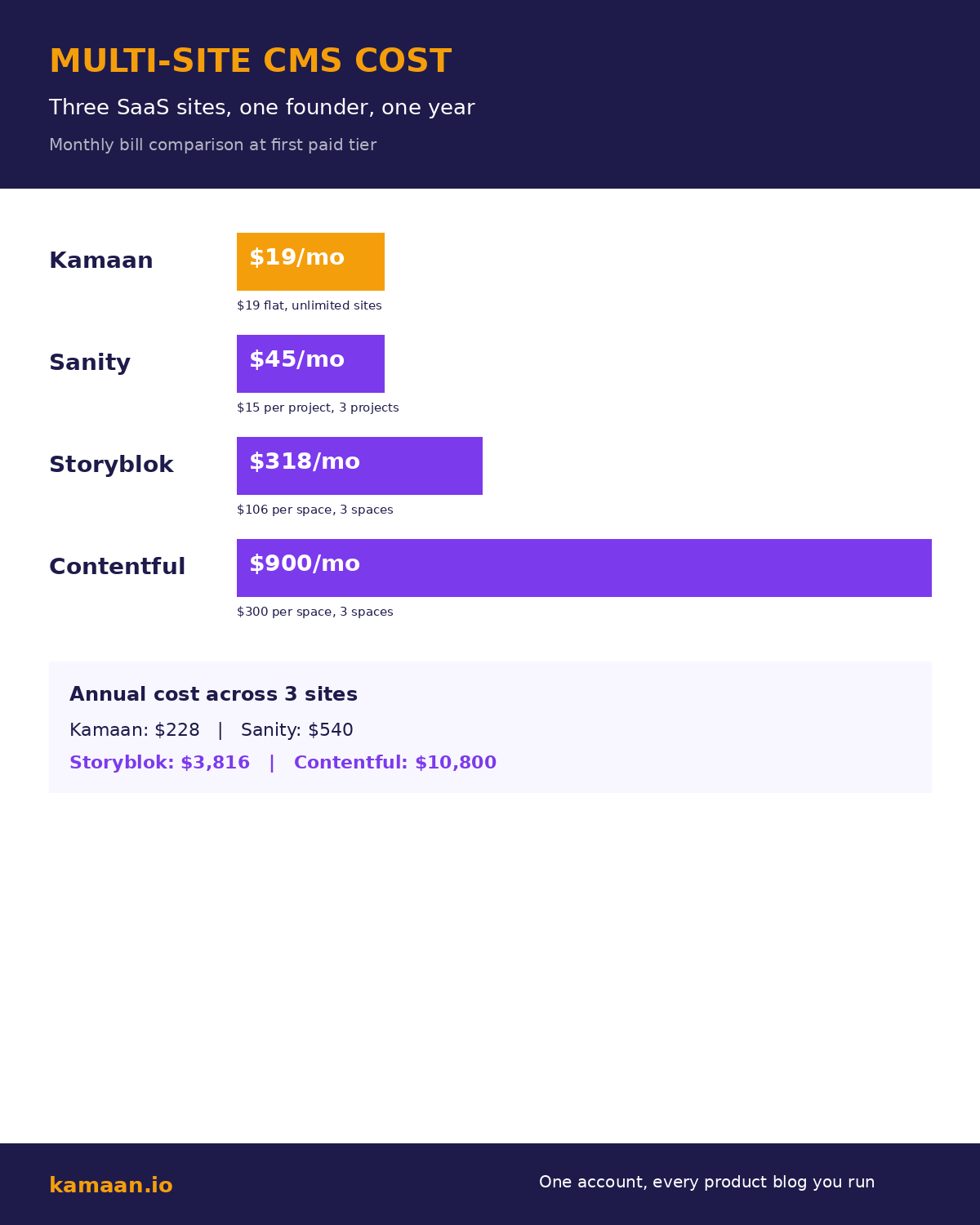
The chart below puts real monthly numbers on what each option costs a founder running three SaaS blogs at the first paid tier.
These are the published first-paid-tier prices as of mid-2026, multiplied by three sites where applicable. Annual numbers below assume no growth into a higher tier.
| Tool | Monthly per site | Three sites monthly | Three sites annually | Multi-site model |
|---|---|---|---|---|
| Kamaan | Flat monthly rate (covers all) | Same flat rate | Same flat rate | One account, unlimited sites, flat |
| Sanity | $15 per project per user | $45 | $540 | Per-project billing |
| Storyblok | $106 (Grow) | $318 | $3,816 | Per-space billing |
| Contentful | $300 (first paid tier) | $900 | $10,800 | Per-space billing |
A few things to read out of that table. First, the gap between Kamaan and Contentful at three sites is roughly 47x. Second, Sanity's per-project model stays survivable for small founders but still triples a one-site bill. Third, Storyblok's per-space model is the one that bites quietly. The price looks reasonable on a single-site review, then quadruples when you actually run multiple products. Running those products in more than one language adds a second axis, which our guide to content localization at scale covers.
Why per-space pricing exists in the first place
The per-space model is a holdover from enterprise CMS. A 5,000-person company running a corporate site, a documentation portal, a customer help center, a careers site, and a partner portal genuinely benefits from siloed content models, distinct role permissions, and separate locale configurations per surface. That company also has a procurement budget that does not flinch at $300 per surface.
The same model breaks badly for a bootstrapped founder running three SaaS blogs. Each blog needs the same content type (an article), the same locale set, the same workflow, and the same translation pipeline. There is no reason for three separate billing surfaces other than "this is how the vendor priced it."
The market gap is sized. There is room for a tool that prices for the multi-product founder reality, not the enterprise reality.
How Kamaan's Multi-Site Management actually works
One Kamaan account holds an unlimited number of sites for one flat monthly rate. You add each SaaS blog as a separate site in the same dashboard. Articles are scoped per site, so product A's blog never collides with product B's. Translation pipelines run per site but share the same account-level quota. Switching between sites in the dashboard is a single click.
On the API side, every request takes a site_id parameter. The same REST endpoint serves all your sites with no separate auth, no separate space keys, no separate billing.
# Article list for SaaS product A
curl "https://api.kamaan.io/v1/sites/site-a-id/articles?language=en"

# Article list for SaaS product B (same auth, different site)
curl "https://api.kamaan.io/v1/sites/site-b-id/articles?language=en"

# Same multilingual story for any site
curl "https://api.kamaan.io/v1/sites/site-c-id/articles?language=de"
The MCP Server inherits the same pattern. Inside a Claude conversation, you reference a site by ID or by short name. You can publish to product A's blog and switch to product B's in the same conversation without re-authenticating.
Setting up three sites in one Kamaan account
Step one: create a Kamaan account. First month is free on every plan. Add your first SaaS site with its primary domain.
Step two: add the second and third sites from the dashboard. Each gets its own site_id, its own subdomain or domain mapping, and its own SEO defaults. Translation languages can be set per site or inherited from the account.
Step three: in each SaaS product's frontend, configure the Kamaan site_id as an environment variable and fetch the blog from api.kamaan.io/v1/sites/{site_id}/articles. Same code, different env var per product.
Step four: connect the MCP Server once. Every site in the account is now reachable from your Claude or Cursor or ChatGPT workspace. Switching between products in a conversation is a parameter, not a login.
That is the whole multi-site setup. One bill, three (or thirty) production blogs.
Real-world scenarios
A bootstrapped founder runs three SaaS products. She used to pay Contentful $900 a month for three spaces. She migrates the content to Kamaan, sets up three sites in one account, and pays one flat monthly rate. The Next.js frontends on all three products use the same REST fetch pattern with a different site_id env var. The savings over the year cover an additional contractor's salary.
An agency owner runs blogs for five small SaaS clients. Each client expects the agency to handle publishing and translation. The agency used to bill the clients for their CMS subscriptions plus markup. With Kamaan they consolidate all five client blogs into one Kamaan account at one flat monthly rate. The agency publishes to whichever client site they need from inside a Claude conversation via the MCP Server. The clients get every article auto-published in 99+ languages without paying per-locale fees.
What about access control across multiple sites?
The honest answer: Kamaan is built for solo founders and small agencies where the same person or two-person team operates every blog. If you need granular role-based access control where editor A only sees product A's blog, the enterprise CMS tools still have an edge. For the founder who is running every blog themselves or with one contractor, the flat-rate model is straightforward and roughly 15x cheaper than Contentful at three sites.
Related on Kamaan
- How to add a blog to your SaaS product. The parent pillar covering the integration pattern that powers each site you add.
- Best headless CMS for startups. The honest comparison hub for the wider category.
- Contentful alternatives. Six headless CMS tools that are not $300 a month, with the per-space breakdown spelled out.
- Headless CMS Next.js integration. The integration code pattern that scales to any number of sites with one env var change.
- Publish from Claude and ChatGPT. The MCP Server is how you operate every site from one conversation.
FAQ
How many sites can I have in one Kamaan account?
Unlimited. One account covers however many SaaS products and blogs you want to run, with no per-site fee, no per-space fee, and no per-seat fee. Multi-Site Management is the headline feature for multi-product founders.
Do I pay extra for translations on additional sites?
No. Auto-Multilingual Delivery applies to every site in the account. One English post on any of your sites becomes a version in every language on your plan, with correct hreflang, at no extra per-locale charge. AI credits only apply if Kamaan runs the translations; if you provide translations from Claude or your own LLM, no AI credits are consumed.
Can different sites have different language sets?
Yes. Each site has its own language configuration. Product A can publish in English plus Spanish; product B can publish in English plus German plus French. The languages on each site are configured in the Kamaan dashboard per site, not at the account level.
How does the API distinguish between sites?
Every endpoint takes a site_id path parameter: https://api.kamaan.io/v1/sites/{site_id}/articles. Same authentication, different site, no separate keys.
Can I run a B2B SaaS, a consumer SaaS, and an agency client all from one Kamaan account?
Yes. Sites are independent of business model. Each gets its own dashboard view, its own content, its own translation set, its own domain. Billing is on the single account, not on the individual sites.
What happens if a vendor like Contentful raises prices?
If Contentful raises the per-space price from $300 to $400, a three-site founder's bill jumps $300 a month, $3,600 a year. The same situation on Kamaan would be a single flat-rate change, applied once, regardless of site count. Flat-rate pricing is not just cheaper, it is more predictable as you grow.
Can I move existing content from Contentful or Sanity to Kamaan across multiple sites?
Yes. Articles can be created via the REST API one at a time, or imported in batch. The Article CMS schema is consistent across sites, so a migration script that works for one site works for all of them by changing the site_id parameter.
Can I publish to all my sites from inside Claude or ChatGPT?
Yes. The Kamaan MCP Server connects Claude, Cursor, and any MCP client. The ChatGPT Actions integration does the same from ChatGPT. You reference any site by ID in the conversation and publish straight to it without opening a dashboard. The command-center experience is the same whether you operate one blog or twenty.
Start building with Kamaan
One account, every product blog you run
Kamaan gives you one dashboard for all your product blogs, auto-translated into 99+ languages on every publish. One account covers unlimited sites at one flat monthly rate. The MCP Server lets you publish from Claude or ChatGPT. First month free.
