

Most content modeling guides are written by enterprise CMS vendors, so they teach you to model like an enterprise: dozens of content types, deep reference chains, a schema you need a workshop to understand. For a blog, that is a trap. You spend a week designing fields you will never use, and every new post fights the structure instead of fitting it. Content modeling is genuinely useful, but for a product blog the whole skill is knowing how little structure you actually need. This guide gives you the minimal model that works, a real example, and a clear line for when to add a field and when to stop.
Quick takeaways
- Content modeling is the process of breaking content into reusable types and defining the fields inside each one, so your front end can render it predictably.
- A content type is a template (Blog Post, Author). A field is one attribute inside it (title, body, date). A reference links two types (a post to its author).
- A blog needs roughly one and a half content types, not ten. Overbuilding the model is the most common and most expensive early mistake.
- Add a field only when something will read it or render it. If nothing consumes a field, it is clutter that every future post has to step around.
- Structured fields (title, slug, date as separate fields) beat one giant text blob, because they make SEO metadata, sorting, and multilingual delivery possible.
What content modeling actually is
Content modeling is the practice of turning messy, unstructured content into structured, reusable pieces. Instead of one big document with everything jammed in, you define the shape of your content once, then every item follows that shape.
Three words carry the whole idea:
- A content type is a template for one kind of thing. "Blog Post" is a content type. So is "Author." It defines what fields exist and nothing more.
- A field is a single attribute inside a content type. For a Blog Post, the fields might be title, slug, body, cover image, and publish date. Each field has a type of its own: text, rich text, media, date, boolean.
- A reference is a link between two content types. A Blog Post references an Author, so you store the author once and point every post at it, instead of retyping the bio on each article.
That is the entire vocabulary. Everything else in content modeling is applying these three ideas with restraint. If you want the layer beneath this, how content and presentation get separated in the first place, the plain-English guide to what a headless CMS is explains the split this whole practice depends on.
The minimal content model for a blog
Here is the honest truth the vendor guides bury: a blog needs almost no modeling. Most blogs run beautifully on one content type plus one small supporting type.
A worked example. The Blog Post type, with its fields:
| Field | Type | Why it exists |
|---|---|---|
| Title | Text | The headline; also the H1 and part of the meta title |
| Slug | Text | The URL path; kept separate so the URL is stable if the title changes |
| Body | Rich text | The article itself |
| Excerpt | Text | Summary for listing pages and meta description |
| Cover image | Media | The featured image |
| Publish date | Date | Sorting and display |
| Author | Reference | Points to an Author entry |
| SEO fields | Text | Meta title, meta description, focus keyword |
And the Author type, referenced by every post:
| Field | Type |
|---|---|
| Name | Text |
| Bio | Rich text |
| Avatar | Media |
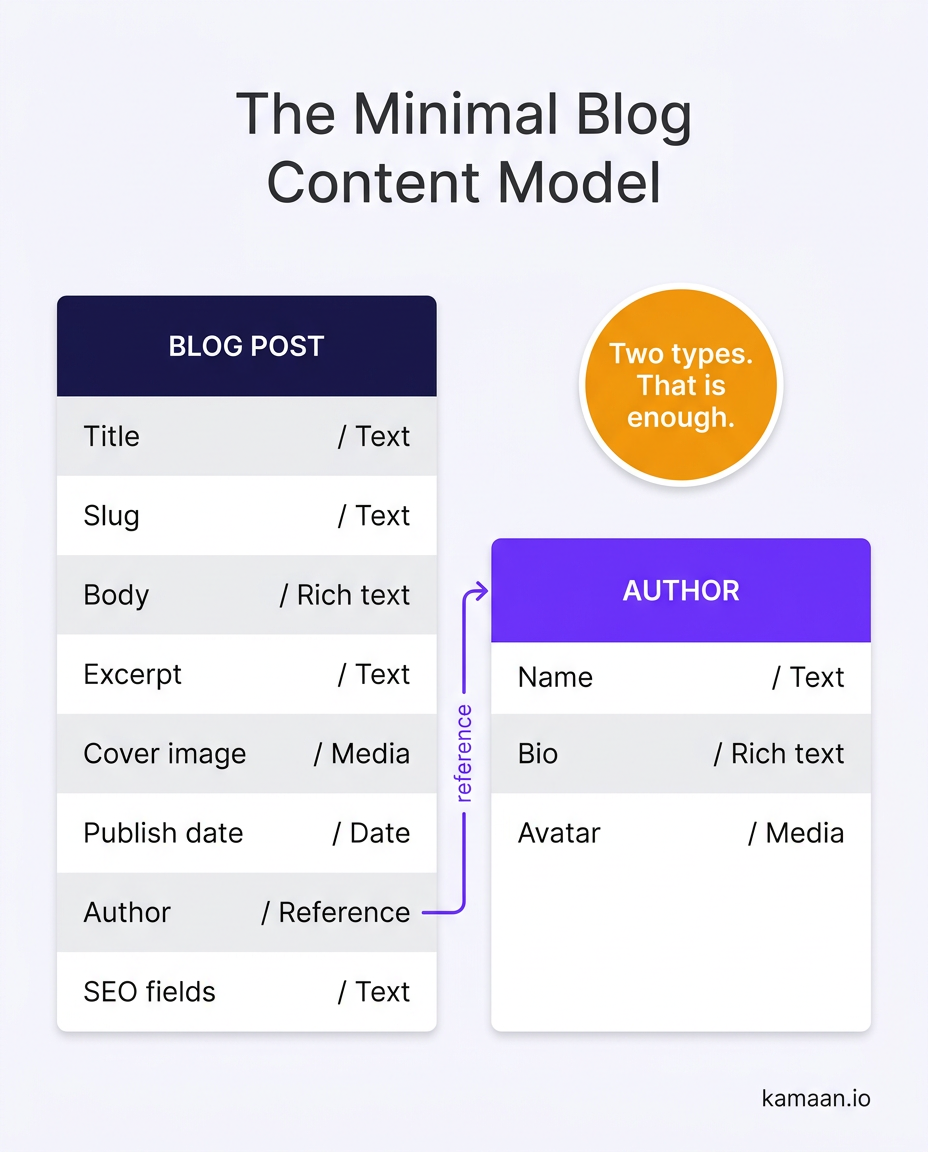
That is it. Two content types, a dozen fields, and you can run a serious blog for years. Notice what is not here: no "Category hierarchy engine," no nested component library, no six-level taxonomy. You add those only when a real need shows up, and usually it never does.
The diagram below shows the whole model at a glance: two types and the reference that links them.
The line between structure and a text blob
If two content types are enough, why model at all? Why not paste the whole article into one field and be done?
Because separate fields are what make the useful stuff possible. When the title, slug, publish date, and SEO metadata are their own fields, your front end can sort posts by date, build a clean URL that survives a title edit, populate the meta tags correctly, and generate a listing page automatically. Cram all of that into one rich-text blob and none of it works: you cannot sort a paragraph, and you cannot pull a meta description out of prose reliably.
Structure exists so software can read your content, not just humans. That is the payoff of content modeling, and the reason even a minimal model is worth the ten minutes it takes to define. The benefits of a headless CMS go deeper on why this decoupling pays off across channels.
How to avoid overbuilding
Overbuilding is the failure mode that costs the most, because it slows down every post you ever write. Four rules keep the model lean.
Rule 1: add a field only when something consumes it. If nothing in your front end reads a field and nothing renders it, the field is clutter. A "reading level" or "internal mood" field that no page displays is pure friction. Model for what you ship, not for what you might one day imagine.
Rule 2: prefer flat over nested. Deep reference chains (a post references a series, which references a season, which references a show) are impressive and almost always premature for a blog. Flatten until it hurts, then add one level.
Rule 3: do not model the design. Fields describe content, not layout. A "hero background color" field is design leaking into your model. Keep the model about meaning, and let the front end decide how it looks.
Rule 4: let the tool carry the standard fields. You should not be hand-building a slug field, an SEO metadata field, or a scheduling field from scratch. A blog-focused CMS already provides those, so your "model" is mostly choosing sensible defaults rather than inventing structure. A good default beats a clever custom schema. If you are on Sanity and maintaining schema files has become a job of its own, why schema-as-code is overkill for a blog covers the lighter alternatives.
The best content model for a blog is the smallest one that renders every page you actually publish. Every field beyond that is a tax on your future self.
How much modelling you are pushed into is partly the platform's choice, not yours. Sanity and Contentful compared on content modelling shows two tools that take opposite positions on exactly this, one schema-as-code, one configured in the UI.
A quick decision guide
When you are staring at a new field wondering whether to add it, run it through this:
- Will a page display this field? If no, do not add it.
- Can an existing field cover this? If yes, reuse it.
- Is this describing content or describing layout? If layout, it belongs in the front end, not the model.
- Would a reader ever filter, sort, or search by this? If yes, it earns a dedicated field. If no, it can live inside the body.
Four questions, and most fields you were tempted to add will fail at least one. That is the point. A content model is finished not when there is nothing left to add, but when there is nothing left to remove without breaking a page.
Where Kamaan fits
If your only structured content is a blog, you do not want to design a schema, you want the sensible one already built and to start writing.
Kamaan is a headless blog CMS with the blog content model already in place: title, slug, rich-text body, excerpt, cover image, author, publish date, and full SEO fields (meta title, meta description, focus keyword) come standard through the Article CMS. You are not modeling from a blank canvas; you are filling in a structure that is already right for a blog. That is the "without overbuilding" part solved by default.
Because the fields are properly separated, the rest follows. Your content is delivered to your front end as standard JSON over the REST API Delivery, so a framework like Next.js, Nuxt, or Astro can render it as real HTML; the blog API guide shows how that fetch-and-render step works, and the Next.js setup guide walks a full integration. And because the SEO and language fields are structured, Auto-Multilingual Delivery can publish the same post in 99+ languages with correct hreflang, which is only possible when the metadata lives in real fields rather than a text blob.
Kamaan Starter gives you a headless blog CMS with MCP, ChatGPT Actions, and SEO metadata. First month free.
FAQ
What is content modeling in simple terms?
It is deciding the shape of your content before you write it: which types of content you have (Blog Post, Author), what fields each one contains (title, body, date), and how they link together. The model is the blueprint your front end reads from.
What is an example of a content model?
A blog content model has a Blog Post type with fields for title, slug, body, excerpt, cover image, publish date, SEO metadata, and a reference to an Author type. The Author type has name, bio, and avatar. Two types and about a dozen fields run a full blog.
What is the difference between a content type and a field?
A content type is the template for a kind of content, like Blog Post. A field is one attribute inside that template, like the title or the publish date. A content type is made up of fields.
How many content types does a blog need?
Usually two: Blog Post and Author. Some blogs add a Category or Tag type. Beyond that you are almost always overbuilding. Add a type only when a page needs it to render.
What does overbuilding a content model look like?
Deep reference chains, fields no page displays, taxonomies with many unused levels, and design properties like colors stored as content fields. The cost is hidden: every future post has to work around structure that serves no one.
Should SEO fields be part of the content model?
Yes. Meta title, meta description, and focus keyword should be dedicated fields, not buried in the body. Separate fields let your front end emit correct meta tags and let a CMS translate metadata cleanly for multilingual pages.
Do I need to build a content model myself for a blog?
No. A blog-focused headless CMS ships the standard model already, so you choose sensible defaults rather than design a schema from scratch. That removes the main risk, overbuilding, before you start.
Related on Kamaan
- What is a headless CMS: a plain-English guide for SaaS teams
- Headless CMS benefits: what you actually get and what you give up
- Blog API: how to fetch and render headless CMS content in any framework
- Headless CMS Next.js integration: step-by-step setup from zero to live blog
Start building with Kamaan
Kamaan gives you a headless blog CMS with the right content model already built: structured fields for title, slug, body, author, and SEO, delivered as clean JSON to any front end, and auto-translated into 99+ languages on every publish. First month free. Start free at kamaan.io
