

"AI content workflow" is the buzzword most SaaS teams use when they actually mean "we paste ChatGPT output into our CMS." That is not a workflow; that is a copy-paste step with extra metadata fields. A real AI content workflow for a SaaS blog runs end-to-end in a single chat: outline, draft, SEO fields, visuals brief, publish, and (if your tier supports it) auto-translation to every language on your plan. The plumbing is the difference. This guide walks the actual setup that lets a solo founder ship a week's blog post in one Claude or ChatGPT session, with zero dashboard clicks.
Quick takeaways
- A real AI content workflow runs entirely inside a Claude or ChatGPT chat. The dashboard is for spot edits later, not for the publish itself.
- Six steps, six prompts: outline, draft, SEO fields, visuals brief, publish via MCP, auto-translate. Each step is one message and one model response.
- Kamaan's MCP Server is included on every tier, from Starter (one site, one language) through Unlimited (up to 30 sites, 99+ languages).
- The bottleneck stops being "writing the article" and becomes "deciding what the article should say." Everything else collapses into structured prompts.
- A weekly publishing rhythm with auto-translation costs about an hour of founder time per post on Growth, which covers three sites and three languages.
What "AI content workflow" actually means
The phrase has been stretched to cover everything from "I asked ChatGPT for blog topic ideas" to "we built a full pipeline." Both are valid uses of AI, but only one of them is a workflow. A workflow is a defined sequence with a definite output, and it earns the label only when the steps connect without a human couriering data between them.
For a SaaS blog, the connected sequence has six steps. You decide the topic. Your AI tool drafts the outline, then the body, then the SEO fields. Your image pipeline produces the featured card and the infographic. Your CMS receives all of it as one publish call. Your translation layer fans out the same article to the other languages on your plan with correct hreflang. The article is live in the time it took you to read the draft.
The reason most "AI workflows" are actually copy-paste rituals is the CMS. If your CMS only accepts content through a web dashboard, the AI tool cannot reach it. Every step has to leave Claude or ChatGPT and re-enter through a browser tab. The Model Context Protocol changed that in late 2024, and the CMS world has been catching up since. A CMS with an MCP Server lets the chat client call the publish API directly. No browser. No copy-paste.
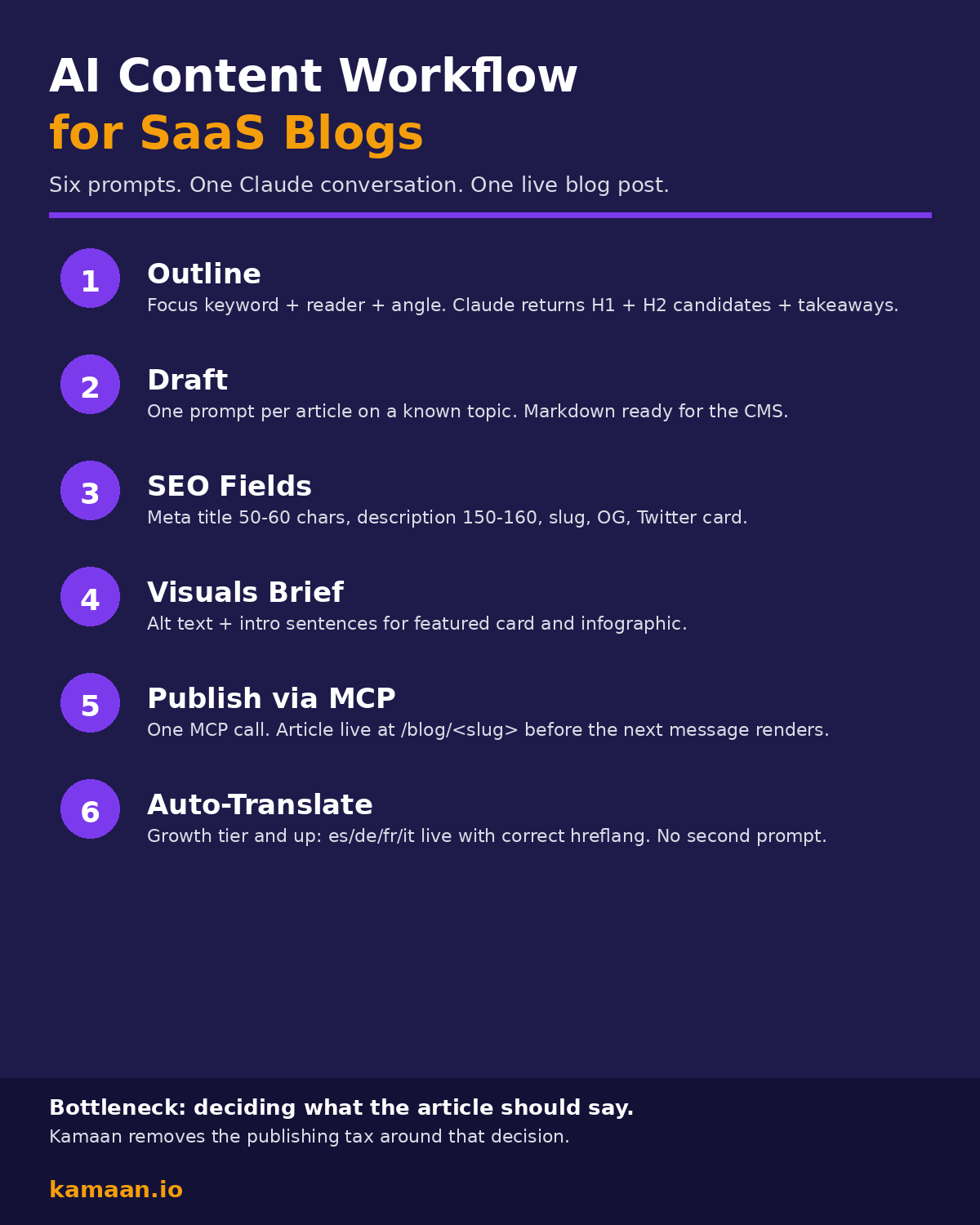
The six-step workflow, in detail
Step 1: Outline. You give Claude the focus keyword, the target reader, and the angle. Claude returns an H1 candidate, four to seven H2 candidates, and a quick-takeaways block. You iterate inline ("the second H2 buries the lede, move it later"). The outline is ready when you stop wanting to change it.
Step 2: Draft. One prompt per article on topics Claude has good priors on. For a 1,800-word post, this is one model response. For something requiring research, point Claude at sources first using its web search tool, then ask for the draft. Output is markdown that drops cleanly into the CMS.
Step 3: SEO fields. "Now write the SEO fields against this draft." Claude returns meta title (50-60 chars), meta description (150-160), URL slug, focus keyword echo, eight to twelve supporting keywords, plus Open Graph and Twitter card copy. You read it once. If something is off you say so, and Claude rewrites.
Step 4: Visuals brief. Claude drafts the alt text for the featured card and the infographic, plus one descriptive sentence to introduce each one in the body. You hand the alt text and an image prompt to whichever image pipeline you use (Canva, PIL, a separate Claude conversation, whatever). The pipeline produces two URLs.
Step 5: Publish via MCP. "Publish this to the Kamaan site, status published, language English, featured image set to the URL above." Claude calls the Kamaan MCP Server, which hits the underlying REST API. The article is live at https://yoursite.com/blog/<slug> before the next message renders.
Step 6: Auto-translate. On Growth or above (Growth covers three languages, Scale covers ten, Unlimited covers 99+), Kamaan's Auto-Multilingual Delivery fires automatically on publish. The Spanish, German, French, and Italian versions go live at their locale-prefixed URLs with correct hreflang. No second prompt. On Starter (one site, one language), you skip this step and just publish the English version.
Why most existing setups stall
The five-tab dance is the most common failure mode. The writer keeps Claude open in one tab, the CMS in another, a meta-fields helper in a third, a translation tool in a fourth, and a social scheduler in a fifth. The content moves by copy-paste. Every tab swap drops what was active in the writer's head: which keyword variant was in the intro, which internal links were placed, which alt text matched which image. The cost is not the typing; it is the context loss.
The second failure mode is "we wired up Zapier." Zapier-style automation is good at simple field maps but bad at editorial decisions. The trigger fires whenever the AI tool returns a draft, and the resulting blog post is whatever shape Zapier was configured to receive. If the article needs a comparison table, a custom intro for a specific cluster, or an internal link to a sibling article that just published, the Zapier flow runs over all of it and ships a post that almost matches the brand voice. "Almost" is the wrong target for a blog that has to rank.
The third failure mode is translation done as an afterthought. Teams publish the English article, then realize three weeks later they need German, French, Italian, and Spanish versions. They paste each one into DeepL, fix the awkward sentences, set up hreflang by hand, and miss it on half the posts. Kamaan's Auto-Multilingual Delivery treats translation as part of the publish, not a separate job, which is why the workflow above has it as Step 6 rather than as a follow-up task.
A real scenario: weekly cadence, solo founder
A solo founder runs a B2B SaaS billing tool on Kamaan Starter (one site, one language). Every Tuesday morning they open Claude and write that week's blog post. The conversation runs the six steps above. The publish takes one MCP call. The whole flow is about 45 minutes including reading the draft. The founder has not opened a CMS dashboard.
A multi-product founder running three SaaS products sits on Growth (three sites, three languages). They run the same six-step flow three times in one morning, once per product blog. Each publish fans out to the three languages on the plan. Total time on the laptop: about three hours for three posts in three languages each. Same headcount, three times the multilingual surface area.
An agency-shaped operation running ten client blogs sits on Scale (ten sites, ten languages, 100,000 API calls). The flow is unchanged; the multiplication is. A multi-product portfolio with more than ten products fits Unlimited (up to 30 sites, 99+ languages, unlimited team members). The structural point: the six-step workflow does not change as the operation grows; the tier does.
What you actually need to wire it up
Five components, each replaceable:
| Component | Purpose | Kamaan default |
|---|---|---|
| AI tool | Drafts the article, sets SEO fields, runs the publish step. | Claude or ChatGPT, both supported via MCP Server / ChatGPT Actions. |
| CMS with MCP Server | Receives the publish call directly from the chat. | Kamaan MCP Server, included on every tier. |
| Image pipeline | Generates featured card and infographic. | Canva brand template + PIL for data graphics. |
| Translation layer | Produces locale versions with correct hreflang. | Kamaan Auto-Multilingual Delivery (Growth and up). |
| Style guide | Keeps voice consistent across runs. | Your own writing-guidelines.md pasted into the system prompt. |
The components do not all have to be Kamaan, but the CMS in the middle has to expose tools the AI can call. Without that, every step has to leave the chat and re-enter through a browser, and you are back to the five-tab dance. The headless blog CMS guide covers why the API-first model is what makes the workflow possible at all.
FAQ
What is an AI content workflow for a SaaS blog?
It is a connected sequence in which an AI tool drafts, sets SEO fields, and publishes a blog post end-to-end without the writer leaving the chat. The minimum components are an AI tool, a CMS that exposes its publish API to the AI tool (via MCP or similar), and an image and translation layer that the AI can drive.
How long does one post take with this workflow?
About 45 minutes for an 1,800-word post on a topic the AI knows well. Most of that is reading and editing the draft. The publish call itself takes one model response. The translation fan-out is automatic on Growth and above.
Do I need ChatGPT Plus or Claude Pro to run this?
You need an account that can use the MCP Server or ChatGPT Actions. Claude Pro supports MCP for desktop clients. ChatGPT supports custom Actions on Plus and above. Kamaan provides the server-side integration on every tier, including Starter.
Can I use this for multiple product blogs?
Yes. On Growth you can publish to three sites from the same Claude conversation by passing the site ID in each tool call. Scale covers ten sites. Unlimited covers up to 30 sites with unlimited team members.
What about hreflang and SEO across languages?
Kamaan emits the hreflang tags server-side on publish for every language on your plan. The translated articles go live at /es/blog/<slug>, /de/blog/<slug>, etc. with the locale prefix before blog. You do not write the hreflang block by hand. The multilingual SEO guide covers the technical details.
How does this handle internal links?
The Kamaan MCP Server's Search_Articles tool lets Claude check what already exists before writing. Claude can pick 4-7 internal links from the sibling articles in your cluster, then embed them in the draft with descriptive anchor text. Reciprocal links go in via Edit_Article_Sections after publish.
What if the article needs custom voice tuning?
Paste your style guide into the system prompt at the start of the conversation. Treat it as a one-time setup per session. Claude will hold the voice rules for the whole chat, including the SEO fields step. If you maintain a writing-guidelines.md file like Kamaan does, that file IS the system prompt.
Can I run the same workflow from Cursor or another MCP client?
Yes. Anything that speaks MCP can connect to the Kamaan MCP Server: Claude Desktop, Cursor, any MCP-compatible IDE, any third-party MCP host. The protocol is the same; the surface area Kamaan exposes is the same.
Related on Kamaan
- Publish blog posts from Claude and ChatGPT: the AI-native CMS setup. The pillar overview of the AI-native workflow.
- How to use Claude to write and publish a blog post in one conversation. The Claude-specific walk-through with prompt examples.
- MCP Server for CMS: how to publish directly from Claude. The MCP-specific config and tool list.
- How to add a blog to your SaaS product: a developer guide. The broader integration story for the rest of the product.
Start building with Kamaan
One Claude conversation, one published post, every language on your plan.
Kamaan is the command center for multi-product founders and agencies who run many SaaS blogs: manage every blog from one dashboard, and run every operation across all of them from Claude, ChatGPT, Cursor, or any MCP client. Growth covers three sites and three languages with auto-translate and hreflang. First month free.
