

The promise of using Claude to write a blog post tends to break at the same place every time: you have a good draft in the chat, and now you need to copy it out, paste it into a CMS, write the meta fields by hand, upload the images, set the slug, hit publish, then do it all again in four other languages. The "AI saves you time" pitch is half-true. The drafting part is fast. The plumbing around it is the same slog you were doing before, just with a different starting point. This guide walks through the actual flow that closes that gap: one Claude conversation, outline to live blog post, with the Kamaan MCP Server handling the publish on the last turn.
Quick takeaways
- Claude can run the full blog workflow if your CMS exposes an MCP Server. Kamaan does. The conversation drives the publish; no dashboard click required.
- The flow has six steps in one chat: outline, draft, SEO fields, visuals brief, publish via MCP, and auto-translate. Each step is a single prompt.
- Auto-translation is part of the publish, not a separate job. On Growth and above, the post goes live in every language on your plan with correct hreflang.
- The MCP Server is included on every Kamaan tier, including Starter. Starter is one site and one language; Growth covers three sites and three languages.
- The bottleneck is no longer "writing the article." It is deciding what the article should say. Claude plus Kamaan removes the publishing tax around that decision.
Why the old "AI plus CMS" workflow is slow
Most teams that say "we use AI for the blog" describe the same five-tab dance. Tab one is the Claude or ChatGPT window with the draft. Tab two is the CMS editor. Tab three is a meta-fields helper or a notepad with the SEO checklist. Tab four is a translation tool. Tab five is whatever queues the social post afterwards. The draft moves across the tabs by copy-paste, with the writer playing courier between the AI and the rest of the stack.
The cost is not the typing. The cost is context-switching. Each tab swap drops what was active in the writer's head: which keyword variant was in the intro, which internal links were already placed, which alt text matched which image. Twenty minutes of cumulative friction per article is a conservative estimate. Multiply that across a SaaS blog that ships three to five posts a week and that is a full workday a month spent shuffling text between windows that should already be talking to each other.
The Model Context Protocol (MCP), introduced by Anthropic in late 2024 and now adopted across every major LLM provider, removes the need for that courier role. An MCP Server gives the LLM direct tool access to the thing on the other side. If the CMS has an MCP Server, Claude can call it the same way it calls a built-in tool. No tabs. No copy-paste. No "now switch over and finish the publish step by hand."
What the conversation actually looks like
Here is the full sequence, the way it runs from a single Claude chat against a Kamaan site. Each step is one prompt. The whole flow takes roughly the time it takes you to read the draft.
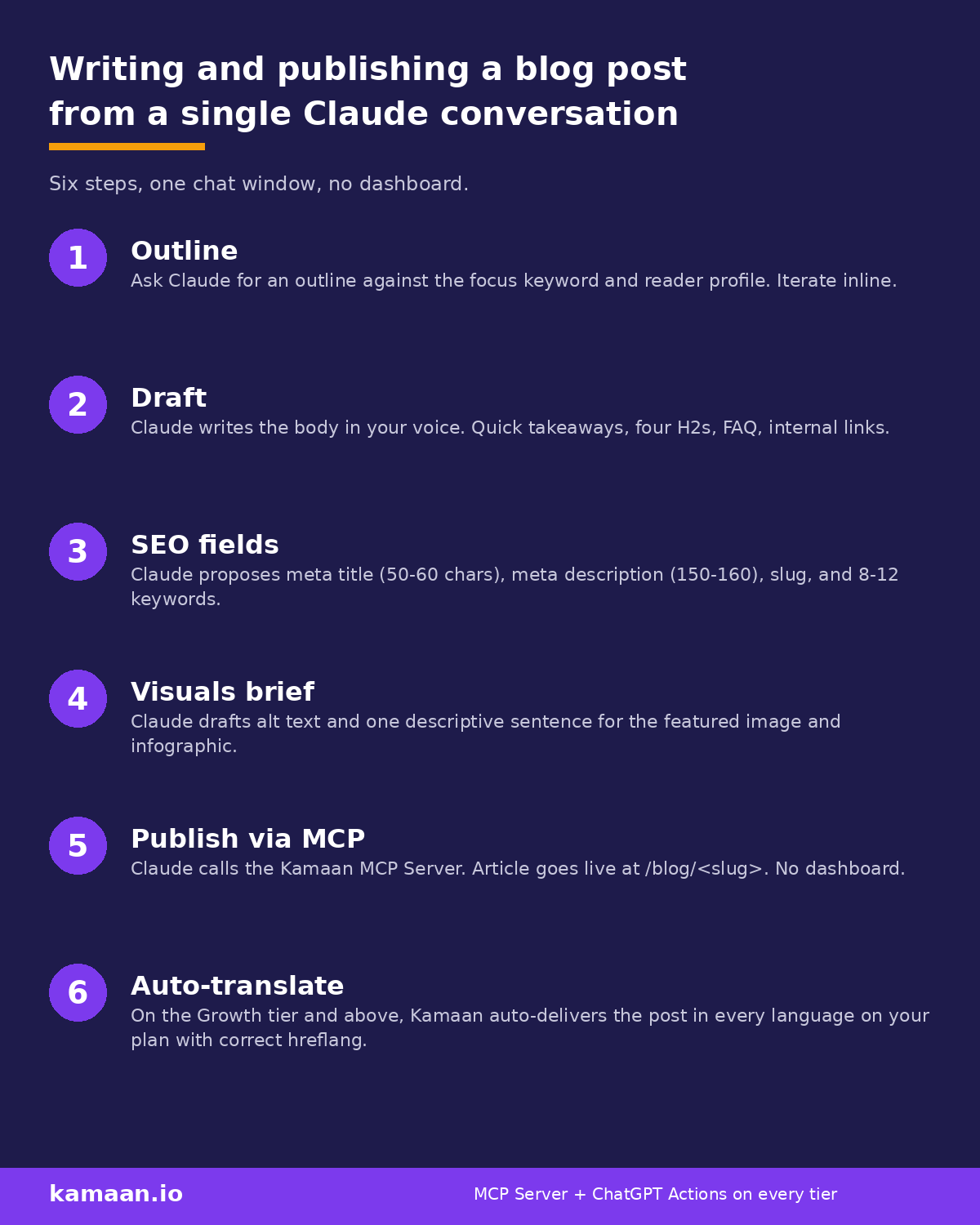
Step 1: Outline. You give Claude the focus keyword, the reader profile, and the angle ("the lead is the pain, not a definition"). Claude returns an H1 candidate, four to seven H2 candidates, and a quick-takeaways block. You iterate inline by replying "tighten section three, that lead is mushy." The outline lands when you stop wanting to change it.
Step 2: Draft. You ask Claude to write each section against the outline. For a 1,800-word post on a topic Claude has solid priors on, this is one prompt. For something requiring research, you point Claude at sources first. The draft comes back as markdown ready for the CMS.
Step 3: SEO fields. One prompt: "Now write the SEO fields against this draft." Claude returns meta title (50 to 60 characters), meta description (150 to 160), URL slug, focus keyword echo, eight to twelve supporting keywords, plus Open Graph and Twitter card copy. You scan it. If something is off, you say so. Claude rewrites.
Step 4: Visuals brief. Claude drafts the alt text for the featured image and the infographic, plus one descriptive sentence to introduce each one in the body. You hand the alt text and prompt to whichever image pipeline you use. Kamaan's media library accepts presigned uploads, so you can pipe images in from a script if you like.
Step 5: Publish via MCP. This is where the MCP Server earns its keep. You tell Claude: "Publish this to the Kamaan site, status published, language English, featured image set to the URL above." Claude calls the MCP Server, which in turn hits Kamaan's REST API. The article is live at https://yoursite.com/blog/<slug> before the next message renders.
Step 6: Auto-translate. If you are on the Growth tier or above, the previous step also fires Kamaan's Auto-Multilingual Delivery. Spanish, German, French, and Italian versions go live at /es/blog/<slug>, /de/blog/<slug>, /fr/blog/<slug>, /it/blog/<slug> with correct hreflang. No second prompt. No translation queue to babysit. If you are on Starter (one site and one language), you skip this step entirely and just publish the English version.
A real scenario: solo founder, weekly cadence
A solo founder runs a B2B SaaS invoicing tool on the Kamaan Starter tier (one site, one language). Every Tuesday morning they open Claude and write one blog post for the product blog. The conversation looks like the six steps above. From "let's write this week's post" to "live at /blog/recurring-invoices-vs-subscription-billing" is about 45 minutes, most of which is reading and editing the draft. The publish itself is a single MCP tool call and takes longer to type the request than to execute.
The founder does not open a CMS dashboard during the conversation. They do not write a meta description. They do not paste anything into a slug field. The Kamaan MCP Server handled the surface area that used to take half the workflow.
A multi-product founder on the Growth tier (three sites, three languages) runs the same flow three times across three product blogs. Each post auto-delivers in the three languages on their plan. The dashboard is still there; the founder just does not need it during the writing flow.
What the Kamaan MCP Server actually exposes
Kamaan's MCP Server gives the LLM the following tools, each callable directly from a Claude or Cursor or ChatGPT (via Actions) conversation:
| Tool | Purpose |
|---|---|
| Plan_New_Article | Returns a plan template and the site's existing articles for internal-link context. |
| Write_Article | Creates the article with title, content, language, status, and optional featured image. |
| Update_SEO_Fields | Sets meta title, meta description, slug, keywords, OG fields, Twitter card fields. |
| Search_Articles | Searches the site so the LLM can confirm there's no duplicate before writing. |
| Read_Article | Fetches an existing article (full or outline view) for cross-link prompts. |
| Edit_Article_Sections | Surgical section edits, useful for reciprocal links and post-publish fixes. |
| Translate_Article | Returns the body plus translation context (brand terms, glossary, style). |
| Upload_Image_From_URL | One-shot image upload from a public URL; returns a CDN URL. |
The shape is small on purpose. Every CMS has these primitives; what differs is whether the LLM can call them directly. Kamaan exposes them as MCP tools, which means Claude can do the whole publish without a dashboard ever opening.
Common failure modes (and how the workflow handles them)
Claude drifts off-brand. Solution: paste your writing-guidelines.md and any sprinkle sentences into the system prompt at the start of the conversation. Kamaan's headless blog CMS guide explains why a structured guideline file outperforms ad-hoc style notes for long-running content workflows. If you would rather start from a proven file than write one from scratch, the skills directory Locul publishes collects free Claude skills you can install without an account.
The slug already exists. Kamaan auto-suffixes (-2, -3) on conflict, but flag it in the publish call so the response surfaces the real final slug. Claude can read that response and adjust internal links in the next post accordingly.
Translations look mechanical. The Translate_Article tool returns brand terms and glossary along with the content. Claude uses that context, which is the difference between a literal translation and one that holds the original tone. The 99-plus languages on Auto-Multilingual Delivery do not all need to be enabled; pick the three on Growth or up to ten on Scale that match your actual audience.
The featured image step breaks the chain. This is where many "all-in-one" pitches stumble: most CMSes require a manual upload from disk. Kamaan's Upload_Image_From_URL accepts an HTTPS source and returns a CDN URL in one call, so an image pipeline that lives in another conversation can feed the publish call without leaving Claude. The blog API guide covers the underlying REST shape if you want to wire your own image step.
FAQ
Can Claude really publish a blog post by itself?
Through MCP, yes. Claude calls the Kamaan MCP Server, which writes the article and sets SEO fields. The article is live at the URL you wanted within seconds of the call. Claude does not have a magic publish button; it is calling the same API a developer would call, just driven from a chat instead of a script.
Do I need to know how to set up MCP?
For Claude Desktop, you add the Kamaan MCP Server to your config file and restart. The setup is documented in Kamaan's Developer Setup Documentation. It is a one-time five-minute step and the same config covers every Kamaan site on your account.
What if I want to use ChatGPT instead of Claude?
Use Kamaan's ChatGPT Actions integration, which exposes the same tools to ChatGPT. The workflow is identical: outline, draft, SEO fields, visuals brief, publish, auto-translate. The Actions setup is documented alongside the MCP Server config.
Does this work on the Starter tier?
Yes. The MCP Server and ChatGPT Actions are included on Starter (one site, one language). You get the full publish-from-Claude flow; you just do not get auto-translation, since Starter is one language. Step 6 of the flow is for Growth and up.
How long does the conversation actually take?
For a 1,800-word post on a topic Claude knows well, the whole flow runs in about 45 minutes including review time. Most of that is reading the draft, not waiting on the publish call. The publish itself is one MCP tool call.
Can I publish multiple sites from one conversation?
Yes. On Growth and above the same Claude conversation can publish to any of your Kamaan sites by passing the site ID in the tool call. A multi-product founder on Scale (ten sites) can ship to a different product blog every week without changing accounts.
What about images?
For a featured image and an in-body infographic, the standard pattern is: generate the images in a separate pipeline (Canva for a branded card, PIL or another tool for a data infographic), upload via Upload_Image_From_URL or the presigned PUT flow, then pass the CDN URLs to Write_Article and embed them in the body. Claude can drive all of this if it has both pipelines connected as tools.
Is the published article SEO-correct?
Kamaan emits the meta title, meta description, OG fields, Twitter card fields, hreflang annotations, and sitemap entries server-side. The SEO surface is not the writer's problem. Step 3 of the flow fills the editorial fields (title, description, slug); the technical SEO is automatic.
Related on Kamaan
- Publish blog posts from Claude and ChatGPT: the AI-native CMS setup. The pillar overview of the AI-native workflow.
- MCP Server for CMS: how to publish directly from Claude without touching a dashboard. The MCP-specific walkthrough with config examples.
- ChatGPT Actions for blog publishing: how to set up and use them. The ChatGPT equivalent of the flow above.
- How to add a blog to your SaaS product: a developer guide. The broader integration story for the rest of the product.
Start building with Kamaan
One Claude conversation, one published post, every language on your plan.
Kamaan is the command center for multi-product founders and agencies who run many SaaS blogs: manage every blog from one dashboard, and run every operation across all of them from Claude, ChatGPT, Cursor, or any MCP client. Starter covers one site and one language; first month free. The Growth tier covers three sites and three languages when you are ready.
