

You are about to launch your blog and your developer asks one question that will quietly shape your SEO for years: should it live at yoursite.com/blog or blog.yoursite.com? Pick the subdomain because it is easier to set up, and you may spend the next two years wondering why your blog posts never rank as well as your homepage. The subdirectory versus subdomain decision looks like a plumbing detail. For a blog, and especially a multilingual one, it is a ranking decision, and most sites get it backwards for the wrong reason.
Quick takeaways
- For most blogs, a subdirectory (
yoursite.com/blog) beats a subdomain (blog.yoursite.com) because it shares your main domain's authority instead of splitting it off. - Google says it can handle either. In practice, subdirectories usually consolidate ranking signals better, which matters most for a young domain.
- A subdomain is treated more like a separate site: separate authority to build, a separate property to track, a more independent crawl.
- For a multilingual blog, put each language in a subfolder (
/es/blog,/de/blog), not a language subdomain (es.yoursite.com), so all your translations feed one domain. - Kamaan delivers multilingual blogs on the subfolder pattern by default, each language at its own path, with hreflang emitted server-side.
The difference in one look
A subdirectory (also called a subfolder) is a path that lives under your main domain: yoursite.com/blog, yoursite.com/es/blog. Everything sits on one hostname.
A subdomain is a prefix that creates a technically separate hostname: blog.yoursite.com, es.yoursite.com. It is still your brand, but search engines can treat it as a distinct site.
The reader-friendly version: a subdirectory is a room inside your house, a subdomain is a separate house on the same street. Same neighborhood, but the authority you build in one house does not automatically fill the other.
Subdirectory (site.com/blog) |
Subdomain (blog.site.com) |
|
|---|---|---|
| Domain authority | Shared with the main domain | Built more separately |
| Backlink equity | Consolidated onto one domain | Split across two |
| Search Console | One property to track | A separate property to verify |
| Crawl budget | Unified, crawled as one site | Crawled more independently |
| Setup effort | Slightly more server config | Often easier to spin up |
| Best fit | Blogs, resource centers, core content | Stores, apps, forums, truly separate sections |
| Verdict for a blog | Recommended default | Use only when the content is genuinely separate |
Why subdirectories usually win for SEO
The core argument is authority consolidation. Google evaluates a domain partly on the signals it has earned: backlinks, engagement, topical depth. When your blog sits in a subdirectory, every link it earns and every ranking signal it builds accrues to the same domain that hosts your product pages. The blog strengthens the whole site, and the site's existing authority helps the blog rank faster.
Put the blog on a subdomain and you fragment that. The subdomain has to earn its own authority more or less from scratch, and the equity it builds does not fully flow back to the main domain. Google's own guidance says it can crawl and rank both structures fine, and that is true. But "can rank either" is not the same as "ranks them equally in practice." For a blog trying to build topical authority, especially on a domain that is not already a heavyweight, keeping everything under one roof is the safer bet.
Three concrete advantages of the subdirectory:
- Consolidated authority. Backlinks and ranking power apply to one domain instead of being split across two.
- One property to manage. You track a single domain in Google Search Console instead of verifying and monitoring separate properties.
- Unified crawl budget. Search bots crawl deeper into folders on a known domain rather than treating a subdomain as a new site to reassess.
When a subdomain is the right call
Subdomains are not bad. They are a specific tool for a specific job, and reaching for one when your goal is blog SEO is the common mistake. Use a subdomain when the content is genuinely separate:
- A truly different product or app. An e-commerce store or a web app with its own architecture,
shop.yoursite.comorapp.yoursite.com, that has nothing to do with your blog's topical authority. - A different tech stack or team. When the section needs its own hosting, framework, or ownership and coupling it to the main site creates friction.
- Content you want to keep at arm's length. A large user-generated forum, where you do not want low-quality or spammy links bleeding into your main domain's reputation.
Notice that none of these describe a blog. A blog is exactly the kind of content that should feed your main domain, which is why the default answer for a blog is a subdirectory.
The comparison below lays out how each structure behaves for a multilingual blog, side by side, so you can see why the subfolder is the default.
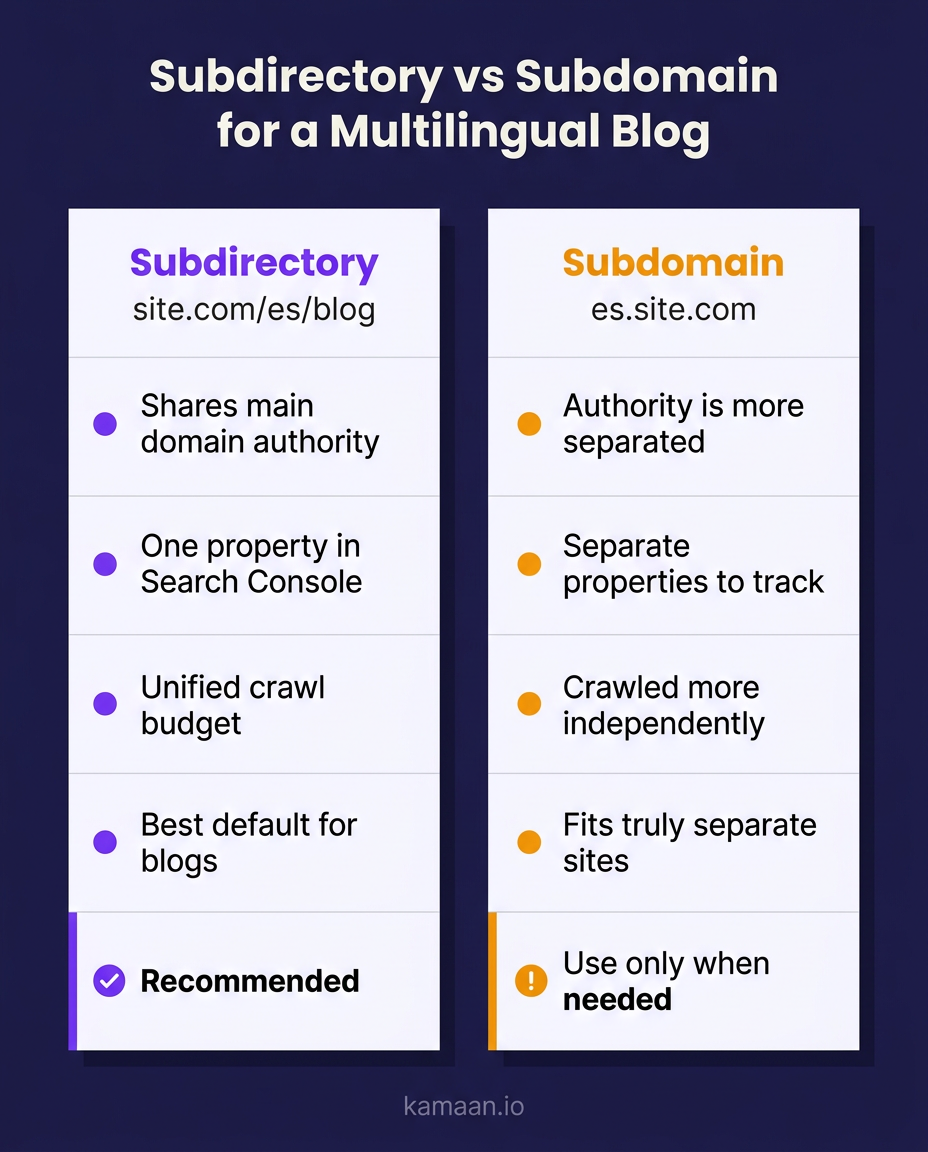
The multilingual case: subfolder, not language subdomain
This is where the decision gets loaded, because there are actually three ways to structure language versions, and only one of them keeps your authority together.
The three options for a multilingual blog:
- Subfolders:
yoursite.com/es/blog,yoursite.com/de/blog. All languages under one domain. - Subdomains:
es.yoursite.com,de.yoursite.com. Each language a separate hostname. - Country-code domains:
yoursite.es,yoursite.de. A separate domain per market.
Country-code domains (ccTLDs) send the strongest geo-targeting signal but are the most expensive and fragmented: you are building authority on many separate domains. Language subdomains split your authority the same way a blog subdomain does, just multiplied by every language you add. Subfolders keep every language version feeding a single domain, so your Spanish and German content strengthens the same site as your English content.
For most SaaS blogs going multilingual, the subfolder pattern is the right default. It consolidates authority, it is the simplest to manage, and it pairs cleanly with hreflang tags that tell Google which language version to show which user. The one caveat: subfolders only work well if your CMS actually emits correct hreflang and serves each language at a clean, stable path. Get the URLs right but the hreflang wrong and Google may still treat your language versions as duplicates. Our hreflang implementation guide has copy-ready tags for the HTML, sitemap, and HTTP header methods. For the deeper mechanics, the blog URL structure guide and the hreflang tags guide cover exactly what needs to be in place. For adapting the content itself rather than the URLs, see localizing content for each market.
A worked example
A founder runs a SaaS at acme.io with the marketing site and product pages already ranking. She adds a blog and wants it in English, Spanish, and German.
The wrong-for-her move is blog.acme.io with es.blog.acme.io and de.blog.acme.io, three subdomains, three pools of authority to build, three Search Console properties, and a hreflang setup spread across separate hostnames. The blog would start cold and drag for months.
The right move is acme.io/blog, acme.io/es/blog, and acme.io/de/blog. Every post, in every language, feeds acme.io, the domain that already has authority. One property to watch, one domain gaining topical depth in three languages, and hreflang wiring the versions together. Same content, a structure that compounds instead of fragments.
How Kamaan structures this for you
Getting the URL structure right is a decision. Getting it implemented correctly, at every post and every language, is the part that trips teams up, and it is what a headless blog CMS should handle.
Kamaan delivers multilingual blogs on the subfolder pattern by default. You publish once in English, and Auto-Multilingual Delivery publishes a version in every language on your plan at its own subfolder path, /es/blog, /de/blog, and so on, with the hreflang tags emitted correctly server-side. You do not hand-build subdomains, you do not maintain separate Search Console properties per language, and you do not hand-write hreflang. The structure that consolidates your authority is the structure you get out of the box.
Because Kamaan is one account and one dashboard for every blog you run, the same clean subfolder-and-hreflang setup applies across all your products, not just one. And if you would rather drive publishing from the AI tool you already use, the same flow runs through the Kamaan MCP Server and ChatGPT Actions.
A subdomain splits your house into two. For a blog, and for every language you add, you want one house that gets stronger with every room.
FAQ
Is a subdirectory or subdomain better for SEO?
For most blogs, a subdirectory is better because it keeps your content under one domain, so backlinks and ranking signals consolidate instead of splitting. Google can rank both, but subdirectories usually build authority faster, which matters most for a younger or smaller domain.
Are subdomains bad for SEO?
Subdomains are not inherently bad, but they fragment your domain authority by being treated more like a separate site. That is a problem when you want a section, like a blog, to benefit from and contribute to your main domain, and a non-issue when the content is genuinely separate, like a store or a web app.
When should I use a subdomain instead of a subdirectory?
Use a subdomain when the content is truly distinct: a separate product or app, a different tech stack or team, or user-generated content you want isolated from your main domain's reputation. A blog rarely fits any of these, so a blog should almost always be a subdirectory.
What is the best URL structure for a multilingual blog?
Use language subfolders, like yoursite.com/es/blog and yoursite.com/de/blog, so every language version feeds one domain and shares its authority. Pair the subfolders with correct hreflang tags. Language subdomains and separate country domains split your authority and are harder to manage.
Does Google prefer subdirectories over subdomains?
Google has stated it can crawl and index both structures and does not have a strict preference. In practice, subdirectories tend to consolidate ranking signals more effectively, which is why most SEO practitioners default to a subdirectory for blogs and content sections.
Can I change from a subdomain to a subdirectory later?
Yes, but it is a migration: you move the content, set up permanent redirects, and update internal links, and rankings can wobble while Google reprocesses the URLs. It is far cheaper to choose the subdirectory from the start than to migrate a subdomain blog later.
How does a headless CMS handle multilingual URL structure?
A multilingual-first headless CMS delivers each language at a clean subfolder path and emits the correct hreflang automatically. Kamaan's Auto-Multilingual Delivery publishes each language version at its own /lang/blog path with server-side hreflang, so you get the authority-consolidating structure without wiring it by hand.
Related on Kamaan
- How to Build a Multilingual Blog: A Complete Guide for SaaS Products
- Blog URL Structure for Multiple Languages: Subfolders, Subdomains, or Query Params
- Hreflang Tags Explained: The Right Way to Set Them Up for a Blog
- Multilingual SEO: What It Is, Why It Matters, and How to Get It Right
- Headless CMS SEO: Does Going Headless Hurt or Help Your Rankings?
Start building with Kamaan
One domain, every language, authority intact
Kamaan is a headless blog CMS that delivers your multilingual blog on the subfolder pattern by default: each language at its own /lang/blog path, with hreflang emitted server-side, so your translations strengthen one domain instead of splitting into many. The Growth tier covers three product blogs with auto-translate into 99+ languages. First month free.
