

Most guides on website localization are written by translation agencies, so they end with the same conclusion: hire a translation agency. That made sense when localizing a site meant a project team, a spreadsheet of strings, and a six-week timeline. For a blog, it does not have to work that way anymore. You can localize a blog into every market you care about without a purchase order, a project manager, or a single email to a vendor. This guide is the self-serve version: what localization actually involves, and a six-step process you can run yourself.
Quick takeaways
- Localization is more than translation. It adapts language, formatting, examples, currency, and dates to a specific market, then serves each version at its own URL with correct hreflang.
- You do not need an agency to localize a blog. The parts an agency used to handle (translation, URL setup, hreflang) are now things a modern publishing tool does on publish.
- URL structure comes first. Subfolders like /es/blog/ are the safest default for SEO and the easiest to maintain.
- Hreflang is the technical core. It tells Google which language version to show which user. Getting it wrong quietly wastes the whole effort.
- Automate the repeatable parts and spend your human time on the few pages that convert. Localize everything, then hand-refine the top performers.
Localization is not the same as translation
The most useful thing to get straight before you start is that translation is one step inside localization, not the whole job.
Translation converts the words. Localization adapts the experience. A translated article says the same sentences in Spanish. A localized article uses the date format a Spanish reader expects, references examples and currency that make sense in that market, links to the right regional pages, and lives at a URL search engines will serve to Spanish users. Skip the wrapper and you get text that reads as a machine output dropped into a foreign template.
For a blog specifically, the localization surface is smaller than for a full product, which is exactly why you can do it yourself. You are not localizing checkout flows, legal terms, or a hundred UI strings. You are localizing articles, their metadata, and the routing around them. Our how to build a multilingual blog guide covers the broader setup, and multilingual SEO explains why the search side rewards doing this properly. For the article-level version of this process, see content localization at blog scale.
Why the agency model does not fit a blog
The traditional agency process exists to solve coordination problems that a blog does not have.
An agency is worth it when you have thousands of strings across a product, legal review in every market, and a brand voice that must be transcreated rather than translated. That is real, expensive work. A blog post is not that. It is a self-contained article whose main risk is a wrong URL or a missing hreflang tag, not a mistranslated legal clause.
The agency model also introduces the slowest part: the loop. You send content out, you wait, you review, you publish. Every new post restarts the loop. For a blog that ships regularly, that lag means your other languages are permanently behind your English, which is the opposite of what you want for freshness and rankings. The auto-translate blog posts guide digs into where automated translation is good enough and where it is not.
The self-serve approach removes the loop. You localize at publish time, so every language version ships together, and you reserve human editing for the handful of pages that actually matter to revenue.
The 6-step website localization process
Here is the process end to end. It is the same whether you localize into one language or ten.
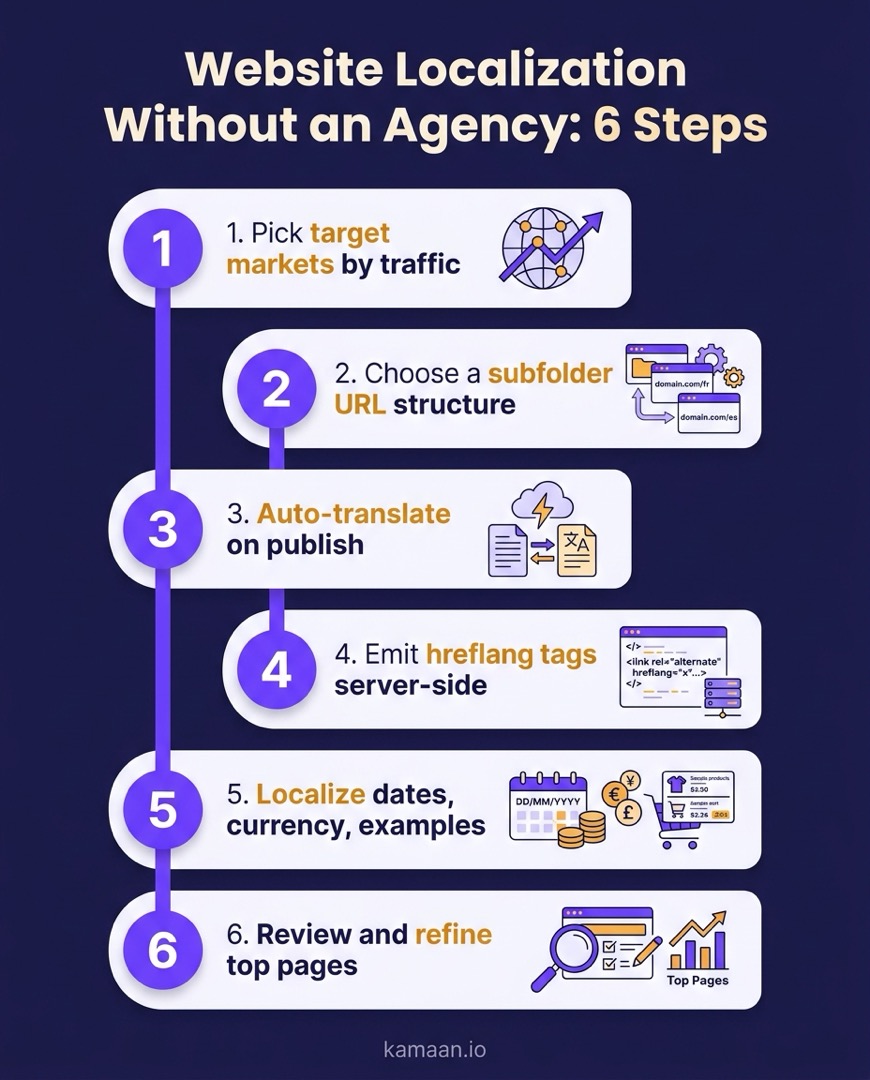
Step 1: Pick target markets by traffic, not ambition
Do not localize into every language at once. Look at where your traffic, signups, and demand already come from, and start with the two or three markets that show real interest. Localizing into a language nobody in your funnel speaks is effort with no return. Let data pick the first languages.
Step 2: Choose a subfolder URL structure
Decide how each language lives at a URL before you translate a single word, because changing it later is painful. Subfolders (example.com/es/blog/) are the safest default: they inherit your domain authority, they are simple to host, and Google handles them well. Subdomains and separate country domains exist for larger operations with local infrastructure, but for a blog, subfolders win on simplicity. The blog URL structure for multiple languages guide compares all three in detail.
Step 3: Translate and adapt on publish
This is the step the agency used to own. Generate the translated version of the article, then adapt the specifics: dates, currency in examples, region-specific references, and internal links that point to the right localized pages. Doing this at publish time, rather than as a separate later project, is what keeps every language shipping together instead of trailing behind.
Step 4: Emit hreflang tags server-side
Hreflang is the tag that tells search engines which language version to show which user, and it is where most self-serve localization quietly fails. Each version of a post must reference every other version, including itself, and the tags need to be in the served HTML, not injected by client-side script that crawlers may miss. Get this right and Google serves the correct version to each market. Get it wrong and your versions compete with each other. If you are writing the tags yourself, the step-by-step hreflang setup with code examples shows the full block every version needs. The hreflang tags for a blog guide is the reference for setting these up correctly.
Step 5: Localize the details that break trust
A reader spots a localization failure instantly: a US date format on a German page, dollars where they expect euros, an example that only makes sense in one country. These small mismatches signal "machine translated and forgotten." Fix the formatting, currency, and culturally specific examples so each version reads like it was written for that reader.
Step 6: Review and refine your top pages
You do not have to hand-edit every localized article. You do have to hand-edit the few that carry your conversions. Publish everything automatically, watch which localized pages get traffic, and spend your limited human editing time on the top performers. This is how a small team localizes at scale without a translation department.
Where a publishing tool replaces the agency
The six steps above split cleanly into two kinds of work: repeatable mechanics, and human judgment. The mechanics are what a modern headless CMS handles so you never touch an agency.
With Kamaan, Auto-Multilingual Delivery covers steps 3 and 4 in one move: publish an article once and it goes live in 99+ languages, each at its own URL with correct hreflang emitted server-side. That removes the two steps most likely to go wrong on their own, translation lag and broken hreflang. You keep control of steps 1, 2, 5, and 6, which are the judgment calls, and let the tool handle the plumbing. Because it is also Multi-Site Management, the same setup applies across every product blog you run, not one site at a time.
Real-world scenarios
A founder running a B2B SaaS invoicing tool publishes one article about a new recurring-billing feature. With Auto-Multilingual Delivery, Kamaan auto-publishes the Spanish, German, French, and Italian versions at their own /es/blog/, /de/blog/, /fr/blog/, and /it/blog/ URLs, with hreflang handled server-side. The founder did not write a word in a second language or email a single vendor, then spends twenty minutes refining the German version because Germany is their strongest non-English market.
A solo founder localizing an existing library of 40 posts does not translate them by hand. They let the platform localize the whole set on publish, then use their traffic data to pick the six posts that drive signups and hand-edit only those, adjusting currency and examples for each market. The other 34 posts go live localized without any manual work.
FAQ
What is website localization?
Website localization is the process of adapting a website to the language and culture of a target market. It goes beyond translation to cover formatting, currency, dates, examples, and URL structure, so each version feels native to its audience rather than like translated text dropped into the same template.
What is the difference between localization and translation?
Translation converts the words from one language to another. Localization is the full adaptation: translated text plus formatting, currency, cultural references, internal links, and the technical routing (URLs and hreflang) that serves each version to the right audience. Translation is one step inside localization.
Do I need a translation agency to localize my blog?
No. An agency makes sense for large, high-stakes localization across a full product with legal review. For a blog, the repeatable parts (translation, URL setup, hreflang) can be handled by a modern publishing tool on publish, leaving you to hand-refine only your top pages. That removes the cost and the review loop.
How do I choose which languages to localize into first?
Use your own data. Start with the two or three markets that already send you traffic, signups, or demand. Localizing into a language that does not appear in your funnel spends effort with no measurable return. Let interest that already exists pick your first languages, then expand.
What URL structure is best for a localized blog?
Subfolders such as example.com/es/blog/ are the safest default. They inherit your domain authority, are simple to host, and are well understood by search engines. Subdomains and country-code domains suit larger operations with local infrastructure, but for a blog, subfolders win on simplicity and SEO.
What is hreflang and why does it matter for localization?
Hreflang is an HTML tag that tells search engines which language version of a page to show which user. Without it, your localized versions can compete with each other in search or be served to the wrong audience. It must appear in the served HTML and reference every version, including the page itself, to work correctly.
Can I automate blog localization?
Yes, for the mechanical parts. Translation on publish and hreflang generation can be fully automated by a headless CMS built for it, so every language version ships at the same time. The parts worth keeping manual are choosing target markets and refining your highest-converting pages, which need human judgment.
How much of my localized blog should I edit by hand?
Only the pages that matter to revenue. Publish everything localized automatically, then use traffic and conversion data to find your top performers and hand-refine those, adjusting currency, examples, and phrasing. This gives you full coverage across languages while spending human time only where it pays off.
Related on Kamaan
- How to Build a Multilingual Blog: A Complete Guide for SaaS Products
- Auto-Translate Blog Posts: What Works, What Breaks, and What Kamaan Does Instead
- Multilingual SEO: What It Is, Why It Matters, and How to Get It Right
- Hreflang Tags Explained: The Right Way to Set Them Up for a Blog
- Blog URL Structure for Multiple Languages: Subfolders, Subdomains, or Query Params
Localize your blog on publish, not in a project
Localization used to be a project you outsourced. For a blog, it is now a setting you turn on. Kamaan is the command center for founders and agencies who publish across markets: Auto-Multilingual Delivery takes one article and ships it in 99+ languages with correct hreflang, so your other languages stop trailing your English. See how the publish-once model works on the Kamaan features page, or start free at kamaan.io.
