

You are trying to decide whether to keep your blog on WordPress or move it to a headless CMS, and every article you find is written by a company that sells one of the two. So you get a sales pitch dressed up as a comparison. The honest answer is that WordPress wins for a real set of situations and a headless CMS wins for a different set, and the line between them is sharper than most people admit. This guide draws that line for a SaaS founder who has one blog today and might have three next year.
Quick takeaways
- WordPress is a full website plus editor plus host in one install. A headless CMS stores content and hands it to your own front end over an API. That single architectural difference drives every trade-off below.
- WordPress wins when you run one marketing site, in one language, edited daily by a non-technical team that wants themes and plugins.
- A headless CMS wins the moment you have a custom front end (Next.js, Astro, a React app), multiple products or blogs, or a real multilingual requirement.
- The usual migration trigger is not a WordPress failure. It is your second product. One blog is easy anywhere. Three blogs on three WordPress installs is three sets of updates, plugins, and logins.
- Cost flips with scale. WordPress looks free until you add a page builder, a multilingual plugin, and managed hosting per site. Headless pricing is flat per platform, not per install.
WordPress and a headless CMS are not the same kind of tool
The most common mistake in this comparison is treating WordPress and headless as two brands of the same product. They are two different architectures.
WordPress is coupled. The content database, the editor, the theme that renders your pages, and the PHP that serves them all live in one install. When a visitor loads a post, WordPress builds the HTML on its own server and sends it back. That coupling is exactly why WordPress is so easy to start: install it, pick a theme, and you have a live site with zero code.
A headless CMS is decoupled. It stores your articles and exposes them through an API. It does not render your public pages. Your own front end (built in whatever framework you like) fetches the content and decides how it looks. If you want the full background on the model, our guide on what a headless CMS is walks through it in plain English, and the headless CMS vs traditional CMS breakdown covers where WordPress sits on that spectrum.
There is a hybrid worth naming: headless WordPress, where you keep WordPress as the editor but render the front end yourself and pull content through the WordPress REST API. It exists, and for a team already deep in WordPress it can be a reasonable bridge. It also means you now maintain a WordPress install and a separate front end, which is often more moving parts than either pure option.
Where WordPress genuinely wins
WordPress powers a huge share of the web for good reasons, and pretending otherwise would make this comparison useless.
WordPress wins when a non-technical team edits content every day and needs to see the page as they build it. The block editor, the live preview, and the theme system let a marketer publish a landing page without touching a developer. That is real value, and no API-first tool matches it for pure in-browser page building.
It wins when you want an ecosystem. Need a contact form, an event calendar, a membership gate, or an SEO checklist inside the editor? There is a plugin, usually several. For a single site that needs to do many things beyond a blog, that catalog is hard to beat.
It wins when you have no developers and no plans to hire any. A headless CMS assumes someone builds and hosts the front end. If that person does not exist on your team, WordPress removes the question by rendering the site for you.
If your situation is one marketing site, one language, edited by hand, with no custom app front end, you probably do not have a headless problem to solve. Keep WordPress and skip the rest of this decision.
Where a headless CMS wins
The case flips the moment your setup stops looking like a single brochure site.
A headless CMS wins when you already have a front end you care about. If your product runs on Next.js, Nuxt, SvelteKit, or Astro, you do not want a second WordPress theme system fighting your app for control of the page. You want your blog to be part of the same codebase, pulling content over a REST API and rendering with your own components. Our headless CMS Next.js setup guide shows exactly how thin that integration is.
It wins on multiple sites and multiple languages. Running several blogs on WordPress means several installs to update, secure, and back up. A headless platform built for many properties treats them as rows in one account, not separate servers. Multilingual is the same story: bolting a translation plugin onto WordPress is a known source of pain, while a headless tool can treat languages as first-class from the start.
It wins on portability and speed. Because the content lives behind a standard API and your front end is static or server-rendered by your own stack, you are not tied to one host's PHP version or one theme's assumptions. You can move, cache, and scale the front end independently of where the content lives.
The best headless CMS for startups comparison goes deeper on the specific platforms, and if Contentful's pricing is what pushed you to look, the Contentful alternatives roundup is the direct follow-up. If Sanity is on your shortlist but its schema-in-code setup looks like more than a blog needs, see headless CMS options if Sanity feels heavy.
Once the headless side wins the argument, the follow-on question is which platform to run. Picking the CMS your SaaS blog runs on ranks the realistic shortlist against multi-site, API, and multilingual needs.
The cost math nobody shows you
"WordPress is free" is true for the software and false for the setup most SaaS blogs actually run. The honest comparison is total cost at your real scale.
A typical WordPress marketing blog is not vanilla WordPress. It is WordPress plus managed hosting, plus a premium theme or page builder, plus a caching layer, plus a multilingual plugin if you translate, plus an SEO plugin. Each of those is a small recurring cost, and each one multiplies per site when you run more than one blog.
Headless pricing works the other way. You pay the platform a flat rate and host your own front end, which for a static or server-rendered site is often cheap or free on modern hosting. The platform cost does not multiply with every new install because there is no install.
The table below shows how the two curves cross as you add products.
| Situation | WordPress reality | Headless CMS reality |
|---|---|---|
| One blog, one language | Cheapest option, near zero if self-hosted | Flat platform fee, small but real |
| One blog, four languages | Multilingual plugin plus manual translation upkeep | Languages handled at the platform level |
| Three product blogs | Three installs, three sets of plugins and hosting | One account, three sites, one bill |
| Ten product blogs or clients | Ten installs to maintain and secure | One dashboard, flat platform cost |
The crossover point is not a single language site. It is the second and third property. That is where WordPress stops being free in practice and a per-platform price starts winning.
Kamaan sits on the headless side of this table. Its Multi-Site Management treats every blog you run as one row in one account with one monthly bill, so adding your third product blog does not mean standing up a third install. You can see how the tiers scale on the Kamaan pricing page.
The migration trigger: your second product
Founders almost never leave WordPress because WordPress broke. They leave because their situation outgrew it, and there is a specific moment when that happens.
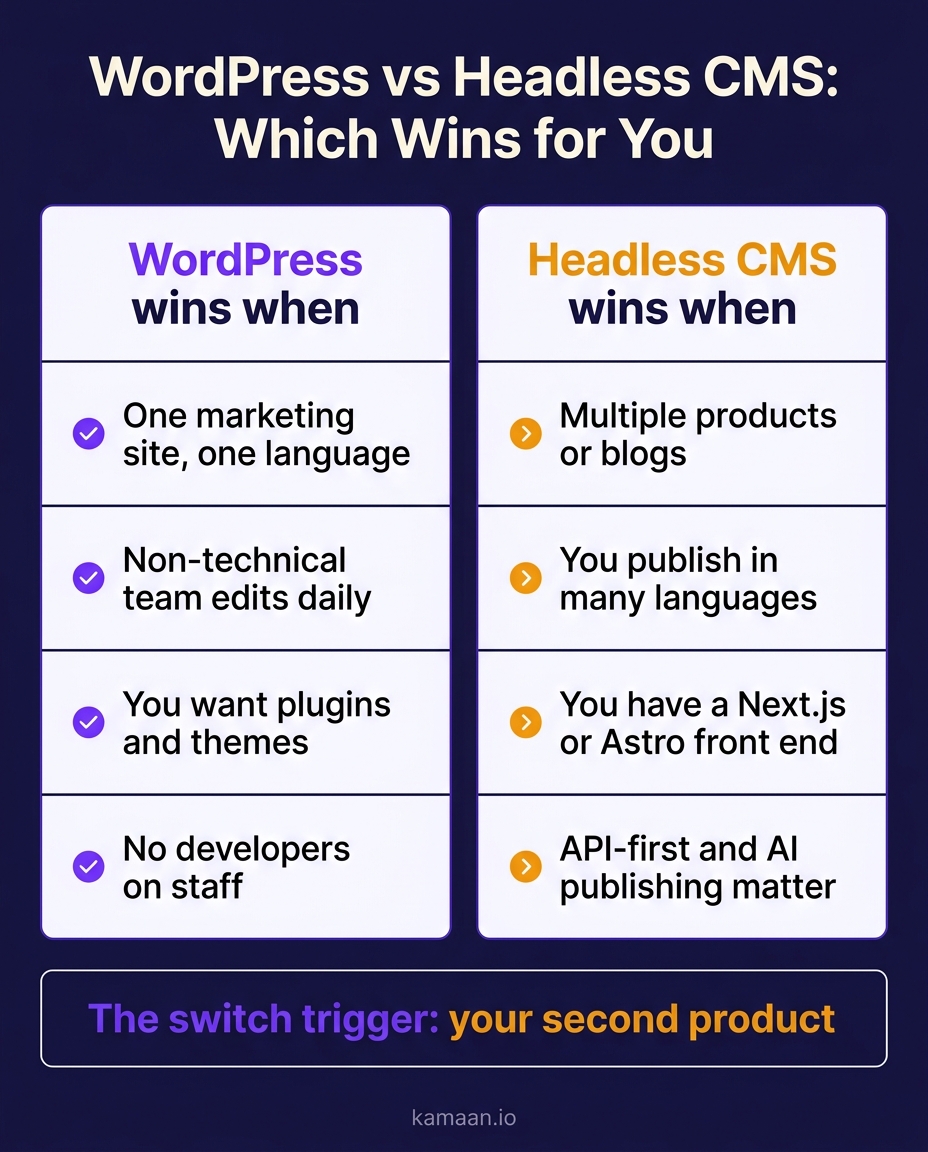
For most SaaS founders, the trigger is the second product. One blog on WordPress is genuinely fine. When you launch product two and want a blog for it, you face a choice: spin up a second WordPress install with its own updates, plugins, and login, or move to a model where a new blog is a new entry in an account you already have.
The infographic below sums up the decision in one glance.
The multilingual trigger works the same way. The first time you seriously want your blog in Spanish, German, and French, the WordPress path is a translation plugin plus a translator plus ongoing sync work. The headless path can make each language a native version of the post with its own URL and correct hreflang, produced when you publish rather than as a separate project. If you would rather keep WordPress and decouple it instead, our guide to headless WordPress walks the full process.
Real-world scenarios
A bootstrapped founder runs a single invoicing SaaS with an English marketing blog on WordPress, edited twice a week by a part-time writer. Nothing about that is broken, and moving would only add work. They keep WordPress, because their situation is exactly the one it is built for.
A founder running three SaaS products publishes blog updates for all three from a single Kamaan dashboard using Multi-Site Management. One account, one monthly invoice, no per-install upkeep. When they draft an article, they run ChatGPT Actions to publish it straight from ChatGPT into the right product's blog, then move to the next. What used to be three WordPress logins is now one screen.
A solo developer building on Astro wants a blog inside the same app, not a separate WordPress theme. They pull articles through Kamaan's REST API Delivery, a standard JSON REST API their front end already knows how to call, and render posts with their own components. The blog ships as part of the product, not as a bolt-on.
FAQ
What is the difference between headless CMS and WordPress?
WordPress is a coupled system: it stores content, edits it, and renders the public site from one install. A headless CMS only stores and serves content through an API, leaving the rendering to your own front end. WordPress is easier to launch with no developers, and headless is more flexible when you have a custom front end or multiple sites.
Can I use WordPress as a headless CMS?
Yes. Headless WordPress means keeping WordPress as the editor and content store while rendering the public site yourself through the WordPress REST API. It gives you the familiar WordPress editor with a custom front end, but you still maintain a full WordPress install alongside your front end, which is more infrastructure than a purpose-built headless platform.
Is a headless CMS better than WordPress?
Neither is better in the abstract. A headless CMS is better when you have a custom front end, multiple blogs, or a real multilingual need. WordPress is better for a single site edited daily by a non-technical team that relies on themes and plugins. Match the tool to your situation rather than to a general verdict.
Why are people moving away from WordPress?
The common reasons are maintenance load across multiple installs, plugin bloat and security patching, clumsy multilingual support, and wanting the blog to live inside a modern app front end. Teams that hit one of these usually move to a headless model rather than leaving content management entirely.
Is a headless CMS more expensive than WordPress?
For a single simple site, WordPress is usually cheaper. As you add products, languages, and the plugins a real WordPress blog needs, costs multiply per install, while headless platforms charge a flat per-platform fee and let you host the front end cheaply. The two cost curves typically cross at your second or third property.
Do I need a developer to use a headless CMS?
You need someone who can build and host the front end that consumes the API, at least once. After that, publishing is as simple as any editor. If your team has no developer and no plans to add one, WordPress or a hosted site builder is the more honest fit.
Will moving off WordPress hurt my SEO?
Not if you preserve URLs, redirects, and metadata during the move. Headless front ends can be as fast or faster than WordPress, which helps rankings, and proper hreflang on multilingual versions is easier to get right on a headless platform. The risk is in a sloppy migration, not in the architecture.
What happens to my existing WordPress content if I switch?
You export it and import it into the new platform, usually as Markdown or through an API. Well-structured posts move cleanly. The work is in mapping URLs and media, not in rewriting the content, so budget migration time for redirects rather than for re-authoring.
Related on Kamaan
- What Is a Headless CMS: A Plain-English Guide for SaaS Teams
- Headless CMS vs Traditional CMS: What SaaS Teams Actually Need
- Best Headless CMS for Startups: An Honest Comparison With Pricing
- Contentful Alternatives: 6 Headless CMS Tools That Are Not $300 Per Month
- Multi-Site CMS: One Account, Multiple Domains, Without the Cost of Contentful
Run every product blog from one place
If the migration trigger for you is a second or third product, the question is not really WordPress versus headless. It is how many separate installs you are willing to maintain. Kamaan is the command center for founders and agencies who run many SaaS blogs: manage every blog from one dashboard, and run every operation across all of them from Claude, ChatGPT, Cursor, or any MCP client. See how the tiers scale as you add products on the Kamaan pricing page.
